Category: Freelancer

  • Fix n8n Embedding Dimension Mismatches in Pinecone and pgvector

    Fix n8n Embedding Dimension Mismatches in Pinecone and pgvector

    An n8n retrieval workflow can run perfectly for months, then fail immediately after you change an embedding model. The error may mention vector dimensions, a Pinecone index, or a PostgreSQL vector(n) column. In other cases, ingestion succeeds in one workflow but retrieval fails in another because the two paths no longer generate the same vector length.

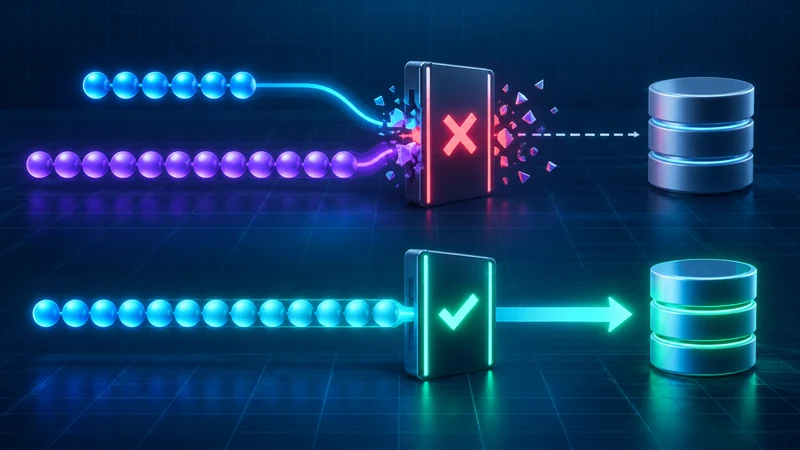
    The safe fix is not to pad arrays, truncate values, or alter a production index in place. First measure the vector produced by the exact n8n node and model configuration. Then compare that number with the destination schema. If they differ, create a parallel index or table, re-embed the source documents with one locked configuration, test retrieval, and only then switch traffic.

    Why embedding dimensions become a production contract

    An embedding is an ordered array of numbers. Its length is part of the data contract between three components:

    1. the embedding model and any dimension parameter,
    2. the vector database schema or index, and
    3. every ingestion and query workflow that uses that store.

    All three must agree. Pinecone describes the dimension field as the number of dimensions in vectors inserted into a dense index, and its integrated inference configuration requires the index dimension to match the model. PostgreSQL with pgvector can enforce the same contract with a column such as vector(1536).

    OpenAI’s current embeddings guide documents default lengths of 1,536 for text-embedding-3-small and 3,072 for text-embedding-3-large. It also supports a dimensions parameter for shorter vectors. That means a model name alone may not fully describe the output: the configured dimension is part of the versioned contract.

    Typical symptoms in n8n

    • Vector-store insertions fail immediately after a model change.
    • The ingestion workflow works, but similarity search fails in the query workflow.
    • Old documents remain searchable while newly ingested documents fail.
    • A Pinecone request reports a vector length that does not match the index.
    • PostgreSQL rejects a value for a vector(n) column.
    • Two n8n workflows reference different embedding credentials, models, or node settings.

    Do not treat these as generic connectivity errors. Authentication and networking may be healthy while the payload violates the vector store’s shape.

    Step 1: measure the actual embedding length

    Run a controlled test through the same embedding node used in production. Use a short fixed string and inspect the returned array before the vector-store node. In a Code node, adapt the property path to the real output and return only diagnostic metadata:

    const vector = $json.embedding;
    
    if (!Array.isArray(vector)) {
      throw new Error('Embedding array not found');
    }
    
    return [{
      json: {
        model: 'record-the-exact-model',
        dimensions: vector.length,
        sample: vector.slice(0, 3),
      },
    }];

    Record the n8n version, node version, model ID, and any dimension-related option. Repeat the test in both ingestion and retrieval workflows. The two measured lengths must match. A notice in the node UI, a remembered default, or an old tutorial is not sufficient evidence.

    This is especially important when a node’s behavior is under active development. A September 2026 n8n issue reports that one version of the Google Gemini embeddings node displayed a 768-dimension notice while its default model produced 3,072 values. Treat that as version-specific evidence, not as a universal Gemini rule. Measure your own installed version.

    Step 2: inspect the destination contract

    Pinecone

    Describe the index through the Pinecone console or control-plane API and record its vector type, dimension, metric, and host. For a dense index, the dimension is fixed for inserted vectors. Do not assume you can repair a mismatch by changing an unrelated index setting.

    curl -s \
      -H "Api-Key: $PINECONE_API_KEY" \
      -H "X-Pinecone-Api-Version: 2025-10" \
      "https://api.pinecone.io/indexes/$INDEX_NAME"

    Compare the returned dimension with the measured length from n8n. Also confirm that ingestion and query nodes use the same index name and namespace.

    PostgreSQL and pgvector

    Inspect the column type rather than guessing from an application error:

    SELECT
      table_schema,
      table_name,
      column_name,
      data_type,
      udt_name
    FROM information_schema.columns
    WHERE table_name = 'documents';

    For stored vectors, pgvector exposes vector_dims(), which returns the number of dimensions. Sample the current data before changing anything:

    SELECT
      id,
      vector_dims(embedding) AS dimensions
    FROM documents
    WHERE embedding IS NOT NULL
    LIMIT 20;
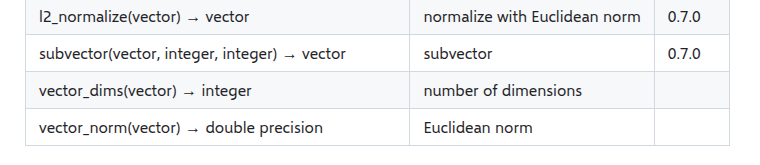
    pgvector reference table showing vector_dims returns the number of dimensions

    If the column uses vector(1536), PostgreSQL is enforcing that length. If it uses unconstrained vector, rows with different lengths can coexist, but pgvector’s documentation notes that indexes still need rows of the same dimension. Mixed dimensions make retrieval and indexing harder to reason about, so do not use an unconstrained column as a shortcut around migration.

    Step 3: find where the contract diverged

    Build a small inventory before making changes:

    Component Record Failure signal
    n8n ingestion Model, node version, measured length Insert rejects vector
    n8n retrieval Model, node version, measured length Query rejects vector
    Pinecone Index, namespace, dimension, metric Dimension mismatch
    pgvector Table, column type, stored dimensions Column or index conflict

    Common causes include switching from one embedding model to another, changing an output-dimension option in only one workflow, pointing ingestion and retrieval at different credentials, restoring a workflow without its original model setting, or reusing an index created for an older model.

    Step 4: choose the safe repair

    Option A: restore the old embedding contract

    If the model change was accidental and the old model is still available, revert both ingestion and retrieval to the exact previous configuration. Test with a new document and a known query. This is the smallest recovery, but it does not migrate existing data to a new model.

    Option B: create a parallel store and re-embed

    Use this when the model change is intentional. Create a new Pinecone index or a new pgvector table with the measured target dimension. Keep the old store read-only during the migration.

    CREATE TABLE documents_v2 (
      id bigint PRIMARY KEY,
      content text NOT NULL,
      metadata jsonb,
      embedding vector(1536)
    );

    The exact dimension above is only an example. Substitute the value measured from your chosen model and settings. Then run a controlled re-ingestion workflow:

    1. Export or query the canonical source documents and metadata.
    2. Generate every vector with one locked embedding configuration.
    3. Write to the new index or table with stable document IDs.
    4. Count successful writes and capture failures separately.
    5. Run a fixed set of representative retrieval queries.
    6. Compare relevance, filters, latency, and result coverage.
    7. Switch the retrieval workflow only after acceptance checks pass.
    8. Retain a rollback path until the new store is stable.

    Why padding and manual truncation are unsafe

    Adding zeros can make an array the expected length, but it does not turn an embedding from one model into an embedding from another. Arbitrary truncation discards coordinates without following the model provider’s supported dimensionality method. Both approaches can produce values that fit the schema while silently degrading retrieval.

    If a provider offers an official dimension parameter, configure it at embedding generation time and use the same value for ingestion and queries. OpenAI specifically recommends the dimensions parameter for its third-generation embedding models. Do not apply a generic slice operation unless the model documentation explicitly defines and validates that transformation.

    n8n guardrails that prevent recurrence

    Add a dimension assertion immediately before every vector-store write and query:

    const expected = 1536;
    const vector = $json.embedding;
    
    if (!Array.isArray(vector)) {
      throw new Error('Embedding is missing');
    }
    
    if (vector.length !== expected) {
      throw new Error(
        'Embedding dimension mismatch: ' +
        vector.length + ' != ' + expected
      );
    }
    
    return $input.all();

    Store the expected dimension in one environment variable or workflow configuration value instead of duplicating it across nodes. Log the model ID, output dimension, destination index or table, and workflow version with each migration batch. Never log the entire embedding unless there is a specific, secure debugging need.

    For production changes, use a small canary set before re-embedding the full corpus. Verify both semantic relevance and metadata filters. A dimension match proves structural compatibility; it does not prove retrieval quality.

    Verification checklist

    • The measured ingestion and query vectors have the same length.
    • The vector database schema or index reports that same dimension.
    • Both n8n paths use the same model ID and dimension setting.
    • Existing source documents and metadata are backed up.
    • Migration writes to a parallel destination, not over the only copy.
    • Representative queries return expected documents and filters.
    • Failures are logged by document ID and can be retried safely.
    • The old destination remains available for rollback until validation completes.

    Final rule

    Embedding dimension is not a cosmetic model detail. It is a versioned interface shared by n8n, the model provider, and the vector store. Measure the real output, inspect the real schema, and migrate through a parallel destination. That approach fixes today’s mismatch without creating a harder retrieval problem tomorrow.

    Official references: OpenAI embeddings guide, Pinecone index configuration, pgvector documentation, and n8n issue #37577.

  • Stream n8n AI Agent Responses with Native Webhook Streaming

    Stream n8n AI Agent Responses with Native Webhook Streaming

    An AI Agent workflow can be technically correct and still feel broken to a user. If the browser receives nothing while the model thinks, calls tools, and builds its answer, a ten-second generation looks like a frozen page. n8n’s native streaming response mode fixes that perception problem by returning output while a supported node produces it.

    The important word is native. Current n8n versions do not require you to assemble a custom Server-Sent Events loop or patch LangChain callbacks for the basic case. Streaming is a contract between a compatible trigger, at least one streaming-capable downstream node, the HTTP path in front of n8n, and a client that reads the response incrementally.

    Reliable baseline: set a Chat Trigger or Webhook node to Response Mode → Streaming, connect it to an AI Agent or another node that supports streaming, and verify the production endpoint with a client that reads the response body as a stream. Do not promise a specific first-token latency until you measure your model, tools, network, and proxy chain.

    How n8n native streaming works

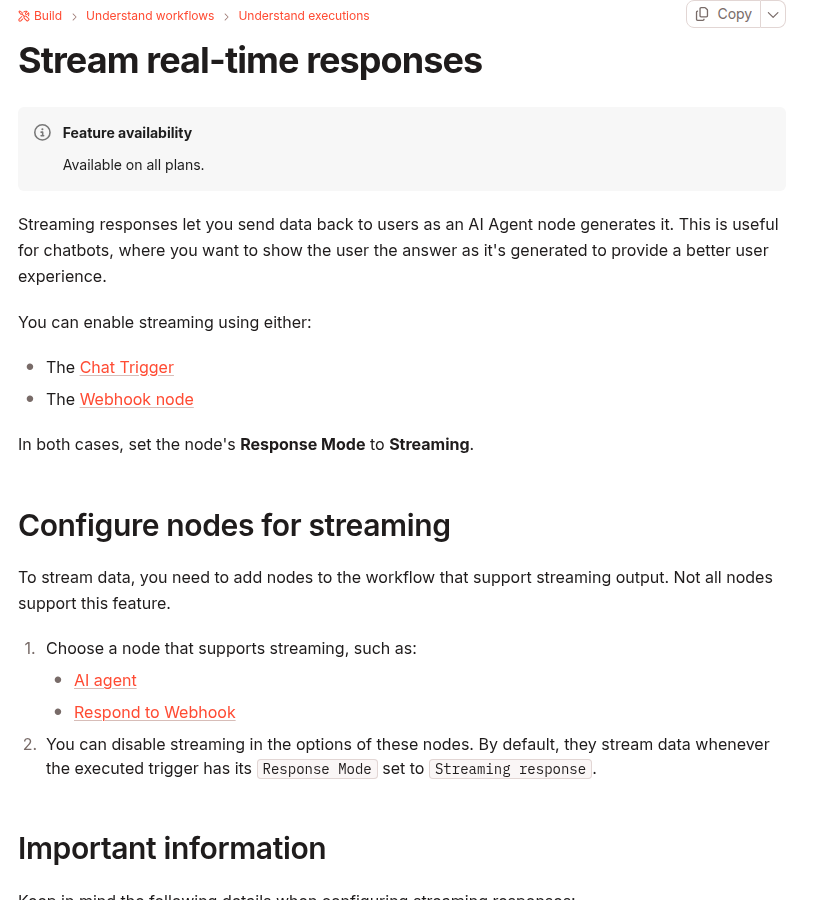
    n8n documentation showing native streaming responses through Chat Trigger or Webhook and supported AI Agent and Respond to Webhook nodes

    n8n documents two triggers for streaming responses: Chat Trigger and Webhook. In both cases, the trigger’s response mode must be set to Streaming. A trigger setting alone is not enough. The workflow must also contain at least one node that can stream data, such as an AI Agent or Respond to Webhook. If no downstream node emits streaming output, n8n warns that the workflow can send no data.

    This gives you a useful three-part model:

    1. The trigger opens the response path. It keeps the request available for incremental output.
    2. A supported node emits data. An AI Agent can send generated output as it becomes available. Respond to Webhook can also participate in a streaming workflow.
    3. The client consumes the response progressively. A browser, mobile app, CLI, or backend must read chunks instead of waiting for the entire body.

    If any one of those layers buffers the complete body, the workflow may execute successfully but appear non-streaming to the user.

    Choose Chat Trigger or Webhook

    Entry point Best fit What you control
    Chat Trigger n8n chat interfaces and embedded chat experiences Chat session behavior, memory integration, and the supported chat response path
    Webhook A custom frontend, mobile app, or server client Authentication, request schema, browser code, retry policy, and user interface

    Use Chat Trigger when the n8n chat contract already matches the product. Use Webhook when your application needs its own route, payload, authentication, or rendering. Do not add both triggers to one workflow merely to keep options open; choose one production contract and test that exact path.

    Build the smallest working streaming workflow

    1. Configure the trigger

    For a custom application, add a Webhook node and set its Response Mode to Streaming. Use the test URL only while developing. Activate the workflow and switch the client to the production webhook URL before measuring behavior.

    For an n8n chat interface, use Chat Trigger and select its streaming response mode. Keep the Chat Trigger and AI Agent connected to the same intended memory source when conversation history matters.

    2. Add a node that actually streams

    Connect the trigger to an AI Agent and enable streaming on that node. n8n’s documentation states that supported nodes stream by default when the executed trigger uses Streaming response, unless streaming is disabled in the node’s options.

    A normal node placed after the AI Agent can accidentally become the final response producer without supporting streaming. Start with the direct path below, verify it, and add transformations one at a time:

    Webhook (Response Mode: Streaming)
      → AI Agent (streaming enabled)
          ↳ Chat Model
          ↳ Optional tools and memory

    3. Activate and call the production endpoint

    Test-mode webhooks and production webhooks have different lifecycle rules. A test URL generally exists for a limited listening session; the production URL requires an active workflow. A browser test that succeeds only while the editor is listening is not a production verification.

    Read the response without re-buffering it

    A custom browser client should read response.body incrementally. The following minimal example displays decoded text as chunks arrive. Adapt the request body and authentication to your workflow.

    async function runAgent(message) {
      const response = await fetch(N8N_WEBHOOK_URL, {
        method: 'POST',
        headers: { 'Content-Type': 'application/json' },
        body: JSON.stringify({ message }),
      });
    
      if (!response.ok || !response.body) {
        throw new Error(`HTTP ${response.status}`);
      }
    
      const reader = response.body.getReader();
      const decoder = new TextDecoder();
    
      while (true) {
        const { value, done } = await reader.read();
        if (done) break;
        const text = decoder.decode(value, {
          stream: true,
        });
        appendToAnswer(text);
      }
    
      const remainder = decoder.decode();
      appendToAnswer(remainder);
    }

    This code proves incremental transport, not a universal message parser. Inspect the actual response produced by your n8n version and workflow before assuming that every chunk is a complete token, JSON object, or SSE event. Network boundaries can split or combine application-level messages.

    Also protect the endpoint. A public AI webhook can consume model tokens, call tools, or expose internal data. Apply authentication, input size limits, rate limits, tool authorization, and origin controls appropriate to the application. CORS is a browser access control, not user authentication.

    Check the reverse proxy before blaming the AI Agent

    Many self-hosted n8n installations sit behind NGINX, a tunnel, a CDN, or several of them. A proxy can receive small upstream chunks and buffer them before forwarding a larger response. The user then sees a long pause followed by the complete answer even though n8n streamed internally.

    NGINX documents that response buffering is enabled by default. When proxy_buffering off is set, NGINX passes the response to the client synchronously as it receives it. Apply changes only to the n8n webhook or chat location that needs streaming, then test the rendered production path.

    location /webhook/ {
      proxy_pass http://n8n:5678;
      proxy_http_version 1.1;
    
      proxy_buffering off;
      proxy_cache off;
      proxy_read_timeout 300s;
    }

    The timeout value is an example, not a recommended universal setting. NGINX defines proxy_read_timeout between successive reads from the upstream response, not as a maximum duration for the entire request. Choose a value from measured model and tool latency, and do not use a very long timeout to hide a workflow that can hang indefinitely.

    Streaming improves incremental delivery, but it does not make an HTTP request durable. When work can outlive proxy or client limits, use a 202 Accepted async job pattern for long-running n8n webhooks instead of relying on longer timeouts.

    Failures that look like “streaming does not work”

    Observed behavior Likely cause Verification
    No response body The trigger is streaming, but no downstream node is configured to emit streaming data Reduce the workflow to Trigger → AI Agent and inspect node options
    The whole answer arrives at once Client or proxy buffering Compare direct-to-n8n and public-domain requests with timestamps
    404 on the webhook Test URL is not listening or the production workflow is inactive Activate the workflow and call the production URL
    Stream starts, then stops during a tool call The agent is waiting for a slow tool or upstream API Inspect the execution timeline and tool duration
    Browser fails but curl works CORS, authentication, or frontend parsing Inspect browser network headers and console errors
    Duplicate chat messages Client retry or reconnect created a second execution Add a request ID and log one execution per ID

    Streaming changes the failure contract

    With a buffered JSON response, the server can often choose an HTTP error status before sending the body. Once a streaming response has started, headers may already be committed. A later model or tool failure may therefore appear as an interrupted stream rather than a clean JSON error with a new status code.

    Design the client for four states:

    • Connecting: the request is open but no content has arrived.
    • Streaming: partial output is visible and the cancel control is available.
    • Completed: the stream ended normally and the final answer can be persisted.
    • Interrupted: the network, model, tool, or workflow ended before a normal completion signal.

    Do not automatically replay every interrupted AI request. If the Agent can call tools with side effects, a retry may repeat an email, payment, ticket, or database mutation. Give each request an idempotency key and keep side-effecting actions behind their own duplicate guard.

    Measure the right latency

    Streaming improves perceived responsiveness, but it does not guarantee that the first chunk arrives in under one second. Separate these measurements:

    • Time to headers: request start until the HTTP response begins.
    • Time to first visible content: request start until the client renders useful output.
    • Generation duration: first content until the final chunk.
    • Total workflow duration: request start until the n8n execution completes.

    A slow first chunk can come from model queueing, DNS, TLS, a cold container, credential lookup, memory retrieval, or a tool call before generation. Streaming cannot remove work that must happen before the model has content to send.

    Production verification checklist

    1. Confirm the workflow uses Chat Trigger or Webhook with Response Mode set to Streaming.
    2. Confirm at least one downstream node supports streaming and has not disabled it.
    3. Activate the workflow and use the production endpoint.
    4. Test with a client that records timestamps for the first and final chunks.
    5. Compare direct and public-domain paths to identify proxy buffering.
    6. Verify authentication, rate limiting, and tool authorization.
    7. Cancel a request and confirm the UI leaves the streaming state cleanly.
    8. Force a model or tool failure after output begins and verify the interrupted-state experience.
    9. Retry with the same request ID and confirm side effects are not duplicated.
    10. Keep a non-streaming fallback for clients or intermediaries that cannot consume incremental responses.

    The safest implementation is intentionally small: native streaming trigger, one supported producer, one observable client, and one verified proxy path. Once that baseline works, add memory, tools, formatting, and richer UI behavior without losing the ability to isolate each layer.

    Sources

  • Secure Multi-Tenant RAG in n8n with Qdrant Metadata Filters

    Secure Multi-Tenant RAG in n8n with Qdrant Metadata Filters

    Multi-tenant retrieval-augmented generation has a deceptively simple failure mode: the answer can look correct while its supporting document belongs to another customer. A shared Qdrant collection is not unsafe by itself. The unsafe part is allowing a search to run without a tenant constraint, or trusting a tenant identifier supplied by the caller.

    This guide builds a fail-closed pattern for n8n and Qdrant. Every document receives a server-derived tenant identifier at ingestion, and every retrieval repeats the same identifier as a metadata filter. A missing or malformed identity stops the workflow before vector search.

    The security boundary

    Similarity is not authorization. Embeddings place semantically related documents near one another, regardless of who owns them. A query for “renewal terms” can retrieve another customer’s contract if all tenants share a collection and the search has no ownership filter.

    The safe data flow is:

    1. Authenticate the request outside the vector search.
    2. Derive tenant_id from the verified identity, never from a query parameter or chat message.
    3. Reject the request if the identity is missing or invalid.
    4. Write that exact tenant_id into document metadata during ingestion.
    5. Require the same value in the Qdrant retrieval filter.
    6. Test that cross-tenant documents are absent, not merely ranked lower.

    Qdrant documents three shared-deployment choices: partition by a payload field, dedicate shards, or combine both in a tiered design. Payload partitioning is a practical default for many small tenants, while dedicated collections or shards may be appropriate when stronger operational separation is required.

    What n8n and Qdrant provide

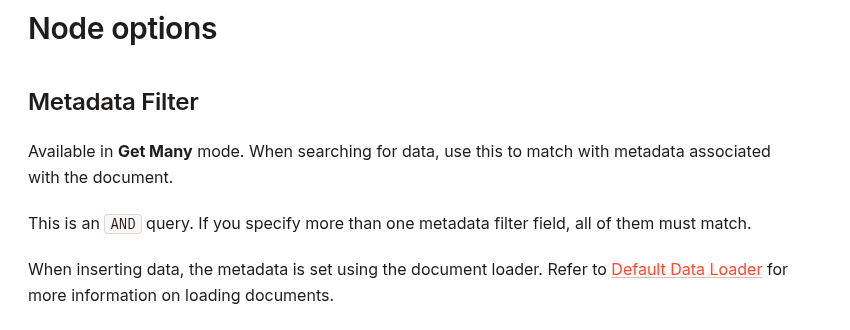
    n8n’s Qdrant Vector Store node supports a Metadata Filter in Get Many mode. Multiple fields are combined as an AND query, and metadata is attached when documents are inserted through a document loader.

    n8n Qdrant Vector Store documentation explaining the Metadata Filter option and AND matching behavior

    On the database side, Qdrant can filter points by payload fields. Its multitenancy guidance recommends adding a tenant-identifying payload field to every point and applying that field to searches. Qdrant also supports a keyword payload index with is_tenant: true, available from Qdrant 1.11, to improve how same-tenant vectors are colocated. That setting is an optimization hint; the filter remains the authorization-critical part.

    Use one canonical tenant identifier

    Choose one normalized field such as tenant_id. Do not alternate between customer name, email domain, account slug, and an internal UUID. Display names change and can collide. A stable internal identifier is easier to validate and audit.

    In n8n, place a validation step immediately after the trusted authentication step. The property path below is deliberately generic; replace verified_identity with the output produced by your authentication layer.

    const tenantId = $json.verified_identity?.tenant_id;
    
    if (
      typeof tenantId !== 'string' ||
      !/^[a-z0-9_-]{3,64}$/.test(tenantId)
    ) {
      throw new Error('Invalid tenant_id');
    }
    
    return [{
      json: {
        ...$json,
        tenant_id: tenantId
      }
    }];

    Do not fall back to a request-body tenant ID when this check fails. A fallback converts an authentication failure into a data-leak path.

    Ingestion workflow: stamp ownership before embedding

    A safe ingestion workflow can use these nodes:

    1. Webhook or queue trigger: receives a document-ingestion job.
    2. Authentication: verifies the caller and returns a trusted account identity.
    3. Validate Tenant: normalizes and validates the canonical tenant ID.
    4. Default Data Loader: loads the document and includes tenant_id in metadata.
    5. Embeddings: produces the vector.
    6. Qdrant Vector Store — Insert Documents: writes the vector, content, and metadata.

    Keep the ownership metadata close to the document-loading step. If a workflow splits files into chunks, every chunk must inherit the same tenant ID. Also include a stable document_id so updates and deletions can target the correct tenant-owned document.

    Tenant isolation and vector compatibility are separate contracts. If you change the embedding model, verify the vector dimension during both ingestion and retrieval; this guide to diagnosing embedding dimension mismatches in Pinecone and pgvector shows the dimension checks and safe migration pattern. Its database repair steps are Pinecone/pgvector-specific, so apply the compatibility principle—not those commands—to Qdrant.

    Field Source Purpose
    tenant_id Verified server-side identity Mandatory retrieval boundary
    document_id Internal content record Update, delete, and audit
    source Trusted ingestion context Traceability
    visibility Server-side policy Optional additional AND filter

    Retrieval workflow: fail closed before Qdrant

    Use Qdrant Vector Store in Get Many mode for deterministic retrieval. Configure the query text and result limit, then add a Metadata Filter:

    • Field: tenant_id
    • Value: ={{ $json.tenant_id }}

    If you also filter on visibility or a document state, n8n combines the fields with AND. That is useful, but the tenant condition must never be optional.

    A conservative retrieval flow is:

    1. Verify identity and derive tenant_id.
    2. Stop on any missing or malformed value.
    3. Run Qdrant Get Many with the tenant metadata filter.
    4. Verify each returned item still carries the expected tenant ID.
    5. Only then pass retrieved text to the language model.

    The post-query check is defense in depth. It should not replace the database filter, because unfiltered foreign text has already crossed the boundary by that point.

    Optional Qdrant tenant index

    For a shared collection with many tenants, create a keyword payload index for the field used to partition data. The Qdrant REST shape is:

    PUT /collections/knowledge/index
    {
      "field_name": "tenant_id",
      "field_schema": {
        "type": "keyword",
        "is_tenant": true
      }
    }

    Use the actual payload path stored by your integration. Inspect one inserted point before creating the index: depending on the document-loader mapping, the field may be nested under a metadata object. The index and every filter must reference the same path.

    Negative tests that prove isolation

    A happy-path answer is not evidence of tenant isolation. Build a small two-tenant test corpus and run explicit negative cases.

    Test Expected result
    Tenant A asks for a unique phrase present only in A A document is returned
    Tenant A asks for a unique phrase present only in B No B document is returned
    Request omits authenticated tenant identity Workflow stops before Qdrant
    Caller sends a different tenant ID in the body Body value is ignored or rejected
    Document chunk lacks tenant_id Ingestion fails; chunk is not stored
    Batch contains mixed tenants Split into isolated executions or reject the batch

    For each test, log the authenticated account ID, normalized tenant ID, workflow execution ID, and returned document IDs. Do not log document content or secrets merely to prove the filter worked.

    Common unsafe patterns

    • Using chat input as the tenant ID: prompt text is untrusted data, not an authorization decision.
    • Filtering after retrieval: foreign content has already left the database boundary.
    • Allowing an empty filter: a missing expression can silently become a collection-wide search.
    • Stamping metadata only on the parent document: every stored chunk needs ownership metadata.
    • Assuming a high similarity threshold protects tenants: relevance scores do not encode ownership.
    • Connecting an unrestricted vector tool directly to an agent: prefer a deterministic retrieval workflow that enforces identity before the model can use results.

    When metadata filtering is not enough

    Payload filtering is an application-enforced boundary. It reduces cross-tenant retrieval risk when implemented consistently, but it is not the same as separate credentials, collections, clusters, encryption keys, or regulatory environments. Consider stronger separation for high-value tenants, incompatible retention rules, customer-managed keys, or workloads where one configuration error would be unacceptable.

    Also restrict direct Qdrant access. If another workflow or service can query the same collection without the tenant filter, the overall system is still exposed. Treat the n8n workflow, Qdrant credentials, collection configuration, and audit trail as one security boundary.

    Production checklist

    • Tenant ID comes from verified server-side identity.
    • Missing identity fails before vector search.
    • Every chunk stores the same canonical tenant field.
    • Every retrieval includes the tenant metadata filter.
    • The stored payload path and filter path match.
    • Cross-tenant negative tests run in CI or a staging workflow.
    • Logs contain IDs and outcomes, not sensitive document text.
    • Direct database access is restricted and reviewed.
    • Higher-risk tenants use stronger physical or operational separation when needed.

    The core rule is simple: derive ownership once from trusted identity, write it on every vector, and require it on every query. In a multi-tenant RAG system, that invariant matters more than the embedding model, similarity threshold, or prompt.

    Official references: n8n Qdrant Vector Store node, Qdrant multitenancy guide, and Qdrant filtering documentation.