
A webhook is often used like a synchronous API: the caller sends a request and keeps the connection open until the workflow finishes. That works for short tasks. It becomes fragile when an n8n execution includes an AI agent, a large export, browser automation, or a slow third-party API. The client or a proxy may stop waiting even while n8n is still working.
Returning a response quickly does not make retries safe by itself. Use Webhook Retry Lab to compare retry side effects and crash recovery before designing the durable worker; the lab sends no real webhooks.
The reliable fix is usually an asynchronous job contract: accept and persist the work, return a job ID promptly, process it separately, and let the caller check the job status. This guide shows how to build that pattern in n8n, how its Webhook response modes fit together, and how to tell a 504 from Cloudflare’s 524.
Why long-running webhook calls fail
An HTTP request has multiple possible timeout points: the caller, a load balancer or reverse proxy, Cloudflare, and the n8n server. A 504 does not identify the failing layer by itself. Cloudflare’s documentation says its branded 502 or 504 pages can reflect an error returned by the origin or a Cloudflare-side condition, so check the response page and logs before changing n8n.
A Cloudflare 524 is more specific: Cloudflare connected to the origin, but did not receive an HTTP response before its default 125-second Proxy Read Timeout. Cloudflare recommends status polling for large HTTP processes. Raising a timeout may help for a controlled, short-term case, but it does not give a caller a durable result if the connection drops or the worker restarts.
First compare the same request through each network path you control. Record the start time, elapsed time, response status, request or trace ID, n8n execution ID, and any proxy request ID. If the direct origin succeeds while the proxied request fails near a consistent threshold, investigate the proxy path. If both fail, inspect the n8n execution and the slow upstream node.
Choose the right n8n response mode
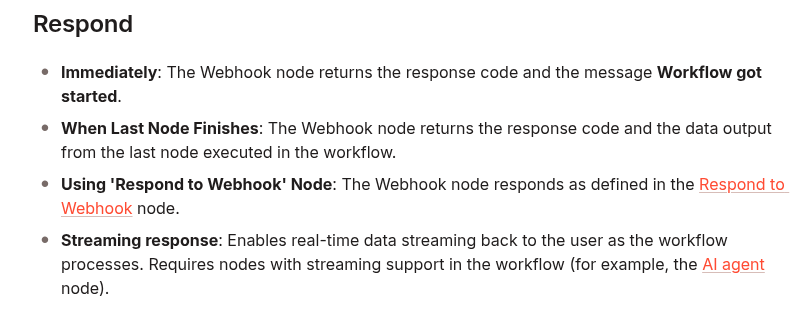
The Webhook node offers several response modes. When Last Node Finishes waits for the workflow’s last node and returns its output; that keeps the HTTP request open for the entire job. Immediately returns the fixed message Workflow got started. It is a quick acknowledgment, but it does not provide a custom job ID. Using Respond to Webhook Node lets you return a chosen status code and response body, which is useful when the caller needs a job ID and status URL.
The following screenshot is from the official n8n Webhook documentation and shows the response modes used to make that choice:
Build the asynchronous job pattern
Use two responsibilities: an ingress workflow that accepts and records work, and a worker workflow that performs it. A separate status endpoint reads the job record.
POST /webhook/report-jobs
  → validate request and idempotency key
  → create or find durable job record (status: queued)
  → respond 202 with job_id and status_url
  → start worker without waiting for completion

Worker workflow
  → claim queued job
  → set status: running
  → perform the long task
  → store result and set status: succeeded
  → or store safe error details and set status: failed

GET /webhook/report-jobs/:job_id
  → authenticate caller
  → read job record
  → return current status and result when available
1. Persist before acknowledging
Do not return “accepted” while the only copy of the request is in the current execution’s memory. Store a job row in PostgreSQL or another durable queue before sending the response. A minimal PostgreSQL table could be:
CREATE TABLE workflow_jobs (
  job_id uuid PRIMARY KEY DEFAULT gen_random_uuid(),
  idempotency_key text NOT NULL UNIQUE,
  request_hash text NOT NULL,
  status text NOT NULL CHECK (status IN ('queued', 'running', 'succeeded', 'failed')),
  request_json jsonb NOT NULL,
  result_json jsonb,
  error_code text,
  attempts integer NOT NULL DEFAULT 0,
  created_at timestamptz NOT NULL DEFAULT now(),
  updated_at timestamptz NOT NULL DEFAULT now()
);
Require an idempotency key for requests that may be retried. Enforce its uniqueness in the database. If the same key arrives again with the same request, return the existing job ID instead of creating duplicate work. If the key is reused for a different request, reject it rather than silently running the wrong payload. This matters because a caller that never receives the first response may retry even though the original request was accepted.
2. Return a useful 202 response
In the Webhook node, set Respond to Using ‘Respond to Webhook’ Node. After request validation and the durable insert, configure a Respond to Webhook node with response code 202 and a JSON body such as:
{
  "job_id": "job_123",
  "status": "queued",
  "status_url": "/webhook/report-jobs/job_123"
}
Map those values from the inserted row using n8n expressions; do not paste the example UUID into a live workflow. Connect the Respond to Webhook node to the worker handoff, or use a separate queue consumer. If you use Execute Sub-workflow, turn off Wait for Sub-Workflow Completion so the parent does not wait for the long job. For stronger recovery, keep a scheduled sweeper that finds old queued rows and dispatches them if the initial handoff was interrupted.
HTTP 202 Accepted means processing has not completed; it is not a success result or a promise that the job will eventually succeed. Include a status monitor in the response, then make that endpoint the source of truth.
3. Claim work safely in the worker
A worker should claim a job atomically so a manual retry, duplicate webhook, and recovery sweep cannot all run it at once. One PostgreSQL pattern is to update only a queued row and require a returned row before doing any work:
UPDATE workflow_jobs
SET status = 'running',
    attempts = attempts + 1,
    updated_at = now()
WHERE job_id = $1
  AND status = 'queued'
RETURNING job_id, request_json, attempts;
Use the Postgres node’s query-parameter fields for $1; do not build SQL by concatenating untrusted webhook values. For jobs that may run longer than a worker lease, add a lease timestamp and a recovery rule for stale running rows. Make each side effect idempotent too: a database claim prevents simultaneous starts, but it cannot undo an external charge or email sent just before a worker crashes.
4. Expose status without exposing the job
Create a second Webhook workflow for GET /report-jobs/:job_id. Read the record by its ID and return a small, stable representation:
{
  "job_id": "job_123",
  "status": "running",
  "created_at": "2026-09-24T07:30:00Z",
  "updated_at": "2026-09-24T07:30:18Z"
}
Return the stored result only when the job is succeeded. For failed, return a stable error code and a safe message, not credentials, raw stack traces, or private input. Authenticate the status endpoint and check that the caller is allowed to see that job; a UUID is an identifier, not access control. Add rate limits if callers may poll frequently.
Retry and recovery rules
- Retry transient failures such as a temporary rate limit or upstream 5xx with a bounded attempt count and exponential backoff.
- Do not automatically retry validation errors or permanent 4xx responses.
- Before retrying a step with an external side effect, use that provider’s idempotency feature or reconcile whether the side effect already happened.
- Move exhausted jobs to
failedand make them visible in an alert or operator queue. - Run a recovery workflow that re-dispatches stale
queuedjobs and investigates stalerunningjobs. - Keep a correlation value across the inbound request, job row, worker execution, and logs.
Test the contract before production
Use a staging webhook and a harmless test payload. Confirm that the ingress response arrives before the simulated long task completes, that the response contains a persisted job ID, and that polling shows the state move from queued to running to a terminal state. Then test a duplicate request with the same idempotency key, a worker failure, a retry, and a restart while a job is queued.
curl -i -X POST "https://YOUR_N8N_HOST/webhook/report-jobs" \
  -H "Content-Type: application/json" \
  -H "Idempotency-Key: customer-42-report-2026-09" \
  -d '{"customer_id":"42","period":"2026-09"}'

curl -i "https://YOUR_N8N_HOST/webhook/report-jobs/JOB_ID" \
  -H "Authorization: Bearer YOUR_TEST_TOKEN"
Measure the time to the first response separately from the total job duration. The first should stay comfortably below the shortest timeout on the path. The job duration can be longer because it is no longer tied to that client connection.
When streaming or a longer timeout is appropriate
Use a streaming response when the caller truly needs incremental output and the whole connection path supports streaming. Use a longer timeout only when you control the relevant limits and the request is still a reasonable synchronous operation. For work that can outlive a browser, proxy, or client connection, a persisted job plus status polling is easier to recover, retry, and audit.
Related DevelopWhale guides
- If the real problem is duplicate webhook side effects rather than timeout length, see Stop Duplicate n8n Webhook Side Effects with an Idempotency Gate.
- If executions themselves run too long, see How to Stop Stuck n8n Executions with Layered Timeouts.
Production checklist
- Identify which hop produced the 504 or 524 before changing timeout settings.
- Persist the accepted request before returning 202.
- Use a unique idempotency key and return the existing job on a safe duplicate.
- Return a job ID and authenticated status URL.
- Disable sub-workflow completion waiting when using it as an asynchronous handoff.
- Claim work atomically and make external side effects idempotent.
- Bound retries, record terminal failures, and recover stale jobs.
- Test response latency, worker failures, duplicate delivery, and restart recovery in staging.
The key change is in the contract: the webhook response confirms that the request was recorded, while a separate status resource reports the eventual outcome. That removes long processing time from the request’s connection lifetime and gives operators a durable place to inspect and recover work.
Official references: n8n Webhook node, n8n Respond to Webhook node, n8n Execute Sub-workflow, Cloudflare Error 524, Cloudflare Error 502 or 504, and RFC 9110 section 15.3.3: 202 Accepted.