Tag: n8n

  • Verify HMAC-SHA256 Webhook Signatures in n8n with Raw Bodies

    Verify HMAC-SHA256 Webhook Signatures in n8n with Raw Bodies

    Webhook signatures are only trustworthy when you calculate them from the exact bytes the sender signed. In n8n, that means preserving the raw request body, hashing that binary value with the correct secret and encoding, and rejecting the workflow before any side effect when the signature does not match.

    This guide builds a provider-neutral HMAC-SHA256 verification path with the Webhook, Crypto, and IF nodes. It also shows a hardened comparison option for environments where the Code node can use Node.js crypto.

    Why parsed JSON breaks valid signatures

    Many webhook providers compute a message authentication code over the request body exactly as it was sent. Parsing JSON and serializing it again can change whitespace, escaping, Unicode representation, or object-key order. The data may still mean the same thing, but the byte sequence is different, so the HMAC is different.

    The rule is simple: use the parsed body for business logic, but use the untouched raw body for signature verification. n8n’s Webhook node exposes a Raw Body option specifically for this purpose.

    Define the provider contract first

    Before building nodes, record the exact signing contract from the provider’s documentation. “HMAC-SHA256” alone is not enough.

    Contract item Example Why it matters
    Header name x-webhook-signature Header names and payload formats vary by provider.
    Signed message Raw body, or timestamp + delimiter + raw body Hashing only the body fails when a timestamp is part of the signed message.
    Digest algorithm SHA-256 SHA-1, SHA-256, and SHA-512 are not interchangeable.
    Output encoding Hex or Base64 The same digest has different textual representations.
    Prefix sha256= Some providers prefix the encoded digest; others do not.
    Replay fields Timestamp and event ID A valid HMAC by itself does not prevent replay.

    Do not copy a header expression or prefix from another provider. Use its official specification and test fixture.

    1. Capture the raw request body in the Webhook node

    1. Create a Webhook node and use the HTTP method required by the sender, usually POST.
    2. In Options, enable Raw Body.
    3. Choose a binary property name and keep it consistent. This guide uses data.
    4. Keep the webhook test URL for controlled tests and switch the provider to the production URL only after the workflow is active.

    The normal JSON body remains useful downstream, while the raw bytes are available as binary data for the cryptographic check. Never reconstruct the signed input with JSON.stringify().

    2. Compute the expected HMAC in the Crypto node

    Add a Crypto node immediately after the Webhook node and configure it as follows:

    • Action: Hmac
    • Value: Binary File
    • Binary Property Name: data
    • Algorithm: SHA256
    • Encoding: HEX or BASE64, exactly as the provider specifies
    • Secret: an n8n Hmac Secret credential, not a literal secret embedded in an expression
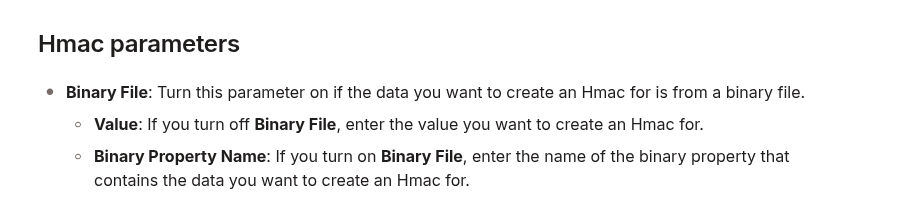
    n8n Crypto node Hmac parameters showing Binary File input and Binary Property Name

    The binary property name must match the property produced by the Webhook node. A mismatch can look like a bad secret even though the real problem is that the Crypto node hashed the wrong value.

    3. Normalize the received signature

    Read the signature from the Webhook output’s headers using the exact header name in the provider contract. Normalize only what the contract permits:

    • Remove a documented prefix such as sha256=.
    • Trim surrounding whitespace only if the provider permits it.
    • For hex, compare a consistent letter case.
    • Do not silently convert between hex and Base64.
    • If the header contains several versioned signatures, parse the documented format instead of comparing the whole header.

    A missing or malformed signature must take the rejection path. It should never fall through as an empty value that happens to match another empty field.

    4. Compare before any side effect

    For a straightforward integration, an IF node can compare the normalized received value with the HMAC generated by the Crypto node. Route the true branch to the rest of the workflow and terminate the false branch without writing to databases, sending messages, or calling business APIs.

    A normal string comparison is useful for compatibility testing, but it is not designed to be constant-time. For higher-risk endpoints, use a Code node only when your n8n environment permits Node.js built-in modules, and compare decoded digest bytes with crypto.timingSafeEqual:

    const { timingSafeEqual } = require('crypto');
    
    const expectedHex = String($json.expectedSignature ?? '')
      .replace(/^sha256=/i, '')
      .trim();
    const receivedHex = String($json.receivedSignature ?? '')
      .replace(/^sha256=/i, '')
      .trim();
    
    if (!/^[a-f0-9]{64}$/i.test(expectedHex) ||
        !/^[a-f0-9]{64}$/i.test(receivedHex)) {
      return [{ json: { signatureValid: false } }];
    }
    
    const expected = Buffer.from(expectedHex, 'hex');
    const received = Buffer.from(receivedHex, 'hex');
    const signatureValid = expected.length === received.length &&
      timingSafeEqual(expected, received);
    
    return [{ json: { signatureValid } }];

    The example assumes a 64-character SHA-256 hex digest. Adapt the parser to the provider’s documented format. On self-hosted n8n, Code node module access may require an explicit allow-list; on managed environments it may be restricted. If the hardened path is unavailable, keep the verification boundary simple and consider validating signatures in a small trusted gateway before n8n.

    5. Add replay protection

    An attacker who captures a valid signed request may be able to send it again. If the provider signs a timestamp, verify that it falls within a short tolerance and include the exact timestamp in the signed message. Also store the provider’s event ID and reject duplicates for the retention period required by your system.

    Do not invent a timestamp scheme when the provider does not sign one. Replay protection must follow the sender’s protocol; otherwise a proxy or gateway should add an authenticated anti-replay layer.

    Test the verification boundary

    Run a negative-test matrix before activating the production webhook:

    1. Known-good fixture: an official sample or captured test event passes.
    2. One-byte body change: the same signature fails.
    3. Wrong secret: verification fails.
    4. Wrong encoding or prefix: verification fails until configuration matches the contract.
    5. Missing header: the request takes the rejection path.
    6. Expired timestamp: a cryptographically valid but stale event is rejected when the protocol supports timestamps.
    7. Duplicate event ID: the second delivery is handled idempotently.

    Verify that every failure occurs before downstream side effects. During debugging, log only safe metadata such as the event ID, validation result, and failure category. Avoid logging the signing secret, full signature, authorization headers, or sensitive payloads.

    Troubleshooting mismatches

    • Every request fails: confirm that Raw Body is enabled and that both nodes use the same binary property.
    • The locally computed value looks different: verify hex versus Base64 and any documented prefix.
    • Test events pass but live events fail: confirm that test and production endpoints use the correct secrets.
    • Only some events fail: look for a signed timestamp, multi-signature header, compression, or proxy transformation.
    • JSON reserialization was used: remove it and hash the captured raw binary body.

    Operational checklist

    • The provider contract identifies the header, signed message, algorithm, encoding, and prefix.
    • The Webhook node captures the raw body.
    • The Crypto node hashes the matching binary property with an Hmac Secret credential.
    • Malformed or missing signatures fail closed.
    • Verification happens before every side effect.
    • Replay protection and idempotency are implemented when the protocol supports them.
    • Positive and negative fixtures are part of regression testing.

    For the underlying node settings, see the official n8n Webhook documentation and n8n Crypto documentation. For the hardened comparison primitive, see Node.js crypto.timingSafeEqual.

  • Fix WordPress REST API 301/302 Redirects in n8n Without Losing POST Data

    Fix WordPress REST API 301/302 Redirects in n8n Without Losing POST Data

    A WordPress REST API call from n8n can look successful while doing the wrong thing. The HTTP Request node follows redirects by default, so a request sent to the wrong scheme, hostname, or path may be redirected before WordPress handles it. The final response can hide the original 301 or 302 and make an authentication, empty-body, or method error look like a WordPress problem.

    The risky case is a write request. HTTP permits a user agent to change POST to GET after a 301 or 302. That behavior is not guaranteed for every client, but it is allowed and common enough that a production publisher should never depend on method preservation across those redirects. The durable fix is to call the final canonical REST endpoint directly, not to increase the redirect limit.

    What you will fix

    This guide shows how to reveal the first redirect, interpret its Location header, correct the n8n URL, and verify a WordPress write without creating duplicates. It deliberately separates redirect diagnosis from authentication and permission errors.

    n8n POST
      |
      +-- 301/302 --> may become GET
      |
      +-- 307/308 --> method preserved
      |
      +-- canonical URL --> WordPress

    Why 301 and 302 are dangerous for POST requests

    RFC 9110 explains that historical client behavior converged on changing a redirected POST to GET after 301 Moved Permanently or 302 Found. The specification therefore allows that change. By contrast, 307 Temporary Redirect and 308 Permanent Redirect were created to unambiguously preserve the method.

    Status Meaning POST behavior to assume Operator action
    301 Permanent move Client may change POST to GET Replace the request URL with the Location target
    302 Temporary move Client may change POST to GET Find and remove the redirect before production writes
    303 See Other Follow-up retrieval is GET or HEAD Do not use as a transparent write redirect
    307 Temporary, method-preserving Method and body are preserved Still call the intended endpoint directly
    308 Permanent, method-preserving Method and body are preserved Update the stored endpoint to the new URL

    A redirect can also affect credentials. When a redirect changes the origin, clients may remove origin-specific fields such as Authorization or cookies. A redirect from one hostname to another can therefore turn a valid WordPress Application Password into an apparent authentication failure.

    Step 1: expose the first response in n8n

    Do not start by testing a production post creation request. First use a non-mutating request such as GET https://your-site.example/wp-json/ or a safe staging endpoint. In the HTTP Request node:

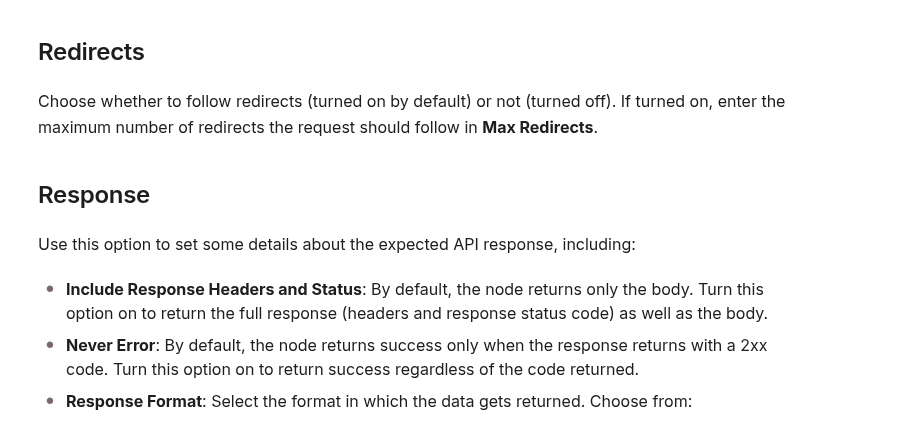
    1. Open Options and add Redirects.
    2. Turn redirect following off.
    3. Under Response, enable Include Response Headers and Status.
    4. Enable Never Error temporarily so that the workflow returns the 3xx response for inspection instead of stopping at the node.
    5. Run the node and record the status code and Location header.
    n8n HTTP Request documentation showing redirect follow controls and response status options

    n8n documents that redirects are followed by default. It also documents the response options that return headers and status and allow non-2xx responses to remain inspectable. These settings turn an invisible redirect into explicit diagnostic data.

    A diagnostic result should give you enough information to answer two questions:

    {
      "statusCode": 301,
      "headers": {
        "location": "https://www.example.com/wp-json/"
      }
    }
    • Which component generated the redirect?
    • What exact URL should n8n call next time?

    Step 2: classify the Location change

    Compare the request URL with the Location value character by character. Most WordPress automation redirects fall into one of these groups.

    HTTP to HTTPS

    http://example.com/wp-json/wp/v2/posts
    https://example.com/wp-json/wp/v2/posts

    The n8n credential or node URL is using the insecure scheme. Replace it with the HTTPS endpoint. Do not keep the HTTP URL and rely on a permanent redirect for every authenticated write.

    Non-www to www, or the reverse

    https://example.com/wp-json/wp/v2/posts
    https://www.example.com/wp-json/wp/v2/posts

    Use the hostname configured as the WordPress site URL and used by the REST API discovery document. Even if the redirect preserves the request in one client version, a host change can alter credential forwarding and should be removed from the write path.

    Path normalization

    /wp-json/wp/v2/posts
    /wp-json/wp/v2/posts/

    Do not assume that a missing or extra trailing slash always causes a redirect. WordPress, the web server, a CDN, or a custom rule may normalize paths differently. Trust the observed Location header, then configure the exact final path directly.

    Reverse-proxy scheme loop

    If the browser uses HTTPS but WordPress repeatedly generates an HTTP URL, the origin may not know that TLS was terminated at a reverse proxy. WordPress determines secure requests through is_ssl(). Its official documentation notes that proxy deployments can require recognition of HTTP_X_FORWARDED_PROTO.

    The correct fix is infrastructure-specific: the trusted proxy must set the forwarded scheme correctly, and WordPress must recognize it. Do not blindly trust a client-supplied forwarded header at the public edge. Configure this only where a known proxy controls the header.

    Step 3: use the canonical WordPress endpoint

    The WordPress REST API defines post creation as:

    POST https://canonical.example/wp-json/wp/v2/posts

    Update every place that can reintroduce the old URL:

    • the HTTP Request node URL;
    • a shared n8n environment variable;
    • a credential base URL;
    • a sub-workflow input;
    • a WordPress publisher configuration record;
    • test and retry branches.

    Keep one canonical base value and build routes from it. For example:

    WP_BASE_URL=https://www.example.com
    POST {{$env.WP_BASE_URL}}/wp-json/wp/v2/posts

    After changing the URL, run the safe GET /wp-json/ diagnostic again with redirects disabled. The expected result is a direct non-redirect response. Only then move to an authenticated write test.

    Step 4: validate with a controlled draft

    Use a staging site when available. If you must validate on production, create a uniquely named draft, not a published post, and use a slug that can be searched before any retry.

    {
      "title": "Redirect validation",
      "slug": "redirect-check-20261009",
      "status": "draft",
      "content": "<p>Endpoint check.</p>"
    }

    Require all of the following before calling the path healthy:

    • the response is a direct 2xx result, not a followed 3xx chain;
    • the JSON contains a positive WordPress post ID;
    • the returned status is draft;
    • the title and content match the sent payload;
    • the slug is the expected value;
    • a read-back request retrieves the same post.

    If n8n reports a timeout or ambiguous error after sending the request, do not immediately retry the create operation. First query WordPress by the unique slug. The original request may have succeeded even if n8n missed the response. A blind retry can create a duplicate.

    Step 5: restore strict failure behavior

    Never Error is useful while inspecting 3xx responses, but it should not become a blanket production setting that treats every HTTP status as success. Once the canonical endpoint is fixed:

    1. turn redirect following off for write calls when your workflow should fail on any unexpected redirect;
    2. turn Never Error off so non-2xx responses fail visibly;
    3. keep response status and headers available when they improve logging;
    4. validate the WordPress response body instead of accepting any 2xx blindly;
    5. route 401/403, 429, and 5xx responses to separate retry or alert logic.

    This creates a useful invariant: a production WordPress write must reach the intended endpoint directly. Any redirect becomes an operational signal rather than hidden transport behavior.

    Common wrong fixes

    Increasing Max Redirects

    This only allows a longer chain. It does not guarantee that the method, body, or authorization survives. Redirect loops also become slower and harder to diagnose.

    Forcing 307 or 308 everywhere

    Method-preserving redirects are safer than 301/302 for writes, but they still leave n8n calling the wrong URL. They can also hide a proxy or site-URL misconfiguration. Prefer the final endpoint directly.

    Changing WordPress authentication first

    A redirect can remove or relocate credentials before WordPress evaluates them. Confirm the redirect chain before regenerating Application Passwords or changing user capabilities.

    Testing with a live publish request

    A diagnostic should not create public content. Use a safe read first, then a staging request or a uniquely identifiable draft with read-back verification.

    Assuming the trailing slash is always the cause

    The redirect source might be HTTPS enforcement, host canonicalization, a CDN rule, WordPress site settings, or reverse-proxy scheme detection. Read the actual Location header instead of guessing.

    Production checklist

    • Call the HTTPS canonical hostname directly.
    • Disable redirect following while diagnosing.
    • Capture status and the Location header.
    • Treat 301/302 as unsafe for transparent POST forwarding.
    • Remember that 307/308 preserve the method but still indicate a non-canonical URL.
    • Fix reverse-proxy scheme detection only at a trusted boundary.
    • Validate with a staging request or unique draft.
    • Read the created object back before declaring success.
    • Search by slug before retrying an ambiguous create.
    • Fail production writes on unexpected redirects.

    The reliable mental model

    A REST write is not complete because n8n reached some final 2xx page. It is complete when the intended method and body reach the intended WordPress endpoint, WordPress returns the expected resource, and a read-back confirms the result. The simplest way to preserve that contract is to remove redirects from the write path entirely.

    Official references: n8n HTTP Request node, RFC 9110 HTTP redirection semantics, WordPress Posts REST API, and WordPress is_ssl() reference.

  • Fix n8n Embedding Dimension Mismatches in Pinecone and pgvector

    Fix n8n Embedding Dimension Mismatches in Pinecone and pgvector

    An n8n retrieval workflow can run perfectly for months, then fail immediately after you change an embedding model. The error may mention vector dimensions, a Pinecone index, or a PostgreSQL vector(n) column. In other cases, ingestion succeeds in one workflow but retrieval fails in another because the two paths no longer generate the same vector length.

    The safe fix is not to pad arrays, truncate values, or alter a production index in place. First measure the vector produced by the exact n8n node and model configuration. Then compare that number with the destination schema. If they differ, create a parallel index or table, re-embed the source documents with one locked configuration, test retrieval, and only then switch traffic.

    Why embedding dimensions become a production contract

    An embedding is an ordered array of numbers. Its length is part of the data contract between three components:

    1. the embedding model and any dimension parameter,
    2. the vector database schema or index, and
    3. every ingestion and query workflow that uses that store.

    All three must agree. Pinecone describes the dimension field as the number of dimensions in vectors inserted into a dense index, and its integrated inference configuration requires the index dimension to match the model. PostgreSQL with pgvector can enforce the same contract with a column such as vector(1536).

    OpenAI’s current embeddings guide documents default lengths of 1,536 for text-embedding-3-small and 3,072 for text-embedding-3-large. It also supports a dimensions parameter for shorter vectors. That means a model name alone may not fully describe the output: the configured dimension is part of the versioned contract.

    Typical symptoms in n8n

    • Vector-store insertions fail immediately after a model change.
    • The ingestion workflow works, but similarity search fails in the query workflow.
    • Old documents remain searchable while newly ingested documents fail.
    • A Pinecone request reports a vector length that does not match the index.
    • PostgreSQL rejects a value for a vector(n) column.
    • Two n8n workflows reference different embedding credentials, models, or node settings.

    Do not treat these as generic connectivity errors. Authentication and networking may be healthy while the payload violates the vector store’s shape.

    Step 1: measure the actual embedding length

    Run a controlled test through the same embedding node used in production. Use a short fixed string and inspect the returned array before the vector-store node. In a Code node, adapt the property path to the real output and return only diagnostic metadata:

    const vector = $json.embedding;
    
    if (!Array.isArray(vector)) {
      throw new Error('Embedding array not found');
    }
    
    return [{
      json: {
        model: 'record-the-exact-model',
        dimensions: vector.length,
        sample: vector.slice(0, 3),
      },
    }];

    Record the n8n version, node version, model ID, and any dimension-related option. Repeat the test in both ingestion and retrieval workflows. The two measured lengths must match. A notice in the node UI, a remembered default, or an old tutorial is not sufficient evidence.

    This is especially important when a node’s behavior is under active development. A September 2026 n8n issue reports that one version of the Google Gemini embeddings node displayed a 768-dimension notice while its default model produced 3,072 values. Treat that as version-specific evidence, not as a universal Gemini rule. Measure your own installed version.

    Step 2: inspect the destination contract

    Pinecone

    Describe the index through the Pinecone console or control-plane API and record its vector type, dimension, metric, and host. For a dense index, the dimension is fixed for inserted vectors. Do not assume you can repair a mismatch by changing an unrelated index setting.

    curl -s \
      -H "Api-Key: $PINECONE_API_KEY" \
      -H "X-Pinecone-Api-Version: 2025-10" \
      "https://api.pinecone.io/indexes/$INDEX_NAME"

    Compare the returned dimension with the measured length from n8n. Also confirm that ingestion and query nodes use the same index name and namespace.

    PostgreSQL and pgvector

    Inspect the column type rather than guessing from an application error:

    SELECT
      table_schema,
      table_name,
      column_name,
      data_type,
      udt_name
    FROM information_schema.columns
    WHERE table_name = 'documents';

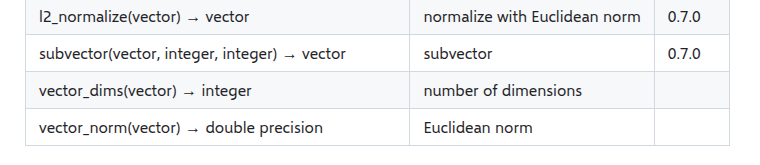
    For stored vectors, pgvector exposes vector_dims(), which returns the number of dimensions. Sample the current data before changing anything:

    SELECT
      id,
      vector_dims(embedding) AS dimensions
    FROM documents
    WHERE embedding IS NOT NULL
    LIMIT 20;
    pgvector reference table showing vector_dims returns the number of dimensions

    If the column uses vector(1536), PostgreSQL is enforcing that length. If it uses unconstrained vector, rows with different lengths can coexist, but pgvector’s documentation notes that indexes still need rows of the same dimension. Mixed dimensions make retrieval and indexing harder to reason about, so do not use an unconstrained column as a shortcut around migration.

    Step 3: find where the contract diverged

    Build a small inventory before making changes:

    Component Record Failure signal
    n8n ingestion Model, node version, measured length Insert rejects vector
    n8n retrieval Model, node version, measured length Query rejects vector
    Pinecone Index, namespace, dimension, metric Dimension mismatch
    pgvector Table, column type, stored dimensions Column or index conflict

    Common causes include switching from one embedding model to another, changing an output-dimension option in only one workflow, pointing ingestion and retrieval at different credentials, restoring a workflow without its original model setting, or reusing an index created for an older model.

    Step 4: choose the safe repair

    Option A: restore the old embedding contract

    If the model change was accidental and the old model is still available, revert both ingestion and retrieval to the exact previous configuration. Test with a new document and a known query. This is the smallest recovery, but it does not migrate existing data to a new model.

    Option B: create a parallel store and re-embed

    Use this when the model change is intentional. Create a new Pinecone index or a new pgvector table with the measured target dimension. Keep the old store read-only during the migration.

    CREATE TABLE documents_v2 (
      id bigint PRIMARY KEY,
      content text NOT NULL,
      metadata jsonb,
      embedding vector(1536)
    );

    The exact dimension above is only an example. Substitute the value measured from your chosen model and settings. Then run a controlled re-ingestion workflow:

    1. Export or query the canonical source documents and metadata.
    2. Generate every vector with one locked embedding configuration.
    3. Write to the new index or table with stable document IDs.
    4. Count successful writes and capture failures separately.
    5. Run a fixed set of representative retrieval queries.
    6. Compare relevance, filters, latency, and result coverage.
    7. Switch the retrieval workflow only after acceptance checks pass.
    8. Retain a rollback path until the new store is stable.

    Why padding and manual truncation are unsafe

    Adding zeros can make an array the expected length, but it does not turn an embedding from one model into an embedding from another. Arbitrary truncation discards coordinates without following the model provider’s supported dimensionality method. Both approaches can produce values that fit the schema while silently degrading retrieval.

    If a provider offers an official dimension parameter, configure it at embedding generation time and use the same value for ingestion and queries. OpenAI specifically recommends the dimensions parameter for its third-generation embedding models. Do not apply a generic slice operation unless the model documentation explicitly defines and validates that transformation.

    n8n guardrails that prevent recurrence

    Add a dimension assertion immediately before every vector-store write and query:

    const expected = 1536;
    const vector = $json.embedding;
    
    if (!Array.isArray(vector)) {
      throw new Error('Embedding is missing');
    }
    
    if (vector.length !== expected) {
      throw new Error(
        'Embedding dimension mismatch: ' +
        vector.length + ' != ' + expected
      );
    }
    
    return $input.all();

    Store the expected dimension in one environment variable or workflow configuration value instead of duplicating it across nodes. Log the model ID, output dimension, destination index or table, and workflow version with each migration batch. Never log the entire embedding unless there is a specific, secure debugging need.

    For production changes, use a small canary set before re-embedding the full corpus. Verify both semantic relevance and metadata filters. A dimension match proves structural compatibility; it does not prove retrieval quality.

    Verification checklist

    • The measured ingestion and query vectors have the same length.
    • The vector database schema or index reports that same dimension.
    • Both n8n paths use the same model ID and dimension setting.
    • Existing source documents and metadata are backed up.
    • Migration writes to a parallel destination, not over the only copy.
    • Representative queries return expected documents and filters.
    • Failures are logged by document ID and can be retried safely.
    • The old destination remains available for rollback until validation completes.

    Final rule

    Embedding dimension is not a cosmetic model detail. It is a versioned interface shared by n8n, the model provider, and the vector store. Measure the real output, inspect the real schema, and migrate through a parallel destination. That approach fixes today’s mismatch without creating a harder retrieval problem tomorrow.

    Official references: OpenAI embeddings guide, Pinecone index configuration, pgvector documentation, and n8n issue #37577.

  • Fix n8n Docker EACCES Errors Without Losing Persistent Data

    Fix n8n Docker EACCES Errors Without Losing Persistent Data

    An EACCES: permission denied error during n8n startup usually means the process inside the container cannot read or write its persistent data directory. The safe fix is not to run n8n as root or make the directory world-writable. First identify the mount and the container’s real UID/GID, then back up the data, repair only the affected ownership or mount option, and prove that the data survives a restart.

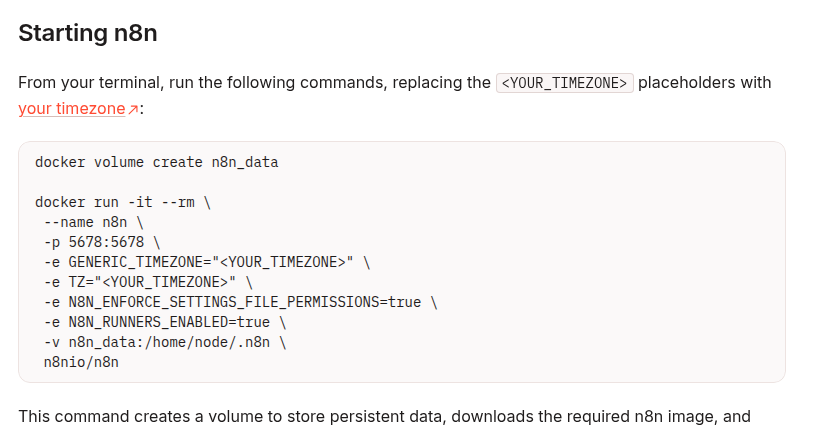
    This guide uses /home/node/.n8n, the persistent user folder shown in n8n’s official Docker examples. Even when PostgreSQL stores workflow data, this folder can still contain important material such as the encryption key, logs, and source-control assets.

    Why n8n reports EACCES in Docker

    A container sees files through numeric user and group IDs. Names such as node are only labels. If a host directory is owned by UID 1002 but n8n runs as UID 1000, for example, Linux may reject writes even though the path is mounted at the expected location.

    The same symptom can also come from a read-only mount, the wrong source path, an SELinux label, a rootless-Docker mapping, or a network filesystem. That is why a blanket chown 1000:1000 is unsafe: the runtime UID can differ between images and environments.

    Official n8n Docker example mounting the n8n_data volume at /home/node/.n8n

    Step 1: capture the failure before changing anything

    Confirm the service name in your Compose file, then collect the current state:

    docker compose ps
    docker compose logs --tail=200 n8n
    docker compose exec n8n id
    docker compose exec n8n sh -c 'ls -ldn /home/node /home/node/.n8n; test -w /home/node/.n8n && echo writable || echo not-writable'
    

    If the container exits too quickly for docker compose exec, inspect the configured user and image without changing the service:

    docker compose config
    docker image inspect n8nio/n8n:latest --format '{{json .Config.User}}'
    

    Prefer an immutable n8n version tag in production. If your deployment uses a custom image, inspect that exact image rather than the example above.

    Step 2: determine whether this is a bind mount or a named volume

    Docker named volumes are managed by Docker. Bind mounts map a specific host path into the container. The repair procedure is different, so inspect the live container rather than guessing from an old Compose file:

    docker inspect <container-name-or-id> --format '{{json .Mounts}}'
    

    Find the entry whose Destination is /home/node/.n8n.

    Mount type What to inspect Typical risk
    bind The host Source path and its numeric ownership Host directory UID/GID does not match the n8n process
    volume The exact Docker volume name and data inside it A previous root-run container created root-owned files

    For a bind mount, inspect the exact source path returned by Docker:

    sudo stat -c '%u:%g %a %n' /srv/n8n/data
    sudo find /srv/n8n/data -maxdepth 2 -printf '%u:%g %m %p\n' | head -n 50
    

    Replace /srv/n8n/data with the verified source path. Do not run a recursive ownership command against a path copied from an unverified tutorial.

    Step 3: back up the complete state

    Stop n8n before copying an SQLite-based .n8n directory. A live filesystem copy can capture an inconsistent database. If PostgreSQL is external, back it up separately; the .n8n folder can still be required to decrypt stored credentials.

    For a named volume, first discover the real name because Compose may add a project prefix:

    docker compose stop n8n
    docker volume ls
    docker volume inspect <actual-volume-name>
    mkdir -p ./backups
    docker run --rm \
      -v <actual-volume-name>:/source:ro \
      -v "$PWD/backups":/backup \
      alpine sh -c 'cd /source && tar -czf /backup/n8n-data.tgz .'
    

    For a bind mount, copy or snapshot the verified host directory while n8n is stopped. Also preserve the Compose file, environment configuration, external database backup, custom nodes, and any external binary-data storage. Test that the archive can be listed before making permission changes.

    Step 4: repair only the confirmed mismatch

    Bind mount

    Use the numeric UID and GID returned by docker compose exec n8n id. After confirming the backup and host path:

    sudo chown -R <runtime-uid>:<runtime-gid> /srv/n8n/data
    

    Do not substitute a guessed UID. If the mount is intentionally shared, a group-based design with the narrowest required permissions may be better than transferring all ownership.

    Named volume

    Use a short-lived helper container and the exact volume name. Keep n8n stopped while changing ownership:

    docker run --rm --user root \
      -v <actual-volume-name>:/data \
      alpine chown -R <runtime-uid>:<runtime-gid> /data
    

    This changes the files in the volume; it does not make the n8n service run as root. Reinspect the directory afterward with a helper container or the restarted n8n service.

    Step 5: restart and prove persistence

    docker compose up -d n8n
    docker compose logs --tail=200 n8n
    docker compose exec n8n sh -c 'id; ls -ldn /home/node/.n8n; test -w /home/node/.n8n && echo writable'
    

    Then perform an application-level check:

    1. Open n8n and confirm existing workflows and credentials are present.
    2. Create a harmless test workflow, save it, and record its name.
    3. Restart the n8n service.
    4. Confirm the workflow still exists and that the logs contain no new EACCES errors.

    A green container state alone is not enough. Persistence after restart is the evidence that the mount points to the intended data and remains writable.

    When ownership is not the problem

    Evidence Likely cause Next check
    RW: false in Docker’s mount data Read-only mount Remove an accidental :ro or read_only setting
    Correct UID/GID but writes still fail on an SELinux host Security label mismatch Inspect audit logs and apply a deliberate z/Z policy only if appropriate
    The mounted folder is empty Wrong source path or a mount obscuring existing files Compare Docker’s live Source and Destination with the Compose config
    Only WSL paths under /mnt/c fail Cross-filesystem permission behavior Move the project data into the Linux filesystem and retest
    IDs look unexpected under rootless Docker User-namespace mapping Inspect rootless/userns configuration before changing host ownership
    Permissions change again after deployment Another init job or root-run container rewrites files Audit every service that mounts the same data

    Fixes to avoid

    • chmod -R 777: it grants unnecessary write access and hides the ownership mistake.
    • Running n8n as root: it weakens isolation and can create more root-owned files.
    • Deleting and recreating the volume: it can erase workflows, credentials, and the encryption key.
    • Assuming UID 1000 everywhere: verify the live image and container instead.
    • Changing a broad host path: a typo in a recursive command can damage unrelated files.

    A compact recovery checklist

    1. Capture logs, runtime UID/GID, mount type, source, destination, and read/write mode.
    2. Stop n8n and take a complete, testable backup.
    3. Repair the verified bind path or named volume using the actual runtime IDs.
    4. Check SELinux, user namespaces, or network storage if ownership already matches.
    5. Restart, inspect logs, save a test workflow, restart again, and verify persistence.

    Official references

  • Automate Freelance Contracts with n8n and DocuSeal

    Automate Freelance Contracts with n8n and DocuSeal

    Freelancers often treat contract signing as a manual handoff: copy a scope of work, replace client details, email a PDF, wait for signatures, download the completed file, and update the project board. That sequence is repetitive, but automating it safely requires more than sending a document. The workflow must create the right submission, wait for every required signer, archive the final evidence, and tolerate duplicate webhook delivery without sending a second contract.

    This guide builds that closed loop with n8n and DocuSeal. DocuSeal provides a verified n8n node for n8n Cloud and self-hosted n8n. Its documented actions include creating submissions from a template, PDF, DOCX, or HTML, while its triggers distinguish a single signer completing a form from the entire submission being completed.

    What you will build

    Use two small workflows instead of one long execution that waits for a signature:

    1. Request workflow: accept approved client and scope data, validate it, create a DocuSeal submission, and persist the returned submission reference.
    2. Completion workflow: receive the DocuSeal completion event, reject duplicates, archive the signed document, update the project record, and notify the parties.
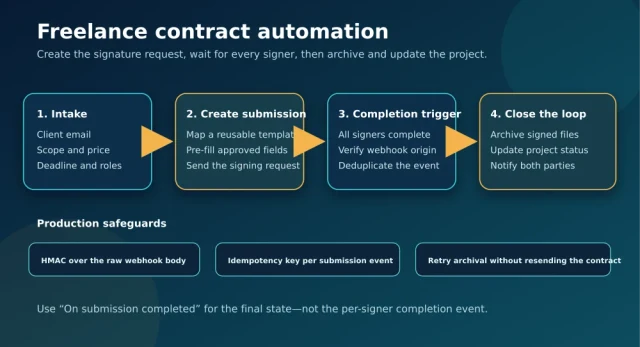
    Four-step n8n and DocuSeal freelance contract workflow from client intake to secure archival, with webhook and idempotency safeguards

    The separation matters. A contract may remain unsigned for hours or days, so keeping an n8n execution open is the wrong reliability model. The first workflow finishes after the signature request is created. The second starts only when DocuSeal reports completion.

    Before you start

    • An active n8n instance. DocuSeal documents support for both n8n Cloud and self-hosted n8n.
    • A DocuSeal account, reusable contract or SOW template, and API credential.
    • A public HTTPS endpoint when a self-hosted n8n instance receives DocuSeal trigger events.
    • A durable store for submission state and idempotency keys. PostgreSQL is a good fit; a database table or another atomic key-value store also works.
    • A destination for final documents, such as Google Drive, S3-compatible storage, or a client/project folder.
    Environment Server Domain Important note
    DocuSeal Global Cloud https://api.docuseal.com Use the API key from the DocuSeal Console.
    DocuSeal EU Cloud https://api.docuseal.eu Keep regional data and credentials aligned.
    DocuSeal On-Premises https://docuseal.example.com/api Replace the example host with the API URL of your instance.

    Do not assume the production API workflow is universally free. At the time of writing, DocuSeal lists API and Embedding as Pro features, charges per completed production API document, and offers an unlimited free Sandbox for development and testing. The open-source on-premises application is free, but production integration features and licensing still need to be checked against the current plan.

    Workflow 1: create the signature request

    1. Define a strict intake contract

    Start with a form, CRM event, or approved spreadsheet row, but normalize it into one internal object before it reaches DocuSeal. Keep template selection on the trusted side of the workflow. A client-supplied value should not be allowed to choose an arbitrary template or signing role.

    {
      "request_id": "sow_2026_1042",
      "template_key": "freelance_sow_v3",
      "client_name": "Example Client",
      "client_email": "[email protected]",
      "project_name": "Automation audit",
      "scope_summary": "Audit and remediation plan",
      "fee": "2500.00",
      "currency": "USD",
      "deadline": "2026-11-15"
    }

    Validate required fields, normalize the email address, reject impossible dates, and derive money values from trusted pricing logic. If a human must approve the final scope, put that approval before the DocuSeal node.

    2. Make request creation idempotent

    A webhook retry or manual replay must not create a second signature request. Claim request_id atomically before calling DocuSeal. In PostgreSQL, a unique constraint plus INSERT ... ON CONFLICT DO NOTHING is safer than a read-then-write check because concurrent executions cannot both win.

    INSERT INTO contract_requests (request_id, status)
    VALUES ($1, 'creating')
    ON CONFLICT (request_id) DO NOTHING
    RETURNING request_id;

    Continue only when the query returns the inserted row. If no row is returned, load the existing record and return its current submission reference instead of creating another contract.

    3. Use the DocuSeal Create submission action

    Add the verified DocuSeal node and choose Create submission. Select the reusable template by its trusted name or ID. Map each signer to the role defined in that template, then map only approved pre-fill values.

    • Keep signer role names identical to the template.
    • Map the client email from the normalized intake object.
    • Use Send Email only after the payload is validated.
    • Store the returned submission reference together with request_id.
    • Record a timestamp and transition the local status from creating to sent.

    If the DocuSeal request fails after the idempotency claim, mark the local row create_failed. A controlled retry can reuse the same request record. Do not silently generate a new request_id.

    Workflow 2: close the loop after signing

    1. Choose the correct trigger

    DocuSeal exposes two completion-related triggers in its n8n integration:

    • On signing form completed: one signer has completed their part.
    • On submission completed: all required signers have signed the document.

    For final archival and project activation, use On submission completed. The per-signer trigger is useful for progress tracking, but treating it as final can archive an incomplete agreement or start work before every party has signed.

    2. Verify and deduplicate the event

    The verified DocuSeal trigger registers the webhook for you. If you instead use a generic n8n Webhook node, follow DocuSeal’s security documentation: verify the X-Docuseal-Signature HMAC-SHA256 value against the exact raw request body, reject stale timestamps, and compare signatures in constant time. Re-serializing parsed JSON changes the signed bytes and can make a valid signature fail.

    After authentication, build a stable idempotency key from the actual event payload shown by your test execution—for example, a submission identifier plus the event type. Persist it under a unique constraint before any archive, notification, or project-status side effect.

    Failure Safe response
    Duplicate completion event Acknowledge it and skip all side effects already completed.
    Archive upload fails Retry the archive step; do not create or resend the submission.
    Project update fails Keep the signed-file location and retry only the project update.
    Notification fails Retry from a notification outbox keyed by the submission event.
    Unknown submission Quarantine the event for review instead of inventing a project mapping.

    3. Archive the signed evidence

    Use the document URL or submission data returned by DocuSeal’s API to retrieve the completed document through an authenticated HTTP Request node. Write it to a deterministic path such as:

    /clients/{client_id}/contracts/{request_id}/signed-contract.pdf

    Save the DocuSeal submission reference, final storage URL, completion timestamp, and a checksum if your storage layer supports one. Treat the audit log and the signed document as business records with restricted access; do not expose them through a public bucket or a broadly shared folder.

    4. Update the project only after archival succeeds

    Once the signed file is durably stored, update the project or CRM record to contract_signed, attach the archive location, and send notifications. This ordering gives operators a clear recovery point: a failed project update can be retried without downloading or resending the contract again.

    Testing the workflow

    1. Use the DocuSeal Sandbox and a non-production template.
    2. Run the request workflow with a test client you control.
    3. Confirm exactly one submission is created and the local record contains its reference.
    4. Replay the original intake and verify that no second submission is created.
    5. Complete only one signer and confirm the final archival path does not run.
    6. Complete all required signers and confirm the completion workflow runs once.
    7. Replay the completion event or execution data and verify that archive, project update, and notification side effects remain single.
    8. Force the archive destination to fail, restore it, and verify the retry resumes after signing rather than sending a new agreement.

    Production checklist

    • Store DocuSeal and storage credentials in n8n credentials, never in workflow code or static fields.
    • Expose self-hosted n8n webhooks through HTTPS and restrict unrelated endpoints.
    • Use a unique intake request ID and a unique completion-event key.
    • Log identifiers and states, but do not log full contracts, signatures, or unnecessary personal data.
    • Use least-privilege access for the archive folder or bucket.
    • Monitor failed executions and build a replay path for individual post-signature steps.
    • Review DocuSeal’s current pricing before moving from Sandbox to production.

    Final architecture

    The reliable pattern is not “form submitted, then wait for a signature.” It is a state machine with two short workflows: create one submission from trusted data, then respond to one authenticated and deduplicated final-completion event. That design prevents duplicate contracts, keeps long waits out of n8n executions, and makes archive or notification failures recoverable without asking the client to sign again.

    Official references: DocuSeal’s n8n integration guide, webhook and HMAC guidance, current pricing, and Signing API overview.

  • Automate WordPress IndexNow Notifications with n8n

    Automate WordPress IndexNow Notifications with n8n

    Publishing a WordPress post does not mean every search engine immediately knows that the URL changed. A sitemap remains the durable inventory of your site, but it is not an event stream. IndexNow adds that missing notification layer: when a URL is created, materially updated, redirected, or removed, your automation can tell participating search engines that the URL should be revisited.

    This guide builds a conservative WordPress-to-n8n pipeline. It validates the URL, debounces repeated saves, batches notifications, records the response, and treats acceptance as delivery evidence rather than an indexing guarantee.

    Important: IndexNow is a change notification protocol. An HTTP 200 means the search engine received the submitted URL set. It does not promise an immediate crawl, an index entry, a ranking improvement, or coverage in every search engine.

    What the IndexNow contract actually provides

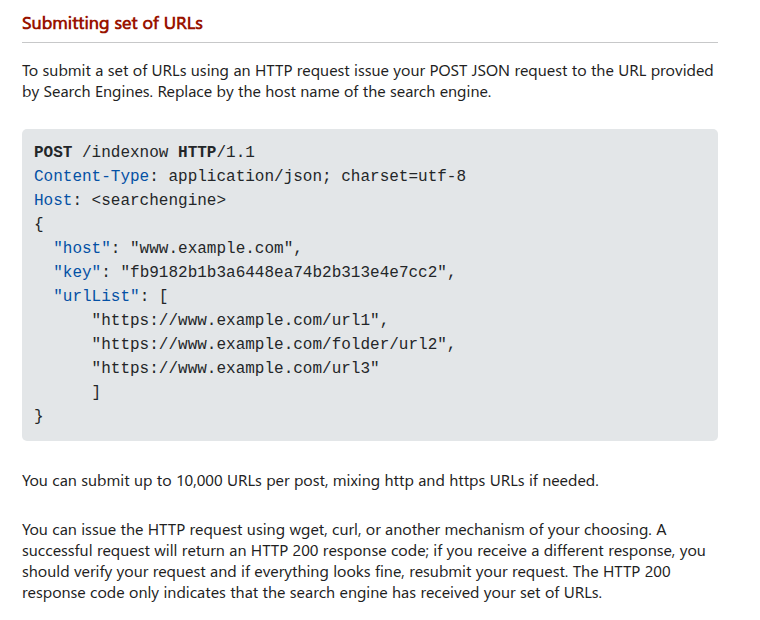
    Official IndexNow documentation showing the bulk POST JSON payload, 10,000 URL limit, and HTTP 200 receipt caveat

    The official protocol accepts notifications for URLs that were added, updated, or deleted. For a batch, send a JSON POST request to https://api.indexnow.org/indexnow with the site host, ownership key, optional key location, and a URL list. One request can contain up to 10,000 URLs.

    Ownership is proven with a UTF-8 text file on the same host. The preferred arrangement is a root-level file named after the key, such as https://example.com/KEY.txt, whose content is the key itself. If the file lives below the root, include keyLocation; its path also limits which URL paths that key can authorize.

    Status Meaning Workflow action
    200 Submission received successfully Record delivery and stop retrying
    202 Submission received; key validation pending Record as accepted and verify the public key file
    400 Invalid request format Fail permanently and inspect the payload
    403 Key is invalid or cannot be verified Check key content, path, host, and public access
    422 URL ownership or protocol schema mismatch Reject the batch and validate every URL
    429 Too many requests or suspected spam Back off, deduplicate, and retry later

    Use a small event bridge instead of exposing WordPress

    The safest boundary is WordPress emitting a narrow event to one authenticated n8n webhook. Do not let an external caller choose an arbitrary URL and forward it to IndexNow. WordPress should provide the canonical permalink and event type; n8n should verify that the final hostname matches the configured site before any submission.

    A minimal event contains only the fields the workflow needs:

    {
      "event": "updated",
      "postId": 481,
      "url": "https://example.com/example-post/",
      "occurredAt": "2026-10-05T03:00:00Z"
    }

    Send the event over HTTPS with a secret header stored outside the theme. A tiny must-use plugin can capture publish and update saves without coupling the integration to the active theme:

    <?php
    function dw_indexnow_event($event, $post) {
        if (!defined('DW_N8N_WEBHOOK')) {
            return;
        }
    
        $payload = wp_json_encode([
            'event' => $event,
            'postId' => $post->ID,
            'url' => get_permalink($post),
            'occurredAt' => gmdate('c'),
        ]);
    
        wp_remote_post(DW_N8N_WEBHOOK, [
            'blocking' => false,
            'timeout' => 2,
            'headers' => [
                'Content-Type' => 'application/json',
                'X-DW-Secret' => DW_N8N_SECRET,
            ],
            'body' => $payload,
        ]);
    }
    
    function dw_indexnow_on_save($new, $old, $post) {
        if ('post' !== $post->post_type) {
            return;
        }
        if ('publish' !== $new) {
            return;
        }
        if (wp_is_post_revision($post->ID)) {
            return;
        }
    
        $event = 'publish' === $old ? 'updated' : 'created';
        dw_indexnow_event($event, $post);
    }
    
    add_action(
        'transition_post_status',
        'dw_indexnow_on_save',
        10,
        3
    );

    WordPress documents that transition_post_status also runs for an update where the status remains unchanged. That behavior is useful here: a published post can emit updated while the first transition into publish emits created. Add explicit post-type, revision, and status guards so drafts and revisions do not consume crawl budget.

    The example uses a non-blocking HTTP request to avoid delaying the editor. Fire-and-forget delivery is not a durable queue. If losing an event matters, enqueue it with Action Scheduler or another persistent job system, then let the worker call n8n with retry and audit data.

    Capture removal before the URL disappears

    A deleted URL should be submitted too, but the timing is important. Capture its permalink while WordPress can still resolve the post. The before_delete_post hook runs before the post and associated metadata are removed. It does not run for an ordinary move to Trash, so handle wp_trash_post as a separate event.

    function dw_indexnow_on_remove($post_id) {
        $post = get_post($post_id);
        if (!$post || 'post' !== $post->post_type) {
            return;
        }
        if ('publish' !== $post->post_status) {
            return;
        }
    
        dw_indexnow_event('deleted', $post);
    }
    
    add_action(
        'wp_trash_post',
        'dw_indexnow_on_remove',
        10,
        1
    );
    add_action(
        'before_delete_post',
        'dw_indexnow_on_remove',
        10,
        1
    );

    The two hooks can produce the same URL more than once when a trashed post is later permanently deleted. That is why deduplication belongs in n8n. The public URL should return an intentional 404 or 410 after removal; notifying IndexNow does not create the correct HTTP behavior for you.

    Build the n8n workflow

    1. Webhook: accept POST only and require the shared secret header. Return quickly if WordPress is waiting for a response.
    2. Normalize: parse the URL, lowercase the hostname, remove the fragment, and keep the canonical absolute URL.
    3. Authorize: require https: and an exact hostname match. Never accept sibling domains or a hostname that merely ends with the expected text.
    4. Filter: allow only created, updated, or deleted. Reject empty URLs and non-public post types.
    5. Debounce: store a key such as indexnow:URL_HASH for at least five minutes. Repeated autosaves should not generate repeated submissions.
    6. Batch: collect changed URLs for a short window, remove duplicates, and cap each request below the 10,000-URL protocol maximum.
    7. HTTP Request: send one JSON POST to the global IndexNow endpoint.
    8. Classify: store the status code, attempt count, batch ID, URL count, and response time. Retry only failures that can succeed later.

    Configure the n8n HTTP Request node as follows:

    Setting Value
    Method POST
    URL https://api.indexnow.org/indexnow
    Body Content Type JSON
    Include Response Headers and Status Enabled
    Never Error Enabled only when a following node classifies every status

    The JSON body should use a secret-backed key value rather than a key embedded in an exported workflow:

    {
      "host": "example.com",
      "key": "KEY_FROM_SECRET_STORE",
      "keyLocation": "https://example.com/key.txt",
      "urlList": [
        "https://example.com/post/"
      ]
    }

    n8n can send a JSON body directly and can expose the response status when Include Response Headers and Status is enabled. If you enable Never Error, a 403 or 429 becomes workflow data instead of a failed node, so the next node must deliberately route every status. Otherwise a rejected submission can look like a green execution.

    Prevent noisy saves from wasting crawl budget

    WordPress can save a published post for reasons that are not useful to a crawler: a plugin may update metadata, an editor may correct an internal note, or an automation may write the same value again. The status hook alone cannot decide whether the public document materially changed. Treat it as a signal to evaluate, not permission to submit immediately.

    A practical n8n gate stores a fingerprint for each canonical URL. Build the fingerprint from stable public fields such as the final permalink, rendered title, rendered content, publication status, and a meaningful modified timestamp. Exclude volatile values such as request IDs or the time at which the event reached n8n. If the new fingerprint matches the last delivered fingerprint, end the execution without contacting IndexNow.

    Use two controls together:

    • Short debounce: collapse multiple saves for the same URL during an editing burst.
    • Content fingerprint: suppress later events when the public representation did not change.

    Persist the last accepted fingerprint only after a 200 or 202 response. Writing it before the HTTP request can hide a failed notification. Keep the current batch ID and response beside the fingerprint so an operator can distinguish “unchanged,” “accepted,” and “failed.” For deletion, use a separate terminal fingerprint that includes the removal event; this prevents an old update fingerprint from suppressing the final removal notice.

    The ownership key is not a WordPress user credential, but it still authorizes submissions for your host. Do not place it in client-side JavaScript, webhook payloads, screenshots, or workflow exports. Store it in server configuration or a secret-backed n8n credential, rotate it deliberately, and remove the old public key file after the new key has been verified.

    Retry only the failures that are recoverable

    • 200: mark delivered.
    • 202: mark accepted with verification pending; check the key file instead of flooding retries.
    • 400: do not retry unchanged input. Send the batch to review.
    • 403: verify the public key file, key value, and host. Retry only after correction.
    • 422: isolate the invalid URL or host mismatch, repair the batch, then submit again.
    • 429: use exponential backoff with jitter and merge duplicate URLs while waiting.
    • Network or 5xx error: retry with a bounded attempt count and preserve the original batch ID.

    Do not retry a whole large batch forever because one URL is invalid. Split a failed batch to identify the bad record, quarantine it, and allow valid changes to proceed.

    Verify the complete path

    1. Open the key file without authentication and confirm that its body contains only the configured key.
    2. Publish one test post and verify exactly one normalized URL enters the workflow.
    3. Update the post twice within five minutes and verify the debounce rule prevents a notification storm.
    4. Confirm the IndexNow response is 200 or 202 and that the batch is logged.
    5. Move the post to Trash and verify the original public permalink is captured before removal.
    6. Force a wrong-host URL and confirm the workflow rejects it before the HTTP Request node.
    7. Force a 403 by using a test-only invalid key and verify it does not enter the transient retry loop.
    8. Keep the XML sitemap active and monitor supported search-engine tooling for crawl and indexing outcomes.

    A good IndexNow workflow is intentionally modest. It reports meaningful URL changes quickly, proves ownership, protects the submission boundary, and records delivery. It does not claim control over a search engine’s crawl schedule or indexing decision.

    Sources

  • Stream n8n AI Agent Responses with Native Webhook Streaming

    Stream n8n AI Agent Responses with Native Webhook Streaming

    An AI Agent workflow can be technically correct and still feel broken to a user. If the browser receives nothing while the model thinks, calls tools, and builds its answer, a ten-second generation looks like a frozen page. n8n’s native streaming response mode fixes that perception problem by returning output while a supported node produces it.

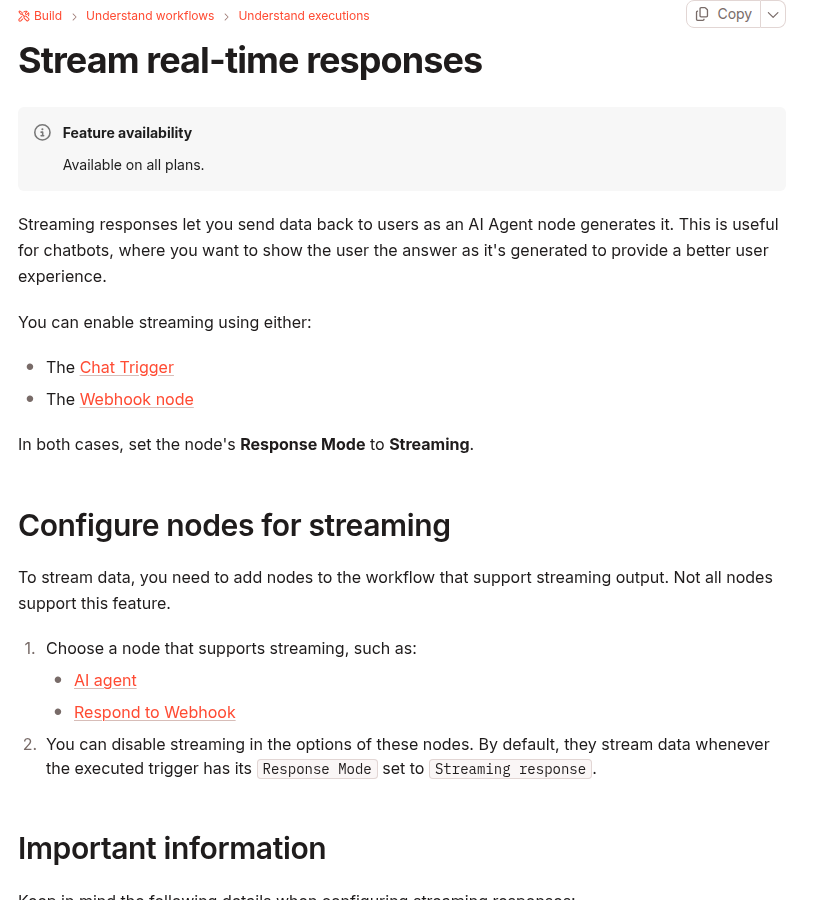
    The important word is native. Current n8n versions do not require you to assemble a custom Server-Sent Events loop or patch LangChain callbacks for the basic case. Streaming is a contract between a compatible trigger, at least one streaming-capable downstream node, the HTTP path in front of n8n, and a client that reads the response incrementally.

    Reliable baseline: set a Chat Trigger or Webhook node to Response Mode → Streaming, connect it to an AI Agent or another node that supports streaming, and verify the production endpoint with a client that reads the response body as a stream. Do not promise a specific first-token latency until you measure your model, tools, network, and proxy chain.

    How n8n native streaming works

    n8n documentation showing native streaming responses through Chat Trigger or Webhook and supported AI Agent and Respond to Webhook nodes

    n8n documents two triggers for streaming responses: Chat Trigger and Webhook. In both cases, the trigger’s response mode must be set to Streaming. A trigger setting alone is not enough. The workflow must also contain at least one node that can stream data, such as an AI Agent or Respond to Webhook. If no downstream node emits streaming output, n8n warns that the workflow can send no data.

    This gives you a useful three-part model:

    1. The trigger opens the response path. It keeps the request available for incremental output.
    2. A supported node emits data. An AI Agent can send generated output as it becomes available. Respond to Webhook can also participate in a streaming workflow.
    3. The client consumes the response progressively. A browser, mobile app, CLI, or backend must read chunks instead of waiting for the entire body.

    If any one of those layers buffers the complete body, the workflow may execute successfully but appear non-streaming to the user.

    Choose Chat Trigger or Webhook

    Entry point Best fit What you control
    Chat Trigger n8n chat interfaces and embedded chat experiences Chat session behavior, memory integration, and the supported chat response path
    Webhook A custom frontend, mobile app, or server client Authentication, request schema, browser code, retry policy, and user interface

    Use Chat Trigger when the n8n chat contract already matches the product. Use Webhook when your application needs its own route, payload, authentication, or rendering. Do not add both triggers to one workflow merely to keep options open; choose one production contract and test that exact path.

    Build the smallest working streaming workflow

    1. Configure the trigger

    For a custom application, add a Webhook node and set its Response Mode to Streaming. Use the test URL only while developing. Activate the workflow and switch the client to the production webhook URL before measuring behavior.

    For an n8n chat interface, use Chat Trigger and select its streaming response mode. Keep the Chat Trigger and AI Agent connected to the same intended memory source when conversation history matters.

    2. Add a node that actually streams

    Connect the trigger to an AI Agent and enable streaming on that node. n8n’s documentation states that supported nodes stream by default when the executed trigger uses Streaming response, unless streaming is disabled in the node’s options.

    A normal node placed after the AI Agent can accidentally become the final response producer without supporting streaming. Start with the direct path below, verify it, and add transformations one at a time:

    Webhook (Response Mode: Streaming)
      → AI Agent (streaming enabled)
          ↳ Chat Model
          ↳ Optional tools and memory

    3. Activate and call the production endpoint

    Test-mode webhooks and production webhooks have different lifecycle rules. A test URL generally exists for a limited listening session; the production URL requires an active workflow. A browser test that succeeds only while the editor is listening is not a production verification.

    Read the response without re-buffering it

    A custom browser client should read response.body incrementally. The following minimal example displays decoded text as chunks arrive. Adapt the request body and authentication to your workflow.

    async function runAgent(message) {
      const response = await fetch(N8N_WEBHOOK_URL, {
        method: 'POST',
        headers: { 'Content-Type': 'application/json' },
        body: JSON.stringify({ message }),
      });
    
      if (!response.ok || !response.body) {
        throw new Error(`HTTP ${response.status}`);
      }
    
      const reader = response.body.getReader();
      const decoder = new TextDecoder();
    
      while (true) {
        const { value, done } = await reader.read();
        if (done) break;
        const text = decoder.decode(value, {
          stream: true,
        });
        appendToAnswer(text);
      }
    
      const remainder = decoder.decode();
      appendToAnswer(remainder);
    }

    This code proves incremental transport, not a universal message parser. Inspect the actual response produced by your n8n version and workflow before assuming that every chunk is a complete token, JSON object, or SSE event. Network boundaries can split or combine application-level messages.

    Also protect the endpoint. A public AI webhook can consume model tokens, call tools, or expose internal data. Apply authentication, input size limits, rate limits, tool authorization, and origin controls appropriate to the application. CORS is a browser access control, not user authentication.

    Check the reverse proxy before blaming the AI Agent

    Many self-hosted n8n installations sit behind NGINX, a tunnel, a CDN, or several of them. A proxy can receive small upstream chunks and buffer them before forwarding a larger response. The user then sees a long pause followed by the complete answer even though n8n streamed internally.

    NGINX documents that response buffering is enabled by default. When proxy_buffering off is set, NGINX passes the response to the client synchronously as it receives it. Apply changes only to the n8n webhook or chat location that needs streaming, then test the rendered production path.

    location /webhook/ {
      proxy_pass http://n8n:5678;
      proxy_http_version 1.1;
    
      proxy_buffering off;
      proxy_cache off;
      proxy_read_timeout 300s;
    }

    The timeout value is an example, not a recommended universal setting. NGINX defines proxy_read_timeout between successive reads from the upstream response, not as a maximum duration for the entire request. Choose a value from measured model and tool latency, and do not use a very long timeout to hide a workflow that can hang indefinitely.

    Streaming improves incremental delivery, but it does not make an HTTP request durable. When work can outlive proxy or client limits, use a 202 Accepted async job pattern for long-running n8n webhooks instead of relying on longer timeouts.

    Failures that look like “streaming does not work”

    Observed behavior Likely cause Verification
    No response body The trigger is streaming, but no downstream node is configured to emit streaming data Reduce the workflow to Trigger → AI Agent and inspect node options
    The whole answer arrives at once Client or proxy buffering Compare direct-to-n8n and public-domain requests with timestamps
    404 on the webhook Test URL is not listening or the production workflow is inactive Activate the workflow and call the production URL
    Stream starts, then stops during a tool call The agent is waiting for a slow tool or upstream API Inspect the execution timeline and tool duration
    Browser fails but curl works CORS, authentication, or frontend parsing Inspect browser network headers and console errors
    Duplicate chat messages Client retry or reconnect created a second execution Add a request ID and log one execution per ID

    Streaming changes the failure contract

    With a buffered JSON response, the server can often choose an HTTP error status before sending the body. Once a streaming response has started, headers may already be committed. A later model or tool failure may therefore appear as an interrupted stream rather than a clean JSON error with a new status code.

    Design the client for four states:

    • Connecting: the request is open but no content has arrived.
    • Streaming: partial output is visible and the cancel control is available.
    • Completed: the stream ended normally and the final answer can be persisted.
    • Interrupted: the network, model, tool, or workflow ended before a normal completion signal.

    Do not automatically replay every interrupted AI request. If the Agent can call tools with side effects, a retry may repeat an email, payment, ticket, or database mutation. Give each request an idempotency key and keep side-effecting actions behind their own duplicate guard.

    Measure the right latency

    Streaming improves perceived responsiveness, but it does not guarantee that the first chunk arrives in under one second. Separate these measurements:

    • Time to headers: request start until the HTTP response begins.
    • Time to first visible content: request start until the client renders useful output.
    • Generation duration: first content until the final chunk.
    • Total workflow duration: request start until the n8n execution completes.

    A slow first chunk can come from model queueing, DNS, TLS, a cold container, credential lookup, memory retrieval, or a tool call before generation. Streaming cannot remove work that must happen before the model has content to send.

    Production verification checklist

    1. Confirm the workflow uses Chat Trigger or Webhook with Response Mode set to Streaming.
    2. Confirm at least one downstream node supports streaming and has not disabled it.
    3. Activate the workflow and use the production endpoint.
    4. Test with a client that records timestamps for the first and final chunks.
    5. Compare direct and public-domain paths to identify proxy buffering.
    6. Verify authentication, rate limiting, and tool authorization.
    7. Cancel a request and confirm the UI leaves the streaming state cleanly.
    8. Force a model or tool failure after output begins and verify the interrupted-state experience.
    9. Retry with the same request ID and confirm side effects are not duplicated.
    10. Keep a non-streaming fallback for clients or intermediaries that cannot consume incremental responses.

    The safest implementation is intentionally small: native streaming trigger, one supported producer, one observable client, and one verified proxy path. Once that baseline works, add memory, tools, formatting, and richer UI behavior without losing the ability to isolate each layer.

    Sources

  • Fix n8n Supabase Pooler Errors: Session vs Transaction Mode

    Fix n8n Supabase Pooler Errors: Session vs Transaction Mode

    An n8n workflow that cannot connect to Supabase often looks like a simple port problem. It usually is not. The same symptoms can come from four different layers: the endpoint and username, the connection mode, the client’s use of prepared statements or session state, and the number of open connections. Switching from port 6543 to 5432 may hide one error while creating a capacity problem elsewhere.

    This guide gives you a safer decision process. It focuses on Supabase’s shared pooler because it is the common choice when an n8n instance needs IPv4 connectivity, but the same diagnostic logic applies when you are deciding between a direct database connection and a pooler.

    Short answer: for a long-running n8n instance, start with the exact Session pooler connection details copied from Supabase when direct IPv6 connectivity is unavailable. Use Transaction pooler only when short-lived, high-concurrency connections are the real requirement and every client feature you rely on is compatible with transaction pooling.

    Do not diagnose the error from the port alone

    Supabase currently documents several connection methods. A direct connection and shared session pooler commonly use port 5432, while the shared transaction pooler uses port 6543. That does not mean every address on 5432 is a direct connection. The hostname, username, and mode selected in the Supabase Connect dialog matter just as much as the port.

    Copy the complete connection parameters from the dashboard rather than reconstructing a pooler hostname. Shared-pooler usernames also include the project reference, so reusing the plain postgres username from a direct connection can produce a tenant or user lookup failure.

    Symptom Most likely layer First check
    prepared statement or statement-name errors Transaction-pooler compatibility Confirm whether the credential points to shared transaction mode on 6543
    Tenant, user, or authentication failure Host/user combination Copy the host and username together from the same Connect mode
    Timeout or connection refused Network, DNS, IP version, or SSL Test reachability from the n8n host and confirm SSL is enabled
    too many connections Client and database capacity Measure active connections before changing pooler modes
    Session variables, advisory locks, or listeners disappear Transaction-pooler semantics Use session mode or a direct connection for session-level features

    Session mode and transaction mode solve different problems

    Supabase documentation comparing shared pooler session mode on port 5432 with transaction mode on port 6543 and its prepared-statement limitation

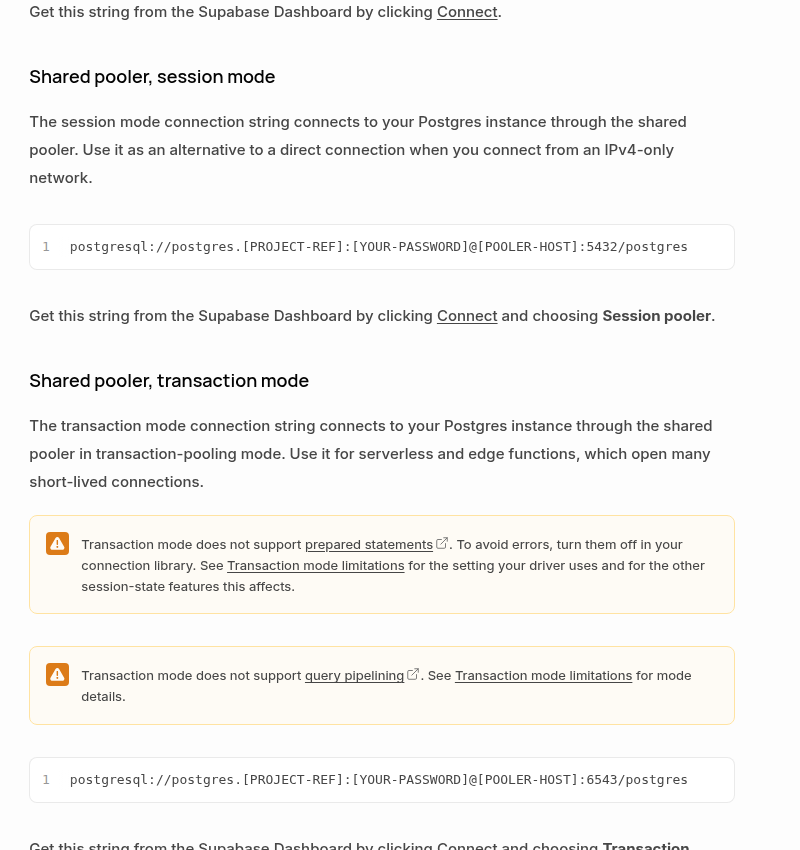
    In session mode, one backend database connection stays associated with the client session. That makes it suitable for persistent services and for features that depend on session state. Supabase documents shared session mode on port 5432 and recommends it as an IPv4-capable alternative to a direct connection.

    In transaction mode, the backend connection returns to the pool after each transaction. A later transaction may run on a different backend connection. This is efficient for serverless or edge workloads that open many short-lived connections, but it intentionally does not preserve session-level state between transactions. Supabase documents shared transaction mode on port 6543.

    The distinction explains prepared-statement failures. PostgreSQL prepared statements are server-side objects that last only for the current database session. A transaction pooler cannot guarantee that the next transaction reaches the same backend session, so Supabase’s transaction mode does not support prepared statements. Turning off named prepared statements can make a compatible application work in transaction mode, but it does not restore other session features.

    Choose the mode from the workload

    Workload Preferred connection Reason
    Long-running self-hosted n8n on IPv6 Direct connection, when practical No pooler is in the path and normal PostgreSQL session behavior is preserved
    Long-running n8n on an IPv4-only network Shared pooler, session mode IPv4 access with prepared statements and session features
    Short-lived serverless workers with high connection churn Shared pooler, transaction mode Backend connections can be shared across many brief clients
    Migrations, backups, restore tools, or session-sensitive maintenance Direct connection Native PostgreSQL commands and one stable session are expected

    Do not select transaction mode merely because it sounds more robust. It is a capacity strategy for connection churn, not a universal upgrade. Likewise, do not select session mode merely to silence a prepared-statement error without considering how many persistent n8n workers and concurrent executions will hold connections.

    Configure the n8n credential safely

    Create or edit a Postgres credential in n8n and transfer the values from one Supabase connection mode without mixing them:

    1. Open the Supabase project and choose Connect.
    2. Select either Session pooler or Transaction pooler.
    3. Copy the displayed host, database, username, password, and port into the n8n credential.
    4. Set n8n’s SSL option to Require. Supabase recommends encrypted connections. Do not enable Ignore SSL Issues as a routine fix; it weakens certificate validation and can conceal a trust-chain problem.
    5. Test the credential with a harmless query before reconnecting production workflows.
    SELECT
      current_user,
      current_database(),
      inet_server_addr() AS server_address,
      inet_server_port() AS server_port;

    This confirms the authenticated role and reachable server. It does not reliably reveal the pooler mode by itself, because the pooler routes the connection behind the endpoint. Treat the Supabase Connect selection and copied host/port pair as the source of truth.

    n8n’s Postgres node supports query parameters such as $1, $2, and $3, and sanitizes values supplied through its Query Parameters option. That is good SQL-injection hygiene, but parameterized queries and named server-side prepared statements are not identical in every driver. If an error explicitly mentions a prepared statement, identify the component that creates it—n8n core, a community node, an ORM, or custom code—before applying driver-specific switches.

    If you must use transaction mode

    Verify all of these conditions:

    • The client can disable prepared statements in the way its driver requires.
    • The workflow does not depend on session-level SET values between transactions.
    • It does not require LISTEN/NOTIFY, session advisory locks, temporary tables across transactions, or a cursor that outlives its transaction.
    • Queries are valid inside transaction pooling and do not rely on query pipelining that the pooler does not support.
    • The short-lived connection pattern actually benefits from shared backend capacity.

    If you cannot determine whether a node or library creates named prepared statements, the conservative choice for a persistent n8n deployment is session mode. Avoid guessing at low-level driver flags that n8n does not expose in the credential UI.

    Common fixes that create a second failure

    Changing only the port: a port is not a complete connection profile. A shared-pooler host and username must be copied with that mode. Leaving the direct hostname in place while changing 5432 to 6543 does not magically select Supavisor.

    Disabling SSL verification: this may make a certificate error disappear, but it does not fix an incorrect host, an expired trust store, or a network interceptor. Keep SSL required and resolve the certificate chain deliberately.

    Increasing every pool: an application-side pool does not create more database capacity. If several n8n workers each open a large pool, the total can overwhelm the database or the server-side pooler. Calculate the aggregate across processes, not the setting on one worker.

    Assuming all prepared queries are unsupported: transaction mode’s restriction concerns server-side prepared statements that depend on a persistent backend session. Continue to pass untrusted values through n8n’s Query Parameters field rather than interpolating them into SQL. Removing parameterization to avoid an error trades a connection problem for a security problem.

    Treat connection exhaustion as a separate incident

    A prepared-statement failure and a connection-limit failure need different remedies. Changing to session mode can fix the former but consume more dedicated backend connections. Changing to transaction mode can reduce backend pressure but break session features. Measure first.

    With sufficient permissions, this query gives a useful snapshot:

    SELECT
      usename,
      application_name,
      state,
      count(*) AS connections
    FROM pg_stat_activity
    WHERE datname = current_database()
    GROUP BY usename, application_name, state
    ORDER BY connections DESC;

    Compare the result with the number of n8n main and worker processes, their execution concurrency, and any application-side pool settings. Supabase distinguishes client connections to the pooler from backend connections to Postgres, so one headline number may not describe the bottleneck. Look for idle connections that never close, execution bursts that exceed the configured pool, and multiple services each keeping their own default-size client pool.

    n8n exposes Connection Timeout and Delay Closing Idle Connection options on Postgres operations. These can tune behavior, but raising a timeout is not a capacity fix. First decide whether connections are merely slow to obtain or truly exhausted.

    A low-risk migration and rollback plan

    1. Record the current credential. Note the selected Supabase mode, host, user, port, and SSL setting. Never paste the password into logs or tickets.
    2. Create a controlled test workflow. Use one read-only query and run it several times, including concurrent executions if production is concurrent.
    3. Change one layer. Replace the complete host/user/port set from the chosen Connect mode. Do not combine a pooler host with a direct-connection username.
    4. Test session-sensitive behavior. If the workflow uses locks, listeners, temporary tables, or multi-step transactions, exercise those paths explicitly.
    5. Observe connections. Check Supabase metrics and pg_stat_activity during a representative load.
    6. Roll out gradually. Move a small set of workflows first and keep the previous credential available for rollback.

    Final verification checklist

    • The host, username, and port all came from the same Supabase Connect mode.
    • SSL is enabled in n8n.
    • A read-only query succeeds repeatedly.
    • Transaction mode is used only when prepared statements and session features are not required.
    • Session mode has enough backend connection capacity for persistent n8n clients.
    • Connection limits were measured instead of inferred from a timeout.
    • The old credential and rollback path remain available until production load is stable.

    The reliable fix is not “use 5432” or “use 6543.” It is to match the endpoint to the lifecycle of your n8n process, preserve the PostgreSQL features your workflows need, and size the connection path with evidence.

    Sources

  • Fix Google Sheets 429 Errors in n8n with Batching and Backoff

    Fix Google Sheets 429 Errors in n8n with Batching and Backoff

    Google Sheets 429 errors in n8n are rarely fixed by adding a single arbitrary delay. The reliable fix is to identify which quota you are consuming, reduce the number of API calls, bound concurrency, and retry only the requests that are safe to repeat.

    This guide builds that control loop from the documented Google Sheets API limits and the rate-limit controls available in n8n. The goal is not merely to make one execution pass; it is to keep a high-throughput workflow predictable when input volume spikes.

    What a Google Sheets 429 actually means

    HTTP 429 Too Many Requests means the workflow crossed a request quota during the current time window. Google currently documents four relevant per-minute limits for the Sheets API:

    • 300 read requests per minute per project
    • 60 read requests per minute per user per project
    • 300 write requests per minute per project
    • 60 write requests per minute per user per project

    These quotas refill every minute. A service account is considered a single account, so many n8n executions that share one service-account credential can collide with the per-user limit even when the project-wide total is below 300. Google also recommends keeping request payloads around 2 MB or less and documents a 180-second processing timeout.

    Google Sheets API quota table showing 300 read and write requests per minute per project and 60 per user per project

    The important distinction is requests, not rows. Writing 1,000 rows does not inherently consume 1,000 requests. It depends on how the workflow groups those rows and which API method it calls. Conversely, a workflow can hit a quota with far fewer than 1,000 rows if several executions make one request per row at the same time.

    Do not treat “60 writes per minute” as the whole rule. It is the per-user-per-project write limit. A separate 300-per-project write limit applies, and the same pair exists for reads. The credential and project used by the workflow determine which bucket is exhausted first.

    Diagnose the request pattern before changing delays

    Start with one failing execution and answer four questions:

    1. Is the failing operation a read or a write? A search or lookup consumes the read quota; append and update operations consume the write quota.
    2. Which credential is used? If many workflows share one OAuth user or service account, they share its per-user quota bucket.
    3. How many API calls does one item cause? Count lookups, appends, updates, and follow-up reads separately.
    4. How many executions overlap? Five workflows that are safe in isolation can still exceed the same shared quota.

    Use the execution timeline and the Google Cloud quota metrics for the credential’s project to correlate the error burst with request volume. If the failures begin near 60 requests for one credential in a minute, the per-user limit is the likely constraint. If many users or credentials together approach 300 requests, the project limit is the likely constraint. This is a diagnosis, not a reason to run permanently at the published ceiling; leave headroom for retries and other workflows.

    Fix 1: batch rows so one call does more work

    The highest-leverage change is usually to reduce the request count. Google states that a batch request, including its subrequests, counts as one API request toward the usage limit. Batched changes are also atomic: if one request in the batch is invalid, none of the dependent changes are applied.

    For a simple append, the Sheets API spreadsheets.values.append endpoint accepts a ValueRange. Put multiple rows in the two-dimensional values array instead of issuing one append call for each row:

    {
      "majorDimension": "ROWS",
      "values": [
        ["order-1042", "paid", 79.00],
        ["order-1043", "paid", 24.50],
        ["order-1044", "refunded", -18.00]
      ]
    }

    If the native Google Sheets node does not expose the batching pattern you need, n8n documents using the HTTP Request node with the same predefined Google Sheets credential. Send the payload to:

    POST https://sheets.googleapis.com/v4/spreadsheets/{spreadsheetId}/values/{range}:append?valueInputOption=USER_ENTERED&insertDataOption=INSERT_ROWS

    For updates to several known ranges, use spreadsheets.values.batchUpdate with one or more ValueRange objects. For related structural changes—such as formatting, adding sheets, or changing dimensions—use spreadsheets.batchUpdate.

    There is no universal “correct” batch size. Begin with a conservative chunk that keeps the JSON payload comfortably below Google’s 2 MB recommendation, then measure request latency and failure rate. Row width matters: 200 narrow rows can be cheaper than 20 rows containing long text or formulas.

    Fix 2: serialize or bound concurrent requests

    Batching lowers total calls; pacing prevents the remaining calls from arriving in a burst. In n8n, place a Loop Over Items node before the Sheets or HTTP Request operation, set a batch size, and route the loop through a Wait node before the next batch.

    A practical starting design is:

    1. Aggregate input records into an array.
    2. Split the array into measured chunks.
    3. Send one API request per chunk.
    4. Wait before releasing the next chunk.
    5. Record the response and the chunk’s idempotency keys.

    Do not hard-code a delay from a blog post and assume it is safe. Estimate a rate from the quota bucket actually in use, then reserve margin. For example, a single credential should not be designed to consume all 60 per-user write requests every minute; retries, manual edits, and parallel workflows need room too.

    Google’s troubleshooting guide recommends limiting concurrent requests to a spreadsheet to one request per second when diagnosing service-pressure errors such as 503 responses. That is useful conservative troubleshooting guidance, but it is not a universal Sheets concurrency quota. For 429 errors, use your measured request rate and shared-credential traffic to set the production pace.

    Fix 3: retry 429s with bounded exponential backoff

    Google recommends truncated exponential backoff with jitter. After a failure, wait longer before each retry, add a small random component so parallel workers do not retry together, and stop increasing the delay at a maximum value.

    A simple schedule can be expressed as:

    delay_ms = min((2 ** attempt + random_ms), maximum_backoff_ms)

    For example, retries might occur after roughly 1, 2, 4, 8, and 16 seconds, with jitter added to each interval. The exact maximum and retry count depend on the workflow’s time budget. Do not retry forever: send exhausted chunks to an error branch or queue with the original payload and diagnostic context.

    n8n provides two useful controls:

    • Retry On Fail in node settings, with a maximum number of tries and a wait between tries, for straightforward transient failures.
    • Loop Over Items plus Wait when you need an explicit increasing delay, jitter, or a separate retry branch.

    A fixed wait between retries is not the same as exponential backoff. Use Retry On Fail when a bounded fixed pause is sufficient; build an explicit loop when you need the backoff curve Google recommends.

    Make retries duplicate-safe

    Retries introduce a second problem: the first request may have succeeded even if the client did not receive the response. Blindly appending the same rows can create duplicates.

    Add a stable idempotency key to every logical record, such as an order ID, event ID, or source-system row ID. Then choose one of these patterns:

    • Use an update/upsert design keyed by that ID when overwriting an existing row is acceptable.
    • Before appending a retry, check whether the key already exists—while remembering that this adds read requests.
    • Persist completed chunk IDs outside the workflow and retry only chunks without a success record.
    • Write an immutable event ID into the sheet and deduplicate downstream.

    The safest pattern depends on whether the sheet is a database-like system of record or a reporting destination. A reporting sheet is often better served by rebuilding or upserting a known range than by repeatedly appending.

    A production-ready n8n control flow

    A resilient workflow separates throughput control from business logic:

    1. Normalize: validate required fields and assign idempotency keys.
    2. Aggregate: collect rows that can be written together.
    3. Chunk: cap each batch by measured row count and payload size.
    4. Pace: allow one controlled write path for the shared credential.
    5. Write: use a multi-row append or batch update.
    6. Retry: on 429, apply bounded backoff with jitter.
    7. Verify: record the updated range or response before marking the chunk complete.
    8. Escalate: send exhausted retries to a recoverable queue, not a silent failure.

    If several workflows use the same credential, local waits inside each workflow may still synchronize into a burst. A shared queue or a single writer workflow gives you one place to enforce throughput and observe failures.

    Test the fix under realistic load

    Do not validate with ten rows and assume the system is stable. Use a non-production spreadsheet and a repeatable load test:

    1. Generate 1,000 rows with unique idempotency keys.
    2. Run at concurrency 1, then 2, then 5.
    3. Record API call count, p50/p95 latency, 429 count, retries, and duplicate rows.
    4. Repeat while another workflow uses the same credential.
    5. Force one retry after an ambiguous timeout and confirm that it does not duplicate data.
    6. Increase chunk size until latency or payload size stops improving, then back off.

    The target is not the largest possible batch or the shortest execution time. It is a stable operating point with quota headroom, bounded recovery time, and no duplicate side effects.

    Quick checklist

    • Confirm whether the exhausted quota is read, write, per-user, or per-project.
    • Count API requests rather than input rows.
    • Batch multiple rows or ranges into fewer calls.
    • Keep payloads well below the recommended 2 MB size.
    • Bound concurrency for every workflow sharing the credential.
    • Retry 429s with a maximum attempt count, increasing delay, and jitter.
    • Use idempotency keys so ambiguous failures are safe to repeat.
    • Measure with realistic parallel load before increasing throughput.

    Sources

  • Stop Duplicate n8n Webhook Side Effects with an Idempotency Gate

    Stop Duplicate n8n Webhook Side Effects with an Idempotency Gate

    Webhook retries are a reliability feature, not an edge case. A provider can deliver the same event again when an acknowledgement is lost, a network path fails, or your endpoint takes too long to respond. If an n8n workflow sends an email, creates a shipment, grants access, or posts a ledger entry every time the trigger fires, one logical event can produce several real-world side effects.

    Before implementing the gate, use Webhook Retry Lab to compare duplicate actions, lost events, and recoverable retries. Move the simulated crash before or after the side effect to see why a seen flag and destination idempotency solve different problems.

    The practical fix is an idempotency gate: verify the request, derive a stable event key, atomically claim that key in durable storage, and let only the successful claimant continue. This article builds that gate with n8n and PostgreSQL. It prevents concurrent duplicate executions from both passing the check, while keeping retry and recovery behavior explicit.

    Core rule: do not implement “check, then insert” as two operations. Two workflow executions can both observe that no record exists. Use one database statement whose unique constraint decides the winner.

    Why a normal lookup is not enough

    A common n8n design looks sensible:

    1. Search a data store for the webhook event ID.
    2. If it is missing, perform the side effect.
    3. Save the event ID as processed.

    The race lives between steps 1 and 3. Suppose two retries arrive within milliseconds. Execution A looks up the ID and finds nothing. Before A saves it, execution B performs the same lookup and also finds nothing. Both branches continue. The workflow has a duplicate guard, but it is not atomic, so it still duplicates the side effect.

    Stripe explicitly warns that webhook endpoints can receive the same event more than once and recommends recording processed event IDs. It also notes a more subtle case: two distinct Event objects can describe duplicate changes to the same underlying object. That distinction affects how you choose a key, which we will return to below.

    Stripe webhook documentation explaining how to handle duplicate event deliveries with event IDs

    The safe workflow shape

    The gate should run near the start of the workflow, before any irreversible action:

    1. Receive: accept the webhook and preserve the original request body.
    2. Authenticate: verify the provider signature before trusting an event ID or payload field.
    3. Normalize: extract a provider name, stable event ID, event type, and the fields required by downstream nodes.
    4. Claim: insert the event key into PostgreSQL with a unique constraint.
    5. Route: continue only if the insert returned a row; otherwise take the duplicate path.
    6. Act: perform the business side effect with its own downstream idempotency protection where available.
    7. Complete: mark the claim as completed and record useful outcome metadata.

    Signature verification comes before the claim. For Stripe, verification must use the unmodified raw request body. If middleware or a Code node parses and reserializes the body first, verification can fail because the byte sequence changes. An unauthenticated sender must not be able to reserve arbitrary event IDs in your gate.

    For a provider-neutral implementation of that first authentication step, see how to verify HMAC-SHA256 webhook signatures in n8n from the raw request body before the idempotency claim.

    Create a durable claim table

    Use a composite primary key so different providers can safely use overlapping ID formats:

    CREATE TABLE webhook_event_claims (
      provider       text        NOT NULL,
      event_id       text        NOT NULL,
      event_type     text        NOT NULL,
      status         text        NOT NULL DEFAULT
                                   'processing',
      first_seen_at  timestamptz NOT NULL DEFAULT now(),
      completed_at   timestamptz,
      last_error     text,
      attempt_count  integer     NOT NULL DEFAULT 1,
      PRIMARY KEY (provider, event_id)
    );

    The primary key is the concurrency control. PostgreSQL can resolve competing inserts against it atomically. The status fields are not required for basic deduplication, but they make failure recovery much safer than a permanent “seen” flag with no context.

    Keep this table in a durable production database, not in workflow static data or process memory. Multiple n8n workers and executions must share the same authority. Back it up, restrict write permissions, and monitor its growth like any other operational table.

    Claim the event in one PostgreSQL node

    Add a PostgreSQL node after signature verification and normalization. Choose Execute Query and use this statement:

    INSERT INTO webhook_event_claims (
      provider,
      event_id,
      event_type
    )
    VALUES ($1, $2, $3)
    ON CONFLICT (provider, event_id)
    DO NOTHING
    RETURNING event_id;

    Provide the three values through the node’s Query Parameters option rather than concatenating expressions into SQL. For example, pass normalized fields such as stripe, evt_..., and invoice.paid. n8n documents parameterized queries for the PostgreSQL node and sanitizes query parameters, which also keeps payload data out of SQL syntax.

    The result is deliberately binary:

    • One returned row: this execution created the claim and owns the right to proceed.
    • No returned row: another execution already owns or completed the same key; do not run the side effect again.

    PostgreSQL documents that ON CONFLICT DO NOTHING avoids inserting a row when the proposed row conflicts with a usable unique constraint. The RETURNING clause gives the workflow a direct signal from the same atomic statement. There is no vulnerable lookup-to-insert gap.

    Route the n8n result without accidental fall-through

    Connect the PostgreSQL node to an IF node that tests whether a returned item contains event_id. The true branch is the winner path. The false or empty-result path is the duplicate path. Depending on the PostgreSQL node version and output settings, a zero-row result may produce no item at all; test this behavior in your exact n8n version. If necessary, enable an output option that preserves an empty result or wrap the claim in a function that always returns an explicit claimed boolean.

    The duplicate branch should avoid every non-idempotent downstream node. Return a successful response only when your state model says the original delivery has been accepted. A duplicate record with status='completed' can normally receive a 2xx acknowledgement immediately. A record still marked processing may also receive 2xx if an independent recovery process guarantees completion, but that choice is operational policy—not a universal rule.

    Use n8n’s Respond to Webhook node for a controlled acknowledgement such as:

    {
      "received": true,
      "duplicate": true
    }

    Do not include secrets or internal database details in the response. Most providers only need a timely success status.

    Completion and failure semantics matter

    An atomic claim prevents two executions from acting at the same time, but it does not create exactly-once delivery. Consider a crash after the claim is inserted but before the side effect finishes. Every retry now sees a duplicate claim. If the duplicate path always returns 2xx, the event can be lost permanently.

    Model the claim as a small state machine:

    • processing: one execution owns the event and work may be in progress.
    • completed: the intended side effect finished successfully.
    • failed: the attempt ended with a known error and is eligible for an explicit retry policy.

    After the side effect succeeds, update the row:

    UPDATE webhook_event_claims
    SET status = 'completed',
        completed_at = now(),
        last_error = NULL
    WHERE provider = $1
      AND event_id = $2;

    On a controlled failure, record a sanitized error and move the row to failed. A separate recovery workflow can retry failed or stale processing rows after a lease interval. Do not simply delete the claim on every error: if the side effect actually succeeded but the acknowledgement or status update failed, deletion reopens the gate and can duplicate the action.

    For high-value actions, add a fencing mechanism or transactional outbox. The ideal design commits the claim and an outbox message in one database transaction; a worker then delivers the side effect and records the result. When the downstream API supports an idempotency key, pass a stable key derived from the provider and event ID. A business-level unique constraint—such as one shipment per order or one ledger row per provider transaction—adds another essential layer.

    Choose the right deduplication key

    For a literal retry of the same Stripe Event object, event.id is the natural delivery key. Stripe defines the Event id as a unique identifier, and its webhook guidance recommends logging processed event IDs.

    However, a provider can sometimes create two different Event objects for changes to the same resource. Stripe’s guidance suggests using the underlying data.object ID together with event.type to identify those cases. Treat that as a business deduplication decision, not a universal replacement for the delivery key. Two events of the same type for one object may represent distinct legitimate state transitions. Only collapse them when the provider’s semantics and your business rules prove they are equivalent.

    A robust schema may therefore store both:

    • a delivery key: (provider, event_id);
    • an optional business key: for example (provider, event_type, object_id, business_version).

    The delivery key protects against transport retries. The business key protects a specific domain invariant. Keeping those purposes separate makes incidents easier to reason about.

    Retention, replay, and observability

    Do not delete claims as soon as a provider stops its normal retry schedule. Manual replay, delayed queues, and support operations can occur later. Stripe, for example, documents automatic retries for live-mode webhook deliveries for up to three days, but your retention period should also cover manual replay and the cost of a duplicate side effect.

    A practical starting point is 30 to 90 days for ordinary events and longer for financial or compliance-sensitive operations. Archive before deletion if you need an audit trail. Any cleanup query should target only old terminal rows, never active processing claims.

    Track at least these metrics:

    • claims created, grouped by provider and event type;
    • duplicate claims rejected;
    • time spent in processing;
    • failed claims and retry outcomes;
    • signature verification failures;
    • claim-to-completion latency.

    An unexpected duplicate spike can reveal provider retries, timeouts, a slow acknowledgement path, or an internal loop. A growing set of stale processing rows usually signals that recovery is missing or a downstream dependency is failing.

    Test the gate before production

    A single happy-path webhook proves almost nothing. Run a test matrix that exercises concurrency and failure boundaries:

    1. Concurrent duplicate: send the same valid event ID to the test endpoint many times in parallel. Exactly one execution should reach the protected side effect.
    2. Invalid signature: reuse the payload with a bad signature. It should fail before any claim is inserted.
    3. Crash before side effect: stop the winner immediately after the claim. Confirm that your stale-claim recovery policy can resume safely.
    4. Crash after side effect: stop it after the external action but before marking completion. Confirm that the downstream idempotency key or business constraint prevents a second action.
    5. Same object, different event types: confirm that legitimate events are not collapsed by an over-broad business key.
    6. Replay after retention: verify what happens when an old claim has been archived or deleted, and document that behavior.

    Inspect the external system—not just n8n’s execution list—to verify that only one email, charge, shipment, entitlement, or ledger entry exists. A clean workflow log does not prove the side effect was unique.

    Redis is an alternative, with the same atomicity requirement

    Redis can implement a fast claim with SET key value NX EX seconds. Redis documents that NX sets the key only if it does not already exist, while EX applies an expiry. That can work well when the n8n integration exposes the required options or when you call a controlled Redis command path.

    Do not translate it into separate GET and SET nodes; that recreates the race. Also choose the expiry carefully: once the key expires, an old replay can pass the gate again. PostgreSQL is often easier when you need durable states, audits, explicit recovery, and business constraints. Redis is attractive for high-throughput short-lived claims, but it does not remove the need for downstream idempotency or failure-aware state.

    Production checklist

    • Verify the webhook signature against the original request bytes.
    • Normalize and validate the provider event ID and type.
    • Use an atomic unique insert, never a lookup followed by an insert.
    • Let only the returned-row branch reach side effects.
    • Represent processing, completed, and failed explicitly.
    • Use downstream idempotency keys or business unique constraints.
    • Define stale-claim recovery and duplicate acknowledgement policy.
    • Retain claims long enough for retries and manual replay.
    • Load-test concurrent copies of the same event.
    • Alert on stale processing rows and duplicate spikes.

    The important guarantee is modest but powerful: for one event key, only one concurrent workflow execution wins the database claim. Combined with signature verification, durable state, downstream idempotency, and tested recovery, that gate turns duplicate webhook delivery from an incident into an expected code path.

    Official references