
Google Sheets 429 errors in n8n are rarely fixed by adding a single arbitrary delay. The reliable fix is to identify which quota you are consuming, reduce the number of API calls, bound concurrency, and retry only the requests that are safe to repeat.
This guide builds that control loop from the documented Google Sheets API limits and the rate-limit controls available in n8n. The goal is not merely to make one execution pass; it is to keep a high-throughput workflow predictable when input volume spikes.
What a Google Sheets 429 actually means
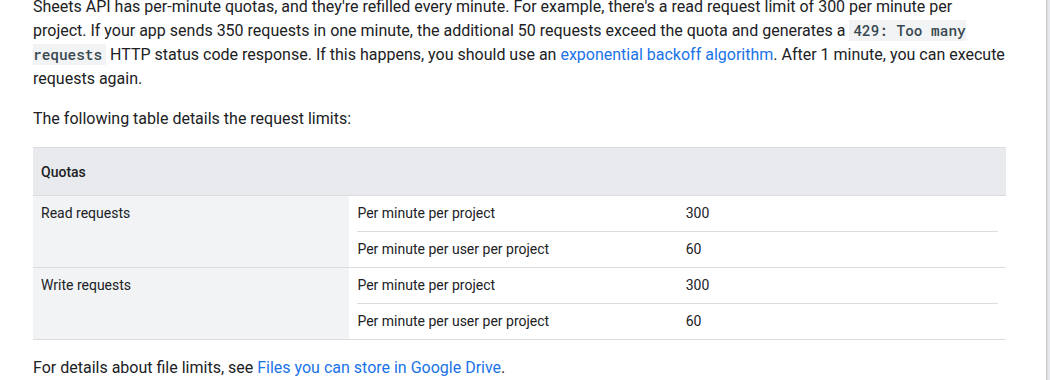
HTTP 429 Too Many Requests means the workflow crossed a request quota during the current time window. Google currently documents four relevant per-minute limits for the Sheets API:
- 300 read requests per minute per project
- 60 read requests per minute per user per project
- 300 write requests per minute per project
- 60 write requests per minute per user per project
These quotas refill every minute. A service account is considered a single account, so many n8n executions that share one service-account credential can collide with the per-user limit even when the project-wide total is below 300. Google also recommends keeping request payloads around 2 MB or less and documents a 180-second processing timeout.
The important distinction is requests, not rows. Writing 1,000 rows does not inherently consume 1,000 requests. It depends on how the workflow groups those rows and which API method it calls. Conversely, a workflow can hit a quota with far fewer than 1,000 rows if several executions make one request per row at the same time.
Do not treat “60 writes per minute” as the whole rule. It is the per-user-per-project write limit. A separate 300-per-project write limit applies, and the same pair exists for reads. The credential and project used by the workflow determine which bucket is exhausted first.
Diagnose the request pattern before changing delays
Start with one failing execution and answer four questions:
- Is the failing operation a read or a write? A search or lookup consumes the read quota; append and update operations consume the write quota.
- Which credential is used? If many workflows share one OAuth user or service account, they share its per-user quota bucket.
- How many API calls does one item cause? Count lookups, appends, updates, and follow-up reads separately.
- How many executions overlap? Five workflows that are safe in isolation can still exceed the same shared quota.
Use the execution timeline and the Google Cloud quota metrics for the credential’s project to correlate the error burst with request volume. If the failures begin near 60 requests for one credential in a minute, the per-user limit is the likely constraint. If many users or credentials together approach 300 requests, the project limit is the likely constraint. This is a diagnosis, not a reason to run permanently at the published ceiling; leave headroom for retries and other workflows.
Fix 1: batch rows so one call does more work
The highest-leverage change is usually to reduce the request count. Google states that a batch request, including its subrequests, counts as one API request toward the usage limit. Batched changes are also atomic: if one request in the batch is invalid, none of the dependent changes are applied.
For a simple append, the Sheets API spreadsheets.values.append endpoint accepts a ValueRange. Put multiple rows in the two-dimensional values array instead of issuing one append call for each row:
{
  "majorDimension": "ROWS",
  "values": [
    ["order-1042", "paid", 79.00],
    ["order-1043", "paid", 24.50],
    ["order-1044", "refunded", -18.00]
  ]
}
If the native Google Sheets node does not expose the batching pattern you need, n8n documents using the HTTP Request node with the same predefined Google Sheets credential. Send the payload to:
POST https://sheets.googleapis.com/v4/spreadsheets/{spreadsheetId}/values/{range}:append?valueInputOption=USER_ENTERED&insertDataOption=INSERT_ROWSFor updates to several known ranges, use spreadsheets.values.batchUpdate with one or more ValueRange objects. For related structural changes—such as formatting, adding sheets, or changing dimensions—use spreadsheets.batchUpdate.
There is no universal “correct” batch size. Begin with a conservative chunk that keeps the JSON payload comfortably below Google’s 2 MB recommendation, then measure request latency and failure rate. Row width matters: 200 narrow rows can be cheaper than 20 rows containing long text or formulas.
Fix 2: serialize or bound concurrent requests
Batching lowers total calls; pacing prevents the remaining calls from arriving in a burst. In n8n, place a Loop Over Items node before the Sheets or HTTP Request operation, set a batch size, and route the loop through a Wait node before the next batch.
A practical starting design is:
- Aggregate input records into an array.
- Split the array into measured chunks.
- Send one API request per chunk.
- Wait before releasing the next chunk.
- Record the response and the chunk’s idempotency keys.
Do not hard-code a delay from a blog post and assume it is safe. Estimate a rate from the quota bucket actually in use, then reserve margin. For example, a single credential should not be designed to consume all 60 per-user write requests every minute; retries, manual edits, and parallel workflows need room too.
Google’s troubleshooting guide recommends limiting concurrent requests to a spreadsheet to one request per second when diagnosing service-pressure errors such as 503 responses. That is useful conservative troubleshooting guidance, but it is not a universal Sheets concurrency quota. For 429 errors, use your measured request rate and shared-credential traffic to set the production pace.
Fix 3: retry 429s with bounded exponential backoff
Google recommends truncated exponential backoff with jitter. After a failure, wait longer before each retry, add a small random component so parallel workers do not retry together, and stop increasing the delay at a maximum value.
A simple schedule can be expressed as:
delay_ms = min((2 ** attempt + random_ms), maximum_backoff_ms)For example, retries might occur after roughly 1, 2, 4, 8, and 16 seconds, with jitter added to each interval. The exact maximum and retry count depend on the workflow’s time budget. Do not retry forever: send exhausted chunks to an error branch or queue with the original payload and diagnostic context.
n8n provides two useful controls:
- Retry On Fail in node settings, with a maximum number of tries and a wait between tries, for straightforward transient failures.
- Loop Over Items plus Wait when you need an explicit increasing delay, jitter, or a separate retry branch.
A fixed wait between retries is not the same as exponential backoff. Use Retry On Fail when a bounded fixed pause is sufficient; build an explicit loop when you need the backoff curve Google recommends.
Make retries duplicate-safe
Retries introduce a second problem: the first request may have succeeded even if the client did not receive the response. Blindly appending the same rows can create duplicates.
Add a stable idempotency key to every logical record, such as an order ID, event ID, or source-system row ID. Then choose one of these patterns:
- Use an update/upsert design keyed by that ID when overwriting an existing row is acceptable.
- Before appending a retry, check whether the key already exists—while remembering that this adds read requests.
- Persist completed chunk IDs outside the workflow and retry only chunks without a success record.
- Write an immutable event ID into the sheet and deduplicate downstream.
The safest pattern depends on whether the sheet is a database-like system of record or a reporting destination. A reporting sheet is often better served by rebuilding or upserting a known range than by repeatedly appending.
A production-ready n8n control flow
A resilient workflow separates throughput control from business logic:
- Normalize: validate required fields and assign idempotency keys.
- Aggregate: collect rows that can be written together.
- Chunk: cap each batch by measured row count and payload size.
- Pace: allow one controlled write path for the shared credential.
- Write: use a multi-row append or batch update.
- Retry: on 429, apply bounded backoff with jitter.
- Verify: record the updated range or response before marking the chunk complete.
- Escalate: send exhausted retries to a recoverable queue, not a silent failure.
If several workflows use the same credential, local waits inside each workflow may still synchronize into a burst. A shared queue or a single writer workflow gives you one place to enforce throughput and observe failures.
Test the fix under realistic load
Do not validate with ten rows and assume the system is stable. Use a non-production spreadsheet and a repeatable load test:
- Generate 1,000 rows with unique idempotency keys.
- Run at concurrency 1, then 2, then 5.
- Record API call count, p50/p95 latency, 429 count, retries, and duplicate rows.
- Repeat while another workflow uses the same credential.
- Force one retry after an ambiguous timeout and confirm that it does not duplicate data.
- Increase chunk size until latency or payload size stops improving, then back off.
The target is not the largest possible batch or the shortest execution time. It is a stable operating point with quota headroom, bounded recovery time, and no duplicate side effects.
Quick checklist
- Confirm whether the exhausted quota is read, write, per-user, or per-project.
- Count API requests rather than input rows.
- Batch multiple rows or ranges into fewer calls.
- Keep payloads well below the recommended 2 MB size.
- Bound concurrency for every workflow sharing the credential.
- Retry 429s with a maximum attempt count, increasing delay, and jitter.
- Use idempotency keys so ambiguous failures are safe to repeat.
- Measure with realistic parallel load before increasing throughput.