
An n8n retrieval workflow can run perfectly for months, then fail immediately after you change an embedding model. The error may mention vector dimensions, a Pinecone index, or a PostgreSQL vector(n) column. In other cases, ingestion succeeds in one workflow but retrieval fails in another because the two paths no longer generate the same vector length.
The safe fix is not to pad arrays, truncate values, or alter a production index in place. First measure the vector produced by the exact n8n node and model configuration. Then compare that number with the destination schema. If they differ, create a parallel index or table, re-embed the source documents with one locked configuration, test retrieval, and only then switch traffic.
Why embedding dimensions become a production contract
An embedding is an ordered array of numbers. Its length is part of the data contract between three components:
- the embedding model and any dimension parameter,
- the vector database schema or index, and
- every ingestion and query workflow that uses that store.
All three must agree. Pinecone describes the dimension field as the number of dimensions in vectors inserted into a dense index, and its integrated inference configuration requires the index dimension to match the model. PostgreSQL with pgvector can enforce the same contract with a column such as vector(1536).
OpenAI’s current embeddings guide documents default lengths of 1,536 for text-embedding-3-small and 3,072 for text-embedding-3-large. It also supports a dimensions parameter for shorter vectors. That means a model name alone may not fully describe the output: the configured dimension is part of the versioned contract.
Typical symptoms in n8n
- Vector-store insertions fail immediately after a model change.
- The ingestion workflow works, but similarity search fails in the query workflow.
- Old documents remain searchable while newly ingested documents fail.
- A Pinecone request reports a vector length that does not match the index.
- PostgreSQL rejects a value for a
vector(n)column. - Two n8n workflows reference different embedding credentials, models, or node settings.
Do not treat these as generic connectivity errors. Authentication and networking may be healthy while the payload violates the vector store’s shape.
Step 1: measure the actual embedding length
Run a controlled test through the same embedding node used in production. Use a short fixed string and inspect the returned array before the vector-store node. In a Code node, adapt the property path to the real output and return only diagnostic metadata:
const vector = $json.embedding;

if (!Array.isArray(vector)) {
  throw new Error('Embedding array not found');
}

return [{
  json: {
    model: 'record-the-exact-model',
    dimensions: vector.length,
    sample: vector.slice(0, 3),
  },
}];
Record the n8n version, node version, model ID, and any dimension-related option. Repeat the test in both ingestion and retrieval workflows. The two measured lengths must match. A notice in the node UI, a remembered default, or an old tutorial is not sufficient evidence.
This is especially important when a node’s behavior is under active development. A September 2026 n8n issue reports that one version of the Google Gemini embeddings node displayed a 768-dimension notice while its default model produced 3,072 values. Treat that as version-specific evidence, not as a universal Gemini rule. Measure your own installed version.
Step 2: inspect the destination contract
Pinecone
Describe the index through the Pinecone console or control-plane API and record its vector type, dimension, metric, and host. For a dense index, the dimension is fixed for inserted vectors. Do not assume you can repair a mismatch by changing an unrelated index setting.
curl -s \
  -H "Api-Key: $PINECONE_API_KEY" \
  -H "X-Pinecone-Api-Version: 2025-10" \
  "https://api.pinecone.io/indexes/$INDEX_NAME"
Compare the returned dimension with the measured length from n8n. Also confirm that ingestion and query nodes use the same index name and namespace.
PostgreSQL and pgvector
Inspect the column type rather than guessing from an application error:
SELECT
  table_schema,
  table_name,
  column_name,
  data_type,
  udt_name
FROM information_schema.columns
WHERE table_name = 'documents';
For stored vectors, pgvector exposes vector_dims(), which returns the number of dimensions. Sample the current data before changing anything:
SELECT
  id,
  vector_dims(embedding) AS dimensions
FROM documents
WHERE embedding IS NOT NULL
LIMIT 20;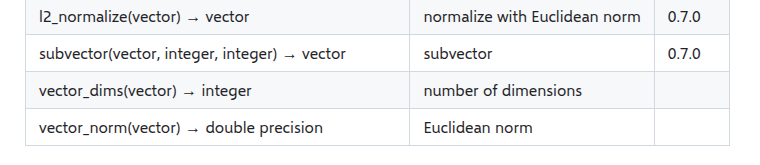
If the column uses vector(1536), PostgreSQL is enforcing that length. If it uses unconstrained vector, rows with different lengths can coexist, but pgvector’s documentation notes that indexes still need rows of the same dimension. Mixed dimensions make retrieval and indexing harder to reason about, so do not use an unconstrained column as a shortcut around migration.
Step 3: find where the contract diverged
Build a small inventory before making changes:
| Component | Record | Failure signal |
|---|---|---|
| n8n ingestion | Model, node version, measured length | Insert rejects vector |
| n8n retrieval | Model, node version, measured length | Query rejects vector |
| Pinecone | Index, namespace, dimension, metric | Dimension mismatch |
| pgvector | Table, column type, stored dimensions | Column or index conflict |
Common causes include switching from one embedding model to another, changing an output-dimension option in only one workflow, pointing ingestion and retrieval at different credentials, restoring a workflow without its original model setting, or reusing an index created for an older model.
Step 4: choose the safe repair
Option A: restore the old embedding contract
If the model change was accidental and the old model is still available, revert both ingestion and retrieval to the exact previous configuration. Test with a new document and a known query. This is the smallest recovery, but it does not migrate existing data to a new model.
Option B: create a parallel store and re-embed
Use this when the model change is intentional. Create a new Pinecone index or a new pgvector table with the measured target dimension. Keep the old store read-only during the migration.
CREATE TABLE documents_v2 (
  id bigint PRIMARY KEY,
  content text NOT NULL,
  metadata jsonb,
  embedding vector(1536)
);
The exact dimension above is only an example. Substitute the value measured from your chosen model and settings. Then run a controlled re-ingestion workflow:
- Export or query the canonical source documents and metadata.
- Generate every vector with one locked embedding configuration.
- Write to the new index or table with stable document IDs.
- Count successful writes and capture failures separately.
- Run a fixed set of representative retrieval queries.
- Compare relevance, filters, latency, and result coverage.
- Switch the retrieval workflow only after acceptance checks pass.
- Retain a rollback path until the new store is stable.
Why padding and manual truncation are unsafe
Adding zeros can make an array the expected length, but it does not turn an embedding from one model into an embedding from another. Arbitrary truncation discards coordinates without following the model provider’s supported dimensionality method. Both approaches can produce values that fit the schema while silently degrading retrieval.
If a provider offers an official dimension parameter, configure it at embedding generation time and use the same value for ingestion and queries. OpenAI specifically recommends the dimensions parameter for its third-generation embedding models. Do not apply a generic slice operation unless the model documentation explicitly defines and validates that transformation.
n8n guardrails that prevent recurrence
Add a dimension assertion immediately before every vector-store write and query:
const expected = 1536;
const vector = $json.embedding;

if (!Array.isArray(vector)) {
  throw new Error('Embedding is missing');
}

if (vector.length !== expected) {
  throw new Error(
    'Embedding dimension mismatch: ' +
    vector.length + ' != ' + expected
  );
}

return $input.all();
Store the expected dimension in one environment variable or workflow configuration value instead of duplicating it across nodes. Log the model ID, output dimension, destination index or table, and workflow version with each migration batch. Never log the entire embedding unless there is a specific, secure debugging need.
For production changes, use a small canary set before re-embedding the full corpus. Verify both semantic relevance and metadata filters. A dimension match proves structural compatibility; it does not prove retrieval quality.
Verification checklist
- The measured ingestion and query vectors have the same length.
- The vector database schema or index reports that same dimension.
- Both n8n paths use the same model ID and dimension setting.
- Existing source documents and metadata are backed up.
- Migration writes to a parallel destination, not over the only copy.
- Representative queries return expected documents and filters.
- Failures are logged by document ID and can be retried safely.
- The old destination remains available for rollback until validation completes.
Final rule
Embedding dimension is not a cosmetic model detail. It is a versioned interface shared by n8n, the model provider, and the vector store. Measure the real output, inspect the real schema, and migrate through a parallel destination. That approach fixes today’s mismatch without creating a harder retrieval problem tomorrow.
Official references: OpenAI embeddings guide, Pinecone index configuration, pgvector documentation, and n8n issue #37577.