
Publishing a WordPress post does not mean every search engine immediately knows that the URL changed. A sitemap remains the durable inventory of your site, but it is not an event stream. IndexNow adds that missing notification layer: when a URL is created, materially updated, redirected, or removed, your automation can tell participating search engines that the URL should be revisited.
This guide builds a conservative WordPress-to-n8n pipeline. It validates the URL, debounces repeated saves, batches notifications, records the response, and treats acceptance as delivery evidence rather than an indexing guarantee.
Important: IndexNow is a change notification protocol. An HTTP 200 means the search engine received the submitted URL set. It does not promise an immediate crawl, an index entry, a ranking improvement, or coverage in every search engine.
What the IndexNow contract actually provides
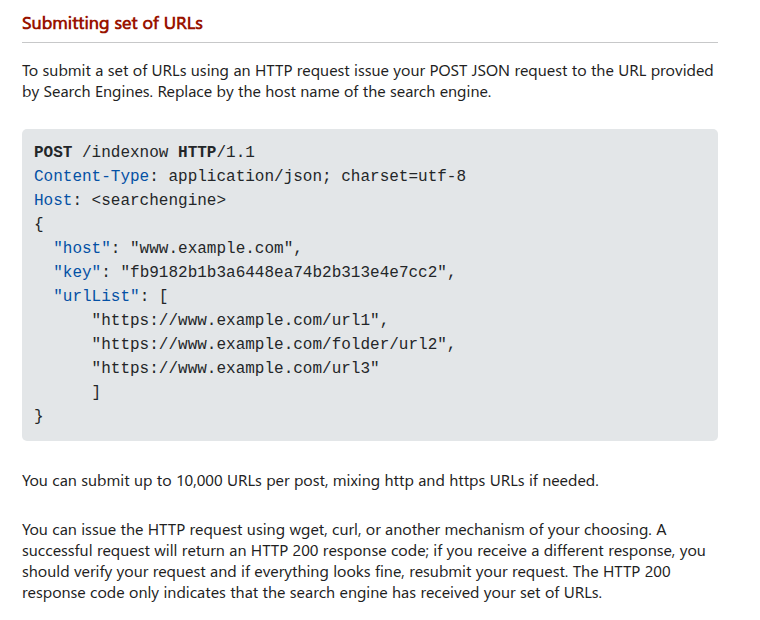
The official protocol accepts notifications for URLs that were added, updated, or deleted. For a batch, send a JSON POST request to https://api.indexnow.org/indexnow with the site host, ownership key, optional key location, and a URL list. One request can contain up to 10,000 URLs.
Ownership is proven with a UTF-8 text file on the same host. The preferred arrangement is a root-level file named after the key, such as https://example.com/KEY.txt, whose content is the key itself. If the file lives below the root, include keyLocation; its path also limits which URL paths that key can authorize.
| Status | Meaning | Workflow action |
|---|---|---|
| 200 | Submission received successfully | Record delivery and stop retrying |
| 202 | Submission received; key validation pending | Record as accepted and verify the public key file |
| 400 | Invalid request format | Fail permanently and inspect the payload |
| 403 | Key is invalid or cannot be verified | Check key content, path, host, and public access |
| 422 | URL ownership or protocol schema mismatch | Reject the batch and validate every URL |
| 429 | Too many requests or suspected spam | Back off, deduplicate, and retry later |
Use a small event bridge instead of exposing WordPress
The safest boundary is WordPress emitting a narrow event to one authenticated n8n webhook. Do not let an external caller choose an arbitrary URL and forward it to IndexNow. WordPress should provide the canonical permalink and event type; n8n should verify that the final hostname matches the configured site before any submission.
A minimal event contains only the fields the workflow needs:
{
  "event": "updated",
  "postId": 481,
  "url": "https://example.com/example-post/",
  "occurredAt": "2026-10-05T03:00:00Z"
}
Send the event over HTTPS with a secret header stored outside the theme. A tiny must-use plugin can capture publish and update saves without coupling the integration to the active theme:
<?php
function dw_indexnow_event($event, $post) {
    if (!defined('DW_N8N_WEBHOOK')) {
        return;
    }

    $payload = wp_json_encode([
        'event' => $event,
        'postId' => $post->ID,
        'url' => get_permalink($post),
        'occurredAt' => gmdate('c'),
    ]);

    wp_remote_post(DW_N8N_WEBHOOK, [
        'blocking' => false,
        'timeout' => 2,
        'headers' => [
            'Content-Type' => 'application/json',
            'X-DW-Secret' => DW_N8N_SECRET,
        ],
        'body' => $payload,
    ]);
}

function dw_indexnow_on_save($new, $old, $post) {
    if ('post' !== $post->post_type) {
        return;
    }
    if ('publish' !== $new) {
        return;
    }
    if (wp_is_post_revision($post->ID)) {
        return;
    }

    $event = 'publish' === $old ? 'updated' : 'created';
    dw_indexnow_event($event, $post);
}

add_action(
    'transition_post_status',
    'dw_indexnow_on_save',
    10,
    3
);
WordPress documents that transition_post_status also runs for an update where the status remains unchanged. That behavior is useful here: a published post can emit updated while the first transition into publish emits created. Add explicit post-type, revision, and status guards so drafts and revisions do not consume crawl budget.
The example uses a non-blocking HTTP request to avoid delaying the editor. Fire-and-forget delivery is not a durable queue. If losing an event matters, enqueue it with Action Scheduler or another persistent job system, then let the worker call n8n with retry and audit data.
Capture removal before the URL disappears
A deleted URL should be submitted too, but the timing is important. Capture its permalink while WordPress can still resolve the post. The before_delete_post hook runs before the post and associated metadata are removed. It does not run for an ordinary move to Trash, so handle wp_trash_post as a separate event.
function dw_indexnow_on_remove($post_id) {
    $post = get_post($post_id);
    if (!$post || 'post' !== $post->post_type) {
        return;
    }
    if ('publish' !== $post->post_status) {
        return;
    }

    dw_indexnow_event('deleted', $post);
}

add_action(
    'wp_trash_post',
    'dw_indexnow_on_remove',
    10,
    1
);
add_action(
    'before_delete_post',
    'dw_indexnow_on_remove',
    10,
    1
);
The two hooks can produce the same URL more than once when a trashed post is later permanently deleted. That is why deduplication belongs in n8n. The public URL should return an intentional 404 or 410 after removal; notifying IndexNow does not create the correct HTTP behavior for you.
Build the n8n workflow
- Webhook: accept
POSTonly and require the shared secret header. Return quickly if WordPress is waiting for a response. - Normalize: parse the URL, lowercase the hostname, remove the fragment, and keep the canonical absolute URL.
- Authorize: require
https:and an exact hostname match. Never accept sibling domains or a hostname that merely ends with the expected text. - Filter: allow only
created,updated, ordeleted. Reject empty URLs and non-public post types. - Debounce: store a key such as
indexnow:URL_HASHfor at least five minutes. Repeated autosaves should not generate repeated submissions. - Batch: collect changed URLs for a short window, remove duplicates, and cap each request below the 10,000-URL protocol maximum.
- HTTP Request: send one JSON POST to the global IndexNow endpoint.
- Classify: store the status code, attempt count, batch ID, URL count, and response time. Retry only failures that can succeed later.
Configure the n8n HTTP Request node as follows:
| Setting | Value |
|---|---|
| Method | POST |
| URL | https://api.indexnow.org/indexnow |
| Body Content Type | JSON |
| Include Response Headers and Status | Enabled |
| Never Error | Enabled only when a following node classifies every status |
The JSON body should use a secret-backed key value rather than a key embedded in an exported workflow:
{
  "host": "example.com",
  "key": "KEY_FROM_SECRET_STORE",
  "keyLocation": "https://example.com/key.txt",
  "urlList": [
    "https://example.com/post/"
  ]
}
n8n can send a JSON body directly and can expose the response status when Include Response Headers and Status is enabled. If you enable Never Error, a 403 or 429 becomes workflow data instead of a failed node, so the next node must deliberately route every status. Otherwise a rejected submission can look like a green execution.
Prevent noisy saves from wasting crawl budget
WordPress can save a published post for reasons that are not useful to a crawler: a plugin may update metadata, an editor may correct an internal note, or an automation may write the same value again. The status hook alone cannot decide whether the public document materially changed. Treat it as a signal to evaluate, not permission to submit immediately.
A practical n8n gate stores a fingerprint for each canonical URL. Build the fingerprint from stable public fields such as the final permalink, rendered title, rendered content, publication status, and a meaningful modified timestamp. Exclude volatile values such as request IDs or the time at which the event reached n8n. If the new fingerprint matches the last delivered fingerprint, end the execution without contacting IndexNow.
Use two controls together:
- Short debounce: collapse multiple saves for the same URL during an editing burst.
- Content fingerprint: suppress later events when the public representation did not change.
Persist the last accepted fingerprint only after a 200 or 202 response. Writing it before the HTTP request can hide a failed notification. Keep the current batch ID and response beside the fingerprint so an operator can distinguish “unchanged,” “accepted,” and “failed.” For deletion, use a separate terminal fingerprint that includes the removal event; this prevents an old update fingerprint from suppressing the final removal notice.
The ownership key is not a WordPress user credential, but it still authorizes submissions for your host. Do not place it in client-side JavaScript, webhook payloads, screenshots, or workflow exports. Store it in server configuration or a secret-backed n8n credential, rotate it deliberately, and remove the old public key file after the new key has been verified.
Retry only the failures that are recoverable
- 200: mark delivered.
- 202: mark accepted with verification pending; check the key file instead of flooding retries.
- 400: do not retry unchanged input. Send the batch to review.
- 403: verify the public key file, key value, and host. Retry only after correction.
- 422: isolate the invalid URL or host mismatch, repair the batch, then submit again.
- 429: use exponential backoff with jitter and merge duplicate URLs while waiting.
- Network or 5xx error: retry with a bounded attempt count and preserve the original batch ID.
Do not retry a whole large batch forever because one URL is invalid. Split a failed batch to identify the bad record, quarantine it, and allow valid changes to proceed.
Verify the complete path
- Open the key file without authentication and confirm that its body contains only the configured key.
- Publish one test post and verify exactly one normalized URL enters the workflow.
- Update the post twice within five minutes and verify the debounce rule prevents a notification storm.
- Confirm the IndexNow response is 200 or 202 and that the batch is logged.
- Move the post to Trash and verify the original public permalink is captured before removal.
- Force a wrong-host URL and confirm the workflow rejects it before the HTTP Request node.
- Force a 403 by using a test-only invalid key and verify it does not enter the transient retry loop.
- Keep the XML sitemap active and monitor supported search-engine tooling for crawl and indexing outcomes.
A good IndexNow workflow is intentionally modest. It reports meaningful URL changes quickly, proves ownership, protects the submission boundary, and records delivery. It does not claim control over a search engine’s crawl schedule or indexing decision.