The error Import of external package is disallowed looks like a missing npm package, but self-hosted n8n has two separate controls: the package must exist in the process that executes the Code node, and that runner must explicitly allow the import.
With modern n8n, the execution location matters. n8n 2.x runs Code node work on task runners, and production deployments should use external mode for isolation. Adding NODE_FUNCTION_ALLOW_EXTERNAL only to the main n8n container can therefore change nothing—the JavaScript runner may never receive it.
The three gates an import must pass
| Gate | Question | Typical failure |
|---|---|---|
| Execution location | Which runner actually executes this Code node? | Configuration is applied to the main container instead of the runner |
| Package installation | Does that runner image contain the npm package? | Cannot find module |
| Allowlist | Is the exact package permitted for the JavaScript runner? | Module is disallowed |
Treat these as independent checks. An allowlist does not install a package, and installing a package does not authorize Code node users to import it.
What the official n8n setting does
n8n restricts built-in and external imports by default. NODE_FUNCTION_ALLOW_BUILTIN controls Node.js built-ins such as crypto. NODE_FUNCTION_ALLOW_EXTERNAL controls third-party packages available from the runner’s module directory.
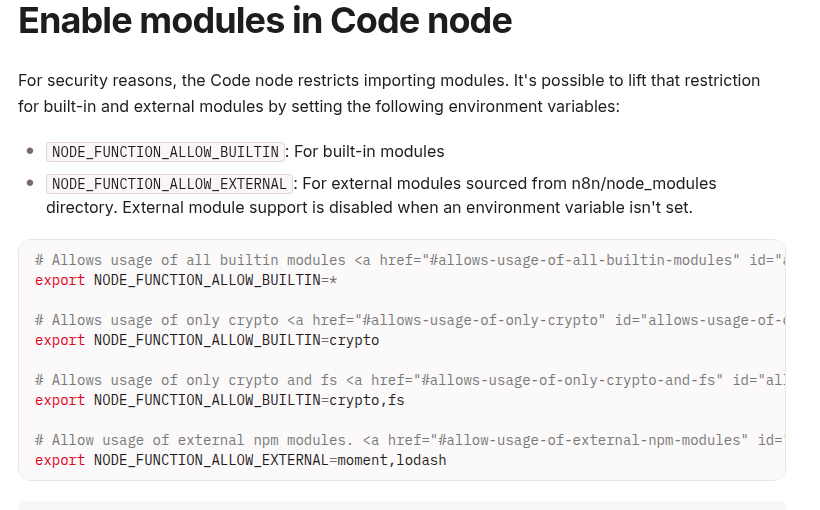
Use a comma-separated list such as lodash,moment. Avoid * in production: every workflow editor who can modify a Code node would gain access to every installed package that the wildcard exposes.
Choose the correct path for your runner mode
Internal or legacy setups
In a simple setup where the JavaScript runner receives normal environment variables directly, an allowlist may look like this:
NODE_FUNCTION_ALLOW_BUILTIN=crypto
NODE_FUNCTION_ALLOW_EXTERNAL=lodash,moment
The variables must reach the process executing the Code node. The official module guide specifically warns that task-runner deployments should configure the runners, not only the main n8n node.
External task-runner mode
For production, n8n recommends external mode: a separate n8nio/runners sidecar connects to the task broker. Current n8n documentation configures per-language allowlists in the runner launcher configuration as env-overrides.
Start from the configuration file shipped with the exact matching runner image. Modify the existing JavaScript runner entry instead of replacing the whole file with a partial example:
{
  "runner-type": "javascript",
  "env-overrides": {
    "NODE_FUNCTION_ALLOW_BUILTIN": "crypto",
    "NODE_FUNCTION_ALLOW_EXTERNAL": "lodash,moment"
  }
}
Keep the rest of the shipped configuration, including any Python runner entry you use. Mount or copy the customized file to the path documented for your n8n version; current external-runner documentation uses /etc/n8n-task-runners.json for the custom launcher configuration.
Build the packages into the runner image
Do not run npm install interactively inside a live container. That change disappears when the container is recreated and makes production state impossible to reproduce. Extend the runner image and pin the dependencies you need.
ARG N8N_VERSION

FROM n8nio/runners:${N8N_VERSION}

USER root

RUN cd /opt/runners/task-runner-javascript \
    && pnpm add \
        [email protected] \
        [email protected]

COPY n8n-task-runners.json \
    /etc/n8n-task-runners.json

USER runner
Build with a runner tag that exactly matches the n8nio/n8n tag used by the main service. n8n’s official setup guide requires matching versions and currently documents extending runner images from the supported runner baseline onward.
docker build \
  --build-arg N8N_VERSION=YOUR_N8N_VERSION \
  -f Dockerfile.runners \
  -t my-n8n-runners:YOUR_N8N_VERSION \
  .
Replace YOUR_N8N_VERSION with one explicit version in both images. Do not mix latest with a pinned runner tag.
Wire the external runner to n8n
A minimal Compose fragment needs a shared authentication token, a broker address reachable from the runner container, and external mode on the n8n service:
services:
  n8n:
    image: n8nio/n8n:${N8N_VERSION}
    environment:
      N8N_RUNNERS_MODE: external
      N8N_RUNNERS_BROKER_LISTEN_ADDRESS: 0.0.0.0
      N8N_RUNNERS_AUTH_TOKEN: ${RUNNERS_TOKEN}

  task-runners:
    image: my-n8n-runners:${N8N_VERSION}
    environment:
      N8N_RUNNERS_TASK_BROKER_URI: http://n8n:5679
      N8N_RUNNERS_AUTH_TOKEN: ${RUNNERS_TOKEN}
    depends_on:
      - n8n
In n8n 2.x, N8N_RUNNERS_ENABLED is deprecated and no longer required. For n8n 1.x migration testing it remains supported, so confirm the exact major version before copying an older Compose example.
Queue mode needs more than one runner sidecar
If your n8n installation uses Queue Mode, each worker that executes Code nodes needs its own task-runner sidecar. If manual executions remain on the main instance, the main instance also needs a runner. A package working in the editor but failing only in production often means manual and production executions reached different runner images or configurations.
| Execution | Likely component | What to compare |
|---|---|---|
| Manual test | Main instance runner | Runner image, config file, allowlist |
| Production webhook | Worker runner | Same image digest and matching config |
| Retry on another worker | Another worker runner | All workers use the same deployment artifact |
Verify with a minimal Code node
After rebuilding and restarting the services, test one built-in and one external package. Keep the test free of file-system or network access; n8n recommends using dedicated file and HTTP nodes for those operations.
const crypto = require('crypto');
const _ = require('lodash');

return items.map((item) => ({
  json: {
    ...item.json,
    moduleCheck: {
      id: crypto.randomUUID(),
      uniqueTags: _.uniq(
        item.json.tags ?? []
      )
    }
  }
}));
A successful execution proves only that this runner can load the packages. Repeat the check through the same trigger and worker path used in production.
Troubleshooting by error message
| Symptom | Most likely cause | Next check |
|---|---|---|
Module is disallowed |
Missing allowlist or wrong configuration layer | Inspect the JavaScript runner’s effective launcher config |
Cannot find module |
Package absent from the active runner image | Verify the package under /opt/runners/task-runner-javascript |
| Manual works, production fails | Main and worker use different runner sidecars | Compare image digests and mounted config files |
| Runner never connects | Broker URI, listen address, or token mismatch | Check runner and broker logs without printing the token |
| Works until restart | Package was installed interactively | Bake it into a versioned image |
Security rules worth keeping
- Allowlist exact packages rather than using
*. - Pin versions and rebuild intentionally for upgrades.
- Use external task-runner mode for production isolation.
- Give workflow-edit permission only to trusted users.
- Do not expose runner authentication tokens in workflow data or logs.
- Review package provenance, transitive dependencies, and known vulnerabilities.
- Keep main and runner image versions aligned.
- Roll the same runner artifact to every Queue Mode worker.
Some libraries mutate global prototypes. n8n blocks prototype mutation by default and offers a separate override, but enabling it weakens the security boundary. Prefer a library that works without that permission unless the operational need clearly justifies the risk.
The reliable mental model
An external module becomes usable only when the correct runner contains it and the correct runner configuration allows it. Solve the problem in that order: locate the executor, bake the dependency into its image, apply the narrow allowlist, restart every relevant runner, and test through the production execution path.
Official references: Enable modules in the Code node, Set up task runners, Task-runner environment variables, and n8n 2.0 breaking changes.