
The n8n Merge node is simple only when both inputs are predictable. Real workflows are messier: one API returns no records, an IF node sends execution down only one branch, two lists arrive in a different order, or a join key is missing. The Merge node then appears to “stall” or silently produces fewer items than expected.
The fix is not a random node option. You need to identify the contract of each input, then choose a Merge mode that matches that contract. This guide shows how Append, Combine, and Choose Branch differ, how to distinguish an empty input from an unexecuted path, and how to test the result before production data is involved.
The first distinction: zero items versus an unexecuted branch
These two states look similar downstream but mean different things:
- Executed with zero items: the upstream node ran, but its output contains no items. In the execution view, the node is present and shows an empty result.
- Branch not executed: routing never entered that path. Nodes on the branch have no run data for that workflow execution.
A Merge node cannot manufacture a missing execution. The official documentation says Append waits for all connected inputs to execute, while Choose Branch always waits for data from both inputs. That makes the execution path part of the data contract—not just a canvas detail.
Before changing the Merge configuration, open the failed execution and inspect both immediate upstream nodes. Record whether each node executed and how many items it returned. That single check prevents most trial-and-error fixes.
Pick the mode from the result you actually need
| Required result | Merge mode | Main risk |
|---|---|---|
| Keep every item from every input | Append | A connected path never executes |
| Join records using a stable ID | Combine → Matching Fields | Missing, duplicated, or differently typed keys |
| Pair item 1 with item 1, item 2 with item 2 | Combine → Position | Order or item count changes |
| Create every possible pair | All Possible Combinations | Multiplicative output growth |
| Wait for synchronization, then keep one input | Choose Branch | It still waits for both inputs |
Append: concatenate streams without joining records
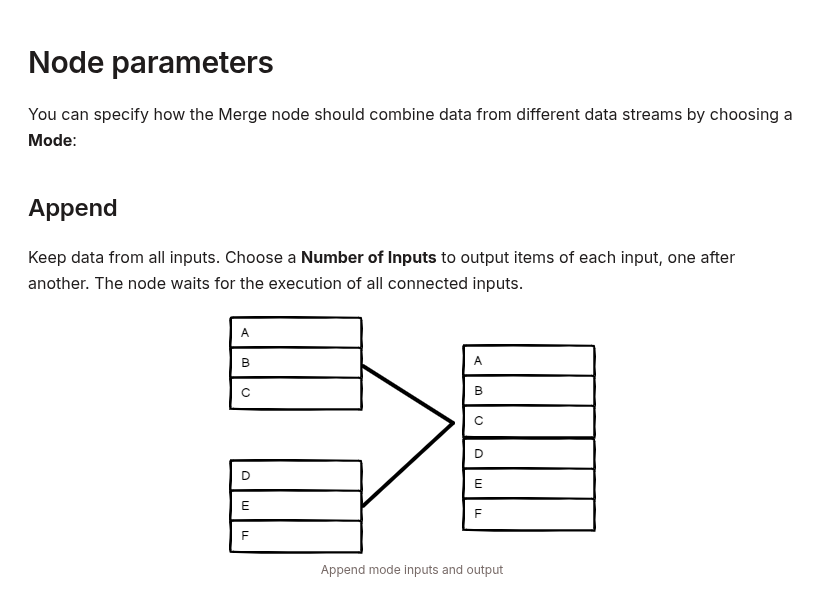
Append keeps the items from all configured inputs and outputs them one stream after another. It does not compare fields and it does not merge two objects into one object.
Given these inputs:
Input 1
[
  { "id": 101, "source": "crm" },
  { "id": 102, "source": "crm" }
]

Input 2
[
  { "id": 201, "source": "billing" }
]
Append returns three items. This is the correct mode for consolidating independent event streams that already share a usable schema.
It is the wrong choice when the goal is to enrich CRM records with billing fields. For that, both streams need a stable key and a matching-field join.
Combine by Matching Fields: treat it like a database join
Matching Fields compares values from selected fields. n8n exposes several output types that map closely to familiar joins:
- Keep Matches: only matching records, similar to an inner join.
- Keep Everything: matching records plus unmatched records from both inputs, similar to a full outer join.
- Enrich Input 1: keep every Input 1 record and add matching Input 2 data, similar to a left join.
- Enrich Input 2: the corresponding right-side behavior.
- Keep Non-Matches: return records that did not match.
Normalize the key before the Merge node. The values 42 and "42" may look identical in the table view but have different types. Whitespace and inconsistent casing can also produce unexpected non-matches.
// Edit Fields or Code node before Merge
{
  "customer_id": "42",
  "email_normalized": "[email protected]"
}
Use a unique identifier when possible. Joining on a non-unique field such as status, city, or product name can create multiple combinations and duplicate-looking output.
Combine by Position: safe only with locked ordering
Position mode pairs items by index. The first item from Input 1 joins the first item from Input 2, and so on. It can be useful when two branches are guaranteed to preserve identical order and cardinality.
That guarantee is fragile. Filtering one branch, retrying a paginated request, removing duplicates, or sorting on only one side changes the alignment. The workflow may still complete while joining the wrong records.
Prefer Matching Fields whenever a stable key exists. If Position is unavoidable, add a temporary sequence field before splitting:
[
  { "_sequence": 0, "customer_id": "c-101" },
  { "_sequence": 1, "customer_id": "c-102" }
]
Verify that both sides contain the same sequence range immediately before the Merge node.
Choose Branch is a synchronization gate, not an IF replacement
Choose Branch waits until both inputs are available, then outputs Input 1, Input 2, or a single empty item. Use it when two independent operations must finish but only one result should continue.
Do not use it merely to reunite mutually exclusive IF routes. If only one route is intended to run, there may never be a second input to wait for. Normalize both routes to the same schema and converge them through a pass-through or No-op pattern instead. Reserve Merge for cases where multiple streams genuinely participate in the result.
A deterministic debugging procedure
- Inspect the execution, not the canvas. Confirm whether each immediate upstream node ran.
- Count items on both inputs. Write down values such as
Input 1 = 12andInput 2 = 0. - State the expected result. Concatenation, keyed enrichment, index pairing, Cartesian pairs, or synchronization are different operations.
- Check key types and uniqueness. Normalize strings, numbers, casing, and whitespace before Matching Fields.
- Use tiny fixtures. Test with two or three hand-built records whose expected output can be calculated mentally.
- Add production assertions. Stop or alert when input counts, unmatched counts, or output counts violate the contract.
Handle an intentionally empty source explicitly
Sometimes zero rows are valid—for example, a customer has no unpaid invoices. Decide what that means before the Merge node:
- For an inner join, zero matches may correctly produce zero output.
- For enrichment, use the output type that preserves the primary input.
- For an optional source that must still be observable, emit an explicit sentinel item and remove it after the merge.
return [{
  json: {
    source: "billing",
    present: false,
    reason: "no_open_invoices"
  }
}];
Use a sentinel only when the downstream workflow understands it. A fabricated blank business record is worse than an empty stream because it can be mistaken for real data.
Watch for explosive output
All Possible Combinations creates a Cartesian product. Ten items on one input and 20 on the other create 200 output items. With 1,000 items on each side, the result is one million combinations.
Before using this mode in production, calculate:
expected_output =
  input_1_count * input_2_count
If that number is not intentionally bounded, use a key-based join or filter each stream first.
Version and execution-order checks
The current Merge documentation covers the overhauled node introduced in n8n 0.194.0. More than two inputs and SQL Query mode require n8n 1.49.0 or later. The workflow execution order also differs between legacy workflows and workflows created from n8n 1.0 onward: modern workflows complete one branch before starting the next, ordered by canvas position.
If a copied workflow behaves differently from a newly created one, inspect its workflow settings before assuming the Merge node is broken. Execution order is observable behavior and should be part of the migration test.
Production checklist
- Both upstream paths are expected to execute.
- Each input’s zero-item behavior is defined.
- The selected mode matches the intended data operation.
- Matching keys have the same type and normalization.
- Position mode has verified order and cardinality.
- Cartesian output has a safe upper bound.
- A small fixture produces the expected count and fields.
- Production monitoring records input and output counts.
The reliable mental model is straightforward: routing determines whether an input exists; Merge mode determines what happens after the inputs exist. Debug those layers separately, and the Merge node becomes predictable instead of mysterious.
Official references: n8n Merge node, Merge data, and Understand execution order.