
Webhook signatures are only trustworthy when you calculate them from the exact bytes the sender signed. In n8n, that means preserving the raw request body, hashing that binary value with the correct secret and encoding, and rejecting the workflow before any side effect when the signature does not match.
This guide builds a provider-neutral HMAC-SHA256 verification path with the Webhook, Crypto, and IF nodes. It also shows a hardened comparison option for environments where the Code node can use Node.js crypto.
Why parsed JSON breaks valid signatures
Many webhook providers compute a message authentication code over the request body exactly as it was sent. Parsing JSON and serializing it again can change whitespace, escaping, Unicode representation, or object-key order. The data may still mean the same thing, but the byte sequence is different, so the HMAC is different.
The rule is simple: use the parsed body for business logic, but use the untouched raw body for signature verification. n8n’s Webhook node exposes a Raw Body option specifically for this purpose.
Define the provider contract first
Before building nodes, record the exact signing contract from the provider’s documentation. “HMAC-SHA256” alone is not enough.
| Contract item | Example | Why it matters |
|---|---|---|
| Header name | x-webhook-signature |
Header names and payload formats vary by provider. |
| Signed message | Raw body, or timestamp + delimiter + raw body | Hashing only the body fails when a timestamp is part of the signed message. |
| Digest algorithm | SHA-256 | SHA-1, SHA-256, and SHA-512 are not interchangeable. |
| Output encoding | Hex or Base64 | The same digest has different textual representations. |
| Prefix | sha256= |
Some providers prefix the encoded digest; others do not. |
| Replay fields | Timestamp and event ID | A valid HMAC by itself does not prevent replay. |
Do not copy a header expression or prefix from another provider. Use its official specification and test fixture.
1. Capture the raw request body in the Webhook node
- Create a Webhook node and use the HTTP method required by the sender, usually
POST. - In Options, enable Raw Body.
- Choose a binary property name and keep it consistent. This guide uses
data. - Keep the webhook test URL for controlled tests and switch the provider to the production URL only after the workflow is active.
The normal JSON body remains useful downstream, while the raw bytes are available as binary data for the cryptographic check. Never reconstruct the signed input with JSON.stringify().
2. Compute the expected HMAC in the Crypto node
Add a Crypto node immediately after the Webhook node and configure it as follows:
- Action: Hmac
- Value: Binary File
- Binary Property Name:
data - Algorithm: SHA256
- Encoding: HEX or BASE64, exactly as the provider specifies
- Secret: an n8n Hmac Secret credential, not a literal secret embedded in an expression
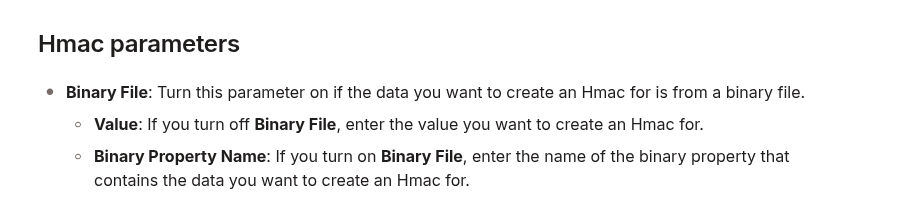
The binary property name must match the property produced by the Webhook node. A mismatch can look like a bad secret even though the real problem is that the Crypto node hashed the wrong value.
3. Normalize the received signature
Read the signature from the Webhook output’s headers using the exact header name in the provider contract. Normalize only what the contract permits:
- Remove a documented prefix such as
sha256=. - Trim surrounding whitespace only if the provider permits it.
- For hex, compare a consistent letter case.
- Do not silently convert between hex and Base64.
- If the header contains several versioned signatures, parse the documented format instead of comparing the whole header.
A missing or malformed signature must take the rejection path. It should never fall through as an empty value that happens to match another empty field.
4. Compare before any side effect
For a straightforward integration, an IF node can compare the normalized received value with the HMAC generated by the Crypto node. Route the true branch to the rest of the workflow and terminate the false branch without writing to databases, sending messages, or calling business APIs.
A normal string comparison is useful for compatibility testing, but it is not designed to be constant-time. For higher-risk endpoints, use a Code node only when your n8n environment permits Node.js built-in modules, and compare decoded digest bytes with crypto.timingSafeEqual:
const { timingSafeEqual } = require('crypto');

const expectedHex = String($json.expectedSignature ?? '')
  .replace(/^sha256=/i, '')
  .trim();
const receivedHex = String($json.receivedSignature ?? '')
  .replace(/^sha256=/i, '')
  .trim();

if (!/^[a-f0-9]{64}$/i.test(expectedHex) ||
    !/^[a-f0-9]{64}$/i.test(receivedHex)) {
  return [{ json: { signatureValid: false } }];
}

const expected = Buffer.from(expectedHex, 'hex');
const received = Buffer.from(receivedHex, 'hex');
const signatureValid = expected.length === received.length &&
  timingSafeEqual(expected, received);

return [{ json: { signatureValid } }];
The example assumes a 64-character SHA-256 hex digest. Adapt the parser to the provider’s documented format. On self-hosted n8n, Code node module access may require an explicit allow-list; on managed environments it may be restricted. If the hardened path is unavailable, keep the verification boundary simple and consider validating signatures in a small trusted gateway before n8n.
5. Add replay protection
An attacker who captures a valid signed request may be able to send it again. If the provider signs a timestamp, verify that it falls within a short tolerance and include the exact timestamp in the signed message. Also store the provider’s event ID and reject duplicates for the retention period required by your system.
Do not invent a timestamp scheme when the provider does not sign one. Replay protection must follow the sender’s protocol; otherwise a proxy or gateway should add an authenticated anti-replay layer.
Test the verification boundary
Run a negative-test matrix before activating the production webhook:
- Known-good fixture: an official sample or captured test event passes.
- One-byte body change: the same signature fails.
- Wrong secret: verification fails.
- Wrong encoding or prefix: verification fails until configuration matches the contract.
- Missing header: the request takes the rejection path.
- Expired timestamp: a cryptographically valid but stale event is rejected when the protocol supports timestamps.
- Duplicate event ID: the second delivery is handled idempotently.
Verify that every failure occurs before downstream side effects. During debugging, log only safe metadata such as the event ID, validation result, and failure category. Avoid logging the signing secret, full signature, authorization headers, or sensitive payloads.
Troubleshooting mismatches
- Every request fails: confirm that Raw Body is enabled and that both nodes use the same binary property.
- The locally computed value looks different: verify hex versus Base64 and any documented prefix.
- Test events pass but live events fail: confirm that test and production endpoints use the correct secrets.
- Only some events fail: look for a signed timestamp, multi-signature header, compression, or proxy transformation.
- JSON reserialization was used: remove it and hash the captured raw binary body.
Operational checklist
- The provider contract identifies the header, signed message, algorithm, encoding, and prefix.
- The Webhook node captures the raw body.
- The Crypto node hashes the matching binary property with an Hmac Secret credential.
- Malformed or missing signatures fail closed.
- Verification happens before every side effect.
- Replay protection and idempotency are implemented when the protocol supports them.
- Positive and negative fixtures are part of regression testing.
For the underlying node settings, see the official n8n Webhook documentation and n8n Crypto documentation. For the hardened comparison primitive, see Node.js crypto.timingSafeEqual.