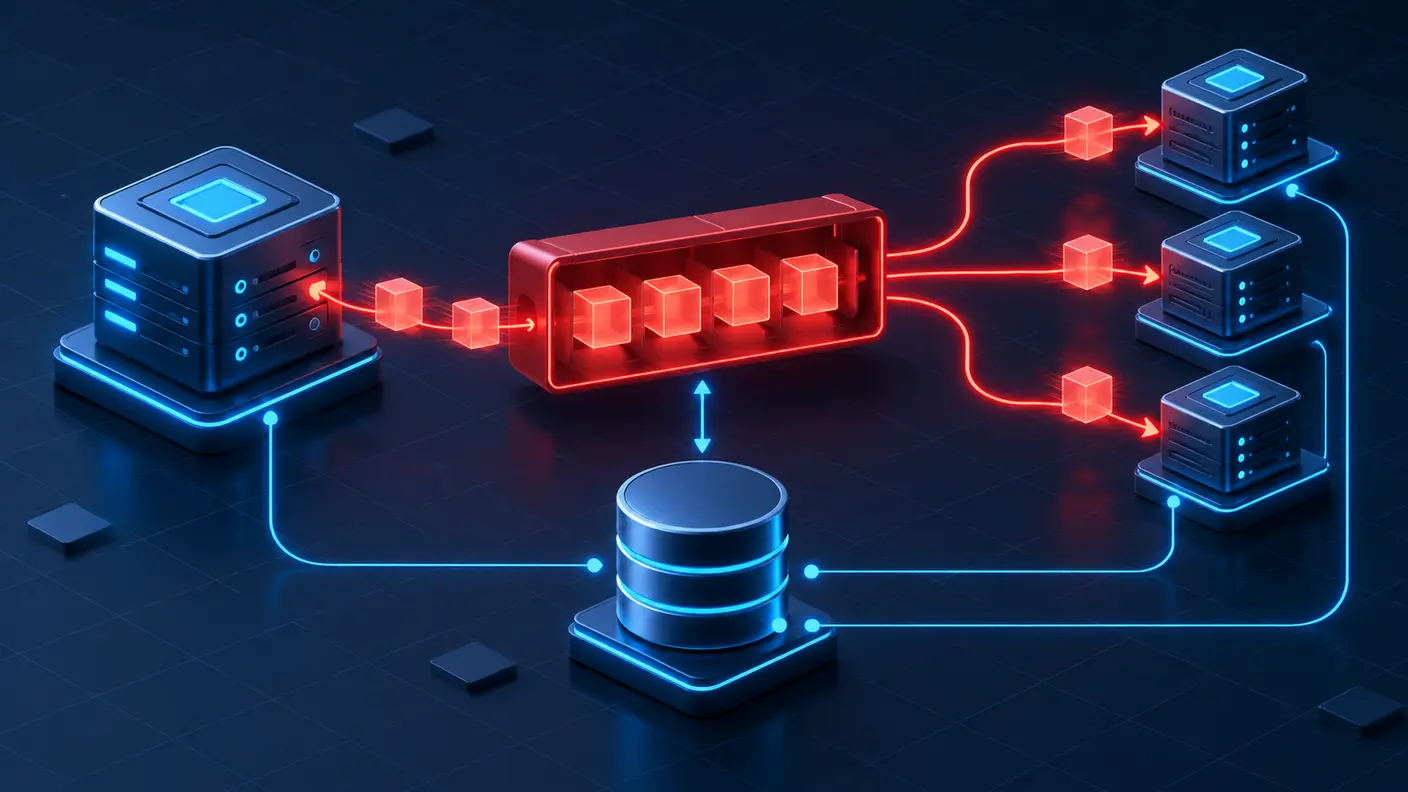
When a self-hosted n8n instance starts handling more webhooks, scheduled jobs, and AI-heavy workflows at the same time, simply giving one container more CPU is not always the cleanest next step. Queue Mode separates orchestration from execution: a main instance accepts triggers, Redis holds execution IDs, PostgreSQL stores shared state, and one or more workers run the workflows.
This guide shows a conservative migration path for a Docker-based installation. It focuses on the configuration contract, the checks that prevent credential and data problems, and a rollback plan. Queue Mode improves horizontal scalability, but it does not make slow APIs, unsafe workflows, or synchronous webhook timeouts disappear by itself.
What Queue Mode changes
In regular mode, the same n8n process can serve the editor, accept production triggers, and execute workflows. Under heavy parallel work, those responsibilities compete for the same process resources. In Queue Mode, the main instance creates an execution and sends its ID to Redis. A worker retrieves that ID, loads the workflow and execution state from the shared database, performs the work, writes the result back, and reports completion through Redis.
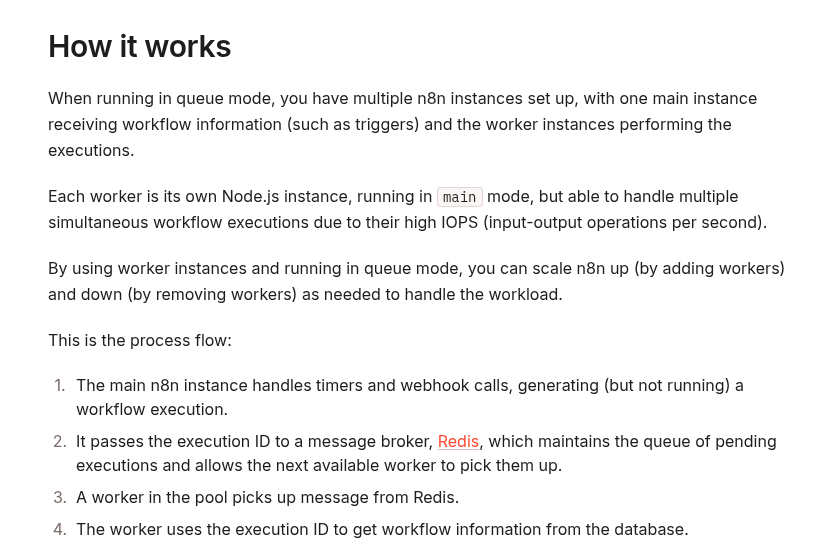
The official n8n documentation describes Queue Mode as its most scalable execution mode. It also notes an important trade-off: webhook requests are received by the main or webhook process while actual execution happens on a worker, so the handoff can add some latency.
Before you migrate
Queue Mode is an infrastructure change, not a single environment-variable toggle. Prepare these items first:
- PostgreSQL: all main and worker processes must share the same supported PostgreSQL database. A distributed Queue Mode setup over SQLite is not supported.
- Redis: Redis is the message broker for pending execution IDs. Protect it from public access and use authentication where appropriate.
- One encryption key: the main instance, workers, and optional webhook processors must use the same
N8N_ENCRYPTION_KEY. Otherwise workers cannot decrypt credentials stored in the database. - One n8n version: pin the same image version across every n8n service. Avoid migrating and upgrading versions in the same change window.
- Backups: back up PostgreSQL and the current n8n configuration before changing the topology.
- Binary-data plan: n8n does not support Queue Mode with filesystem binary-data storage as the normal persistence model. If workflows persist files, choose a supported storage design before cutover.
A minimal Docker Compose topology
The following example is an architectural starting point, not a drop-in production file. Put secrets in an .env file or secret manager, add health checks and backups appropriate to your platform, and pin an explicit n8n image version.
services:
  postgres:
    image: postgres:17
    environment:
      POSTGRES_DB: n8n
      POSTGRES_USER: n8n
      POSTGRES_PASSWORD: ${POSTGRES_PASSWORD}
    volumes:
      - postgres_data:/var/lib/postgresql/data

  redis:
    image: redis:7-alpine
    command: ["redis-server", "--requirepass", "${REDIS_PASSWORD}"]

  n8n-main:
    image: docker.n8n.io/n8nio/n8n:${N8N_VERSION}
    ports:
      - "5678:5678"
    environment: &n8n-env
      DB_TYPE: postgresdb
      DB_POSTGRESDB_HOST: postgres
      DB_POSTGRESDB_DATABASE: n8n
      DB_POSTGRESDB_USER: n8n
      DB_POSTGRESDB_PASSWORD: ${POSTGRES_PASSWORD}
      EXECUTIONS_MODE: queue
      QUEUE_BULL_REDIS_HOST: redis
      QUEUE_BULL_REDIS_PORT: 6379
      QUEUE_BULL_REDIS_PASSWORD: ${REDIS_PASSWORD}
      N8N_ENCRYPTION_KEY: ${N8N_ENCRYPTION_KEY}
      WEBHOOK_URL: https://n8n.example.com/
    depends_on:
      - postgres
      - redis

  n8n-worker:
    image: docker.n8n.io/n8nio/n8n:${N8N_VERSION}
    command: worker --concurrency=5
    environment: *n8n-env
    depends_on:
      - postgres
      - redis

volumes:
  postgres_data:
The key relationship is more important than the exact YAML: main and worker use the same database, Redis connection, encryption key, execution mode, and n8n version. Scale workers only after measuring CPU, memory, database load, and external API limits.
Configuration that must match
| Setting | Where | Why it matters |
|---|---|---|
EXECUTIONS_MODE=queue |
Main, workers, webhook processors | Places production executions on the Redis-backed queue. |
N8N_ENCRYPTION_KEY |
Every n8n process | Allows workers to decrypt the same stored credentials. |
QUEUE_BULL_REDIS_HOST and port |
Every n8n process | Points all processes to the same broker. |
| PostgreSQL connection | Every n8n process | Provides the shared workflow and execution state. |
| n8n image version | Every n8n service | Avoids protocol and schema mismatches during execution. |
WEBHOOK_URL |
Main configuration | Keeps generated production webhook URLs aligned with the public origin. |
Choose worker concurrency deliberately
A worker can run multiple jobs at once. The command-line --concurrency flag sets the worker concurrency, while N8N_CONCURRENCY_PRODUCTION_LIMIT can place a broader limit on production executions. More concurrency is not automatically better: every parallel workflow may consume memory, database connections, API quotas, and file bandwidth.
Start with a conservative value, observe real workloads, and increase it gradually. A useful validation set includes:
- worker CPU and memory at peak load;
- PostgreSQL active connections and query latency;
- Redis memory and queue depth;
- execution wait time versus execution duration;
- 429 responses or other rate-limit errors from downstream APIs;
- failure and retry rates for large AI or file-processing jobs.
If one workflow is unusually memory-heavy, reducing concurrency or routing that workload to dedicated workers is often safer than increasing the global worker count.
Decide whether you need webhook processors
Workers scale workflow execution. Webhook processors are an optional, separate layer that scales incoming production webhook requests. They are useful when webhook intake itself becomes a bottleneck.
If you add webhook processors, route production paths such as /webhook/* and /webhook-waiting/* to their load-balancer pool. Keep editor and internal API traffic on the main instance. The official documentation advises against putting the main process in the webhook load-balancer pool because webhook load can degrade editor responsiveness.
You can also disable production webhook handling on the main process with N8N_DISABLE_PRODUCTION_MAIN_PROCESS=true after the webhook-processor pool is healthy. Do not enable that flag before routing and health checks are proven, or production webhooks may have nowhere to go.
Handle binary data before cutover
Queue Mode changes where execution happens, so local files cannot be assumed to exist on every process. n8n explicitly warns that Queue Mode is not supported with filesystem binary-data storage as the normal persistence model.
For workflows that persist images, PDFs, audio, or other binary data, review the current n8n storage options and licensing before migration. External S3 or Azure storage is available only on qualifying self-hosted plans. If you use external storage, every relevant n8n process must receive the same storage configuration. Also configure the provider’s lifecycle policy for binary data rather than allowing files to accumulate forever.
Large synchronous webhook responses need separate attention. The worker sends the response back to the main or webhook process through the queue path, and n8n documents a relay-size limit. Queue Mode therefore is not a substitute for an asynchronous job pattern when a request can take a long time or return a very large payload.
A safe migration sequence
- Inventory the current instance. Record the n8n version, database, encryption key source, public URL, binary-data mode, mounted volumes, and reverse-proxy routes.
- Back up PostgreSQL and configuration. Test that the backup can be read before continuing.
- Introduce Redis privately. Verify authentication and connectivity from the n8n Docker network; do not expose Redis directly to the internet.
- Start one worker with no production cutover. Give it the same database and encryption key, then enable
QUEUE_HEALTH_CHECK_ACTIVEand check/healthz/readinessfor database and Redis readiness. - Enable Queue Mode on main and worker. Restart in a controlled window and confirm both processes remain on the same n8n version.
- Run a canary production workflow. Use a harmless webhook or schedule that reads credentials, performs a small external request, writes a result, and completes through the worker.
- Test failure paths. Confirm that a failed node is recorded, retries behave as expected, and queued executions recover after a worker restart.
- Increase load gradually. Add concurrency or workers one change at a time while watching resource and error signals.
- Add webhook processors only if intake needs scaling. Validate load-balancer paths before disabling production webhooks on main.
Verification checklist
Do not call the migration complete merely because all containers are running. Verify the behavior that matters:
- The editor loads and saved credentials can be used by a worker.
- A production webhook creates an execution and the worker completes it.
- Scheduled workflows still trigger at the expected time.
- Execution results appear in the UI and survive restarts.
- Worker readiness reports successful database and Redis connectivity.
- Stopping one worker leaves queued jobs available for another healthy worker.
- Binary-data workflows can read their files on the process that executes them.
- Your reverse proxy still sends the correct webhook and editor paths to the correct services.
- Execution pruning remains configured so finished execution data does not grow without bound.
Common migration failures
Workers start but every credentialed node fails
Compare N8N_ENCRYPTION_KEY byte for byte across main and workers. A newly generated worker key cannot decrypt credentials created by the original main instance.
Executions remain queued
Check worker logs, Redis connectivity, PostgreSQL connectivity, and whether every process actually has EXECUTIONS_MODE=queue. A running container is not the same as a ready worker.
The editor becomes slow during webhook spikes
Measure whether the main process is accepting too much production webhook traffic. If the workload justifies it, add webhook processors and route only production webhook paths to them instead of placing main in that pool.
Image or document workflows fail after migration
Revisit binary-data storage. A file written to one container’s local filesystem is not automatically available to another worker. Use a supported shared storage design and test the full write-and-read path.
More workers create more 429 errors
Queue Mode increases execution capacity; it does not increase a third-party API quota. Reduce concurrency, add workflow-level throttling, or coordinate global rate limits before scaling further.
Rollback without data loss
Keep the previous Compose configuration, pinned image version, and database backup available during the change window. If the canary fails, stop accepting new production triggers, allow or terminate active jobs according to your incident plan, restore the prior execution topology, and verify a known workflow before reopening traffic.
A rollback should not replace the current database with an older backup unless the database itself is damaged; doing so can discard executions and configuration created after the snapshot. Treat configuration rollback and database restoration as separate decisions.
Related DevelopWhale guides
- If long-running executions are the operational bottleneck, see How to Stop Stuck n8n Executions with Layered Timeouts.
- If a webhook must acknowledge work before background processing finishes, see How to Fix n8n Webhook 504 and Cloudflare 524 Timeouts with an Async Job Pattern.
Final recommendation
Use Queue Mode when measurement shows that separating intake and execution will solve a real capacity or isolation problem. The smallest reliable production topology is one main instance, PostgreSQL, Redis, and at least one worker, all sharing the same encryption key and n8n version. Add worker concurrency, more workers, webhook processors, and external storage only when the workload and verification data justify each layer.
For the current behavior and supported options, keep the official Queue Mode guide, concurrency documentation, execution-data guidance, and external-storage documentation in your migration checklist.