Freelancers often treat contract signing as a manual handoff: copy a scope of work, replace client details, email a PDF, wait for signatures, download the completed file, and update the project board. That sequence is repetitive, but automating it safely requires more than sending a document. The workflow must create the right submission, wait for every required signer, archive the final evidence, and tolerate duplicate webhook delivery without sending a second contract.
This guide builds that closed loop with n8n and DocuSeal. DocuSeal provides a verified n8n node for n8n Cloud and self-hosted n8n. Its documented actions include creating submissions from a template, PDF, DOCX, or HTML, while its triggers distinguish a single signer completing a form from the entire submission being completed.
What you will build
Use two small workflows instead of one long execution that waits for a signature:
- Request workflow: accept approved client and scope data, validate it, create a DocuSeal submission, and persist the returned submission reference.
- Completion workflow: receive the DocuSeal completion event, reject duplicates, archive the signed document, update the project record, and notify the parties.
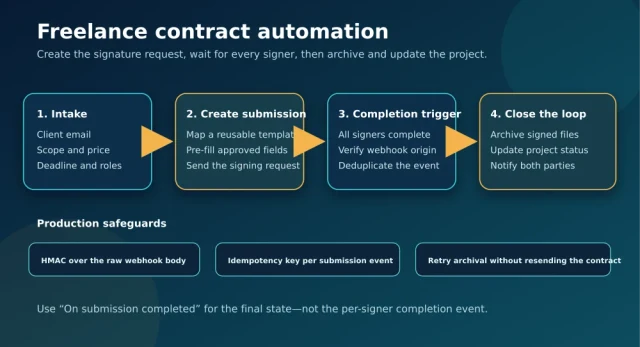
The separation matters. A contract may remain unsigned for hours or days, so keeping an n8n execution open is the wrong reliability model. The first workflow finishes after the signature request is created. The second starts only when DocuSeal reports completion.
Before you start
- An active n8n instance. DocuSeal documents support for both n8n Cloud and self-hosted n8n.
- A DocuSeal account, reusable contract or SOW template, and API credential.
- A public HTTPS endpoint when a self-hosted n8n instance receives DocuSeal trigger events.
- A durable store for submission state and idempotency keys. PostgreSQL is a good fit; a database table or another atomic key-value store also works.
- A destination for final documents, such as Google Drive, S3-compatible storage, or a client/project folder.
| Environment | Server Domain | Important note |
|---|---|---|
| DocuSeal Global Cloud | https://api.docuseal.com |
Use the API key from the DocuSeal Console. |
| DocuSeal EU Cloud | https://api.docuseal.eu |
Keep regional data and credentials aligned. |
| DocuSeal On-Premises | https://docuseal.example.com/api |
Replace the example host with the API URL of your instance. |
Do not assume the production API workflow is universally free. At the time of writing, DocuSeal lists API and Embedding as Pro features, charges per completed production API document, and offers an unlimited free Sandbox for development and testing. The open-source on-premises application is free, but production integration features and licensing still need to be checked against the current plan.
Workflow 1: create the signature request
1. Define a strict intake contract
Start with a form, CRM event, or approved spreadsheet row, but normalize it into one internal object before it reaches DocuSeal. Keep template selection on the trusted side of the workflow. A client-supplied value should not be allowed to choose an arbitrary template or signing role.
{
  "request_id": "sow_2026_1042",
  "template_key": "freelance_sow_v3",
  "client_name": "Example Client",
  "client_email": "[email protected]",
  "project_name": "Automation audit",
  "scope_summary": "Audit and remediation plan",
  "fee": "2500.00",
  "currency": "USD",
  "deadline": "2026-11-15"
}
Validate required fields, normalize the email address, reject impossible dates, and derive money values from trusted pricing logic. If a human must approve the final scope, put that approval before the DocuSeal node.
2. Make request creation idempotent
A webhook retry or manual replay must not create a second signature request. Claim request_id atomically before calling DocuSeal. In PostgreSQL, a unique constraint plus INSERT ... ON CONFLICT DO NOTHING is safer than a read-then-write check because concurrent executions cannot both win.
INSERT INTO contract_requests (request_id, status)
VALUES ($1, 'creating')
ON CONFLICT (request_id) DO NOTHING
RETURNING request_id;
Continue only when the query returns the inserted row. If no row is returned, load the existing record and return its current submission reference instead of creating another contract.
3. Use the DocuSeal Create submission action
Add the verified DocuSeal node and choose Create submission. Select the reusable template by its trusted name or ID. Map each signer to the role defined in that template, then map only approved pre-fill values.
- Keep signer role names identical to the template.
- Map the client email from the normalized intake object.
- Use Send Email only after the payload is validated.
- Store the returned submission reference together with
request_id. - Record a timestamp and transition the local status from
creatingtosent.
If the DocuSeal request fails after the idempotency claim, mark the local row create_failed. A controlled retry can reuse the same request record. Do not silently generate a new request_id.
Workflow 2: close the loop after signing
1. Choose the correct trigger
DocuSeal exposes two completion-related triggers in its n8n integration:
- On signing form completed: one signer has completed their part.
- On submission completed: all required signers have signed the document.
For final archival and project activation, use On submission completed. The per-signer trigger is useful for progress tracking, but treating it as final can archive an incomplete agreement or start work before every party has signed.
2. Verify and deduplicate the event
The verified DocuSeal trigger registers the webhook for you. If you instead use a generic n8n Webhook node, follow DocuSeal’s security documentation: verify the X-Docuseal-Signature HMAC-SHA256 value against the exact raw request body, reject stale timestamps, and compare signatures in constant time. Re-serializing parsed JSON changes the signed bytes and can make a valid signature fail.
After authentication, build a stable idempotency key from the actual event payload shown by your test execution—for example, a submission identifier plus the event type. Persist it under a unique constraint before any archive, notification, or project-status side effect.
| Failure | Safe response |
|---|---|
| Duplicate completion event | Acknowledge it and skip all side effects already completed. |
| Archive upload fails | Retry the archive step; do not create or resend the submission. |
| Project update fails | Keep the signed-file location and retry only the project update. |
| Notification fails | Retry from a notification outbox keyed by the submission event. |
| Unknown submission | Quarantine the event for review instead of inventing a project mapping. |
3. Archive the signed evidence
Use the document URL or submission data returned by DocuSeal’s API to retrieve the completed document through an authenticated HTTP Request node. Write it to a deterministic path such as:
/clients/{client_id}/contracts/{request_id}/signed-contract.pdfSave the DocuSeal submission reference, final storage URL, completion timestamp, and a checksum if your storage layer supports one. Treat the audit log and the signed document as business records with restricted access; do not expose them through a public bucket or a broadly shared folder.
4. Update the project only after archival succeeds
Once the signed file is durably stored, update the project or CRM record to contract_signed, attach the archive location, and send notifications. This ordering gives operators a clear recovery point: a failed project update can be retried without downloading or resending the contract again.
Testing the workflow
- Use the DocuSeal Sandbox and a non-production template.
- Run the request workflow with a test client you control.
- Confirm exactly one submission is created and the local record contains its reference.
- Replay the original intake and verify that no second submission is created.
- Complete only one signer and confirm the final archival path does not run.
- Complete all required signers and confirm the completion workflow runs once.
- Replay the completion event or execution data and verify that archive, project update, and notification side effects remain single.
- Force the archive destination to fail, restore it, and verify the retry resumes after signing rather than sending a new agreement.
Production checklist
- Store DocuSeal and storage credentials in n8n credentials, never in workflow code or static fields.
- Expose self-hosted n8n webhooks through HTTPS and restrict unrelated endpoints.
- Use a unique intake request ID and a unique completion-event key.
- Log identifiers and states, but do not log full contracts, signatures, or unnecessary personal data.
- Use least-privilege access for the archive folder or bucket.
- Monitor failed executions and build a replay path for individual post-signature steps.
- Review DocuSeal’s current pricing before moving from Sandbox to production.
Final architecture
The reliable pattern is not “form submitted, then wait for a signature.” It is a state machine with two short workflows: create one submission from trusted data, then respond to one authenticated and deduplicated final-completion event. That design prevents duplicate contracts, keeps long waits out of n8n executions, and makes archive or notification failures recoverable without asking the client to sign again.
Official references: DocuSeal’s n8n integration guide, webhook and HMAC guidance, current pricing, and Signing API overview.