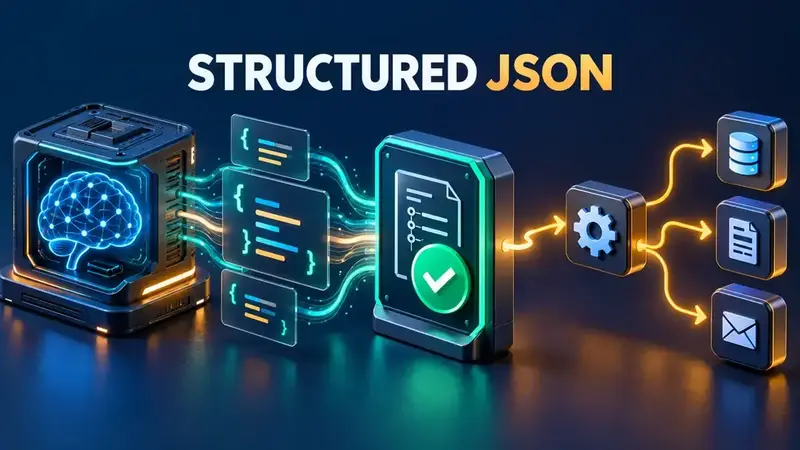
Local models are attractive in n8n because they keep data close to your infrastructure and remove per-request API costs. The difficult part is not getting text back from Ollama. It is getting a predictable object that the next node can trust.
A prompt such as “return JSON” is only a request. A production workflow needs a contract: a schema at generation time when possible, validation before side effects, and an explicit failure path when the response does not match.
The three layers of reliable structured output
| Layer | Purpose | What it prevents |
|---|---|---|
| Generation constraint | Ask the model runtime to emit JSON or follow a JSON Schema | Markdown fences and free-form prose |
| Schema validation | Check required fields, types, and allowed values | Valid JSON with the wrong shape |
| Workflow gate | Stop or route invalid items before database, email, or API nodes | Bad data reaching a side effect |
These layers are related, but they are not interchangeable. JSON mode can produce syntactically valid JSON while still omitting a required field. A parser can reject a bad response, but it cannot guarantee that every model attempt will succeed. The workflow must handle both outcomes.
Choose one of two schema-first patterns
Use the native n8n pattern when your AI root node supports an output-parser connection and you want the workflow canvas to own the schema. Use the direct Ollama API pattern when you need Ollama’s runtime-level format contract or the current n8n node does not expose the control you need.
Pattern A: n8n Structured Output Parser
- Add a Basic LLM Chain or another compatible AI root node.
- Connect the Ollama Chat Model as the model.
- Enable Require Specific Output Format.
- Attach a Structured Output Parser.
- Define the shape with a JSON example or a JSON Schema.
For a support-ticket classifier, a small schema is easier to debug than a deeply nested one:
{
  "type": "object",
  "properties": {
    "category": {
      "type": "string",
      "enum": ["billing", "technical", "other"]
    },
    "priority": {
      "type": "string",
      "enum": ["low", "normal", "high"]
    },
    "summary": {
      "type": "string"
    }
  },
  "required": [
    "category",
    "priority",
    "summary"
  ]
}
n8n treats every field as required when it generates a schema from a JSON example. If optional fields matter, define the JSON Schema manually so required and optional properties are explicit.
There is also an important agent caveat. n8n’s documentation says structured parsing directly inside agents is often unreliable and recommends a separate LLM chain to receive the agent result and parse the final object. That creates a cleaner boundary:
AI Agent
  → Basic LLM Chain
  → Structured Output Parser
  → Validate business rules
  → Continue workflow
The parser formats the final output. It is not intended to structure every intermediary tool call inside an agent.
Pattern B: call Ollama with a JSON Schema
Ollama’s API accepts either "json" or a JSON Schema object in the format field. A schema is stronger because it declares the fields and types you expect.
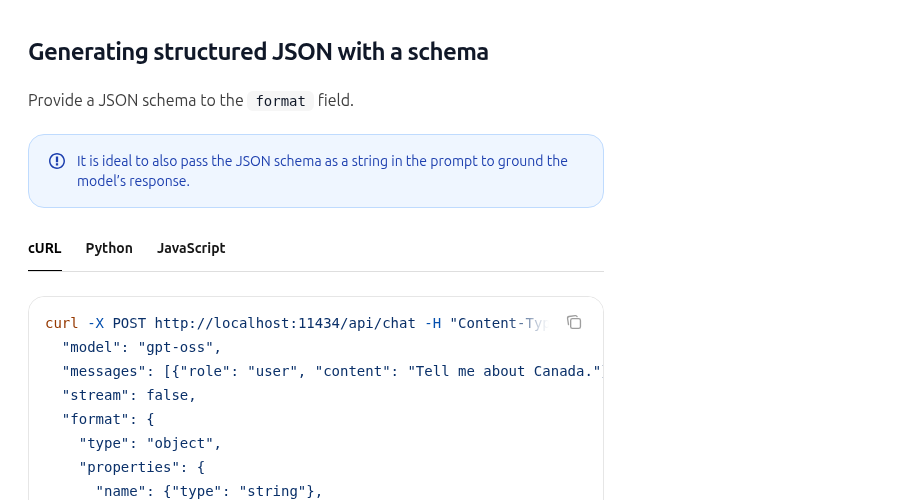
The following request can be sent from an n8n HTTP Request node to Ollama’s chat endpoint:
{
  "model": "qwen2.5:7b",
  "messages": [
    {
      "role": "user",
      "content": "Classify this ticket: {{$json.text}}"
    }
  ],
  "stream": false,
  "format": {
    "type": "object",
    "properties": {
      "category": {
        "type": "string",
        "enum": ["billing", "technical", "other"]
      },
      "priority": {
        "type": "string",
        "enum": ["low", "normal", "high"]
      },
      "summary": {
        "type": "string"
      }
    },
    "required": [
      "category",
      "priority",
      "summary"
    ]
  }
}
Use POST http://ollama:11434/api/chat when n8n and Ollama share a Docker network and the Ollama service is named ollama. If they run in different environments, use the reachable Ollama base URL for that deployment. Do not assume that localhost inside the n8n container points to the host or to another container.
Ollama also recommends including the schema in the prompt to ground the response. Treat that as reinforcement, not as a replacement for the format schema and downstream validation.
Parse once, then validate business rules
Depending on the Ollama endpoint and n8n node configuration, the generated object may arrive as JSON text inside a response field. Parse it once in a Code node, then check the values that matter to your workflow:
const raw = $json.message?.content
  ?? $json.response;

if (typeof raw !== 'string') {
  throw new Error('Missing Ollama response text');
}

let data;
try {
  data = JSON.parse(raw);
} catch {
  throw new Error('Ollama returned invalid JSON');
}

const categories = [
  'billing',
  'technical',
  'other'
];
const priorities = [
  'low',
  'normal',
  'high'
];

if (!categories.includes(data.category)) {
  throw new Error('Unexpected category');
}
if (!priorities.includes(data.priority)) {
  throw new Error('Unexpected priority');
}
if (typeof data.summary !== 'string'
    || data.summary.trim() === '') {
  throw new Error('Missing summary');
}

return [{ json: data }];
This check is intentionally boring. Deterministic validation is easier to inspect than asking a second agent to decide whether the first response “looks right.” For large schemas, use a dedicated JSON Schema validator in a controlled Code node or service rather than hand-writing dozens of checks.
Fail closed before side effects
Never connect unvalidated model output directly to a WordPress publish, database update, invoice, or outbound message. Route the result through a validation gate first:
- Accept the object only when JSON parsing and schema checks pass.
- Record the model, workflow execution, and validation error without logging secrets.
- Retry once only when the failure is likely transient.
- Send repeated failures to an error workflow or review queue.
- Make downstream writes idempotent so a retry cannot duplicate work.
If you already operate a central failure handler, connect this validation branch to it. The related guide on building an n8n error workflow with Error Trigger explains the alerting side of that design.
Batch-processing trap in parser sub-nodes
n8n sub-nodes resolve expressions against the first input item rather than processing every expression independently across all incoming items. If five source items need separate prompts and separate structured results, split or loop them so each model invocation receives the intended item. Do not assume that a parser sub-node will automatically resolve a different schema expression for every input row.
Production checklist
- Keep the schema small and explicit.
- Use enums for values that drive branching.
- Mark required fields deliberately.
- Set
stream: falsewhen your node expects one complete JSON response. - Parse the response once.
- Validate business rules after JSON parsing.
- Stop before side effects when validation fails.
- Use a separate LLM chain for final agent-output formatting.
- Test with missing fields, unexpected enum values, empty strings, and malformed JSON.
- Record failures without storing sensitive prompts or credentials.
What this pattern does—and does not—guarantee
A schema-first design sharply reduces formatting failures and makes bad responses visible. It does not make every local model equally capable, eliminate hallucination inside valid fields, or replace domain validation. Model size, prompt quality, context length, and quantization can still affect correctness.
The reliable contract is therefore: constrain generation, validate the object, enforce business rules, and fail closed before the workflow changes the outside world.
Official references: Ollama Structured Outputs, Ollama Generate API, n8n Structured Output Parser, n8n parser common issues, and n8n Information Extractor.