
Most pagination bugs in n8n are not caused by the HTTP Request node. They start with a mismatch between the API’s pagination contract and the value that the next request sends. A workflow may fetch only the first page, repeat the same page forever, skip records, or consume far more memory than expected.
This guide shows how to configure the three patterns you will meet most often: a next-page URL, a page or offset parameter, and an opaque cursor. It also adds a verification checklist so a workflow that “ran successfully” does not silently return an incomplete or duplicated dataset.
Start with the API contract, not the n8n expression
Before enabling pagination, run the endpoint once without pagination and inspect the response. The current n8n documentation explicitly recommends checking the API documentation or making a single request first because pagination shapes differ between APIs.
Record these five details:
| Question | Example answer | Why it matters |
|---|---|---|
| Where are records stored? | body.data |
You need to distinguish records from pagination metadata. |
| What identifies the next page? | next, next_cursor, or page |
This determines the pagination mode and expression. |
| What marks the end? | next = null or has_more = false |
A reliable loop needs an explicit terminal signal. |
| Does the first index start at 0 or 1? | page=1 |
An off-by-one error can skip or repeat the first page. |
| What is the maximum page size? | limit=100 |
The API may reject or silently clamp larger values. |
Do not copy a pagination expression from another API just because both responses contain a field named next. One may return a complete URL; another may return an opaque token that belongs in a query parameter.
The two pagination modes in n8n
Open the HTTP Request node and select Add Option → Pagination. n8n currently documents two modes:
- Response Contains Next URL — use this when the response provides the complete URL for the following page.
- Update a Parameter in Each Request — use this when the next request must change a query parameter or body parameter.
The node exposes pagination variables including $pageCount, $request, and $response. The response object includes the body, headers, and status code returned by the API. The exact JSON path remains API-specific.
Pattern 1: follow a next-page URL
This is the cleanest case. Suppose the endpoint returns:
{
  "data": [
    { "id": "cus_101" },
    { "id": "cus_102" }
  ],
  "next-page": "https://api.example.com/customers?cursor=eyJpZCI6MTAyfQ"
}
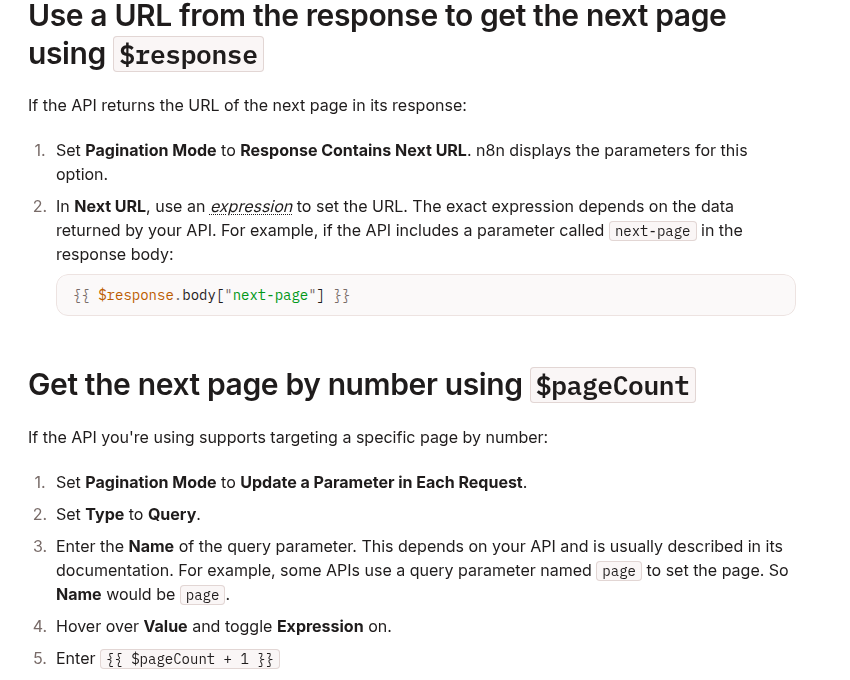
Choose Response Contains Next URL and set Next URL to:
{{ $response.body["next-page"] }}This is the same structure shown in n8n’s official pagination cookbook. Adapt only the property path. If the API uses links.next, for example, the expression becomes:
{{ $response.body.links.next }}Confirm what the terminal response returns. A final page may use null, an empty string, an omitted property, or a separate Boolean such as has_more. Do not invent a fallback URL when the next-page value is absent; that can send the workflow back to page one.
Pattern 2: increment a page number
For an API that accepts ?page=1, choose Update a Parameter in Each Request, set Type to Query, and set the parameter name to page.
n8n documents this value:
{{ $pageCount + 1 }}$pageCount starts at zero. Adding one sends page 1 on the first request, page 2 on the next request, and so on. If the API is zero-based, do not add one:
{{ $pageCount }}Set the page size separately in the node’s normal query parameters. For example:
limit = 100
page  = {{ $pageCount + 1 }}
The page size should remain stable during a run. Changing it while also changing the page number can create gaps or overlaps because the server recalculates page boundaries.
Pattern 3: calculate an offset
Offset APIs commonly accept a fixed limit and a changing offset. If the first request uses offset zero and the page size is 100, the offset can be derived from the zero-based page count:
limit  = 100
offset = {{ $pageCount * 100 }}
This arithmetic is an implementation pattern, not a universal API rule. Verify whether the endpoint defines offset as a record index, a page index, or something else. Also check whether the underlying dataset can change while the workflow is running. Inserts and deletions can shift offsets and cause duplicate or missing records.
When the API offers a stable cursor as well as an offset, prefer the cursor for long-running synchronization jobs. An opaque cursor is designed to preserve the server’s traversal state; an offset is only a position in a potentially changing result set.
Pattern 4: pass an opaque cursor
A cursor response may look like this:
{
  "data": [
    { "id": "evt_201" },
    { "id": "evt_202" }
  ],
  "next_cursor": "eyJhZnRlciI6ImV2dF8yMDIifQ",
  "has_more": true
}
Use Update a Parameter in Each Request and update the query parameter expected by the API, such as cursor. For subsequent requests, the expression usually reads the token from the previous response:
{{ $response.body.next_cursor }}The token is opaque. Do not decode it, increment it, trim it, or substitute the last record ID unless the API explicitly documents that behavior. Preserve it exactly as returned.
The API’s terminal signal still controls completion. For the sample response, that may be has_more = false or a missing next_cursor. Test the final page deliberately and verify the node stops instead of resending the last cursor.
How infinite pagination loops happen
The cursor never changes
If page two returns the same cursor as page one and the workflow keeps using it, every later request can repeat the same page. During testing, compare the cursor or next URL between successive responses. A repeated non-empty token is a failure signal, not progress.
The expression points to the wrong level
An API may return body.meta.next_cursor while the expression reads body.next_cursor. The value becomes empty, and the next request may fall back to the original endpoint. Inspect the execution data and copy the actual JSON path.
The first-page index is wrong
Using $pageCount against a one-based API starts at page zero. Using $pageCount + 1 against a zero-based API starts at page one and can skip the first page. Confirm the convention from the API documentation or a manual request.
There is no trustworthy end condition
“Stop when fewer than 100 records are returned” can work only when the API guarantees that page size and response shape. Rate limits, filtering, permissions, or server-side caps may produce a short page before the dataset ends. Prefer the documented next-link, cursor, or Boolean completion signal.
A safe test procedure
- Call the endpoint once with a small page size, such as 2 or 5.
- Save the first response and identify the records plus the pagination metadata.
- Configure exactly one pagination strategy.
- Execute the node against a bounded test dataset.
- Inspect at least the first, second, and final requests in execution data.
- Confirm the page value, offset, URL, or cursor changes every time progress is expected.
- Confirm the final response produces the documented terminal state.
- Compare the collected count with an authoritative count endpoint when the API provides one.
- Check record IDs for duplicates before connecting downstream side effects.
Keep side-effect nodes—email sends, order creation, database writes—disconnected while pagination is being tested. A repeated page is merely annoying during a read-only test; it can become expensive or destructive when every repeated item triggers an action.
Production hardening
- Use API-defined limits. Stay within documented maximum page sizes and request-rate limits.
- Separate fetching from side effects. Fetch and validate records before performing irreversible actions.
- Deduplicate by a stable ID. Pagination correctness and business idempotency solve different problems; use both.
- Persist sync checkpoints. For scheduled incremental jobs, store the last confirmed cursor or timestamp only after downstream processing succeeds.
- Log the contract. Record the endpoint, mode, parameter name, page size, and terminal signal in workflow notes.
- Monitor volume. A sudden jump in page count can indicate a filter regression or a terminal condition that stopped working.
Related DevelopWhale guides
- If repeated API pages can create duplicate side effects, see Stop Duplicate n8n Webhook Side Effects with an Idempotency Gate.
- If pagination work becomes long-running and exceeds an inbound webhook lifetime, see How to Fix n8n Webhook 504 and Cloudflare 524 Timeouts with an Async Job Pattern.
Decision guide
- Complete next-page URL: use Response Contains Next URL and pass the returned next URL.
- One-based page number: use Update a Parameter with
$pageCount + 1. - Zero-based offset: use Update a Parameter with
$pageCount × page size. - Opaque cursor token: use Update a Parameter and pass the returned
next_cursorunchanged.
The most reliable rule is simple: let the API define the pagination contract, let n8n carry the documented value forward, and verify that every request makes measurable progress toward a real terminal state.
Official references: n8n HTTP Request pagination cookbook and n8n HTTP Request node documentation.